05 06
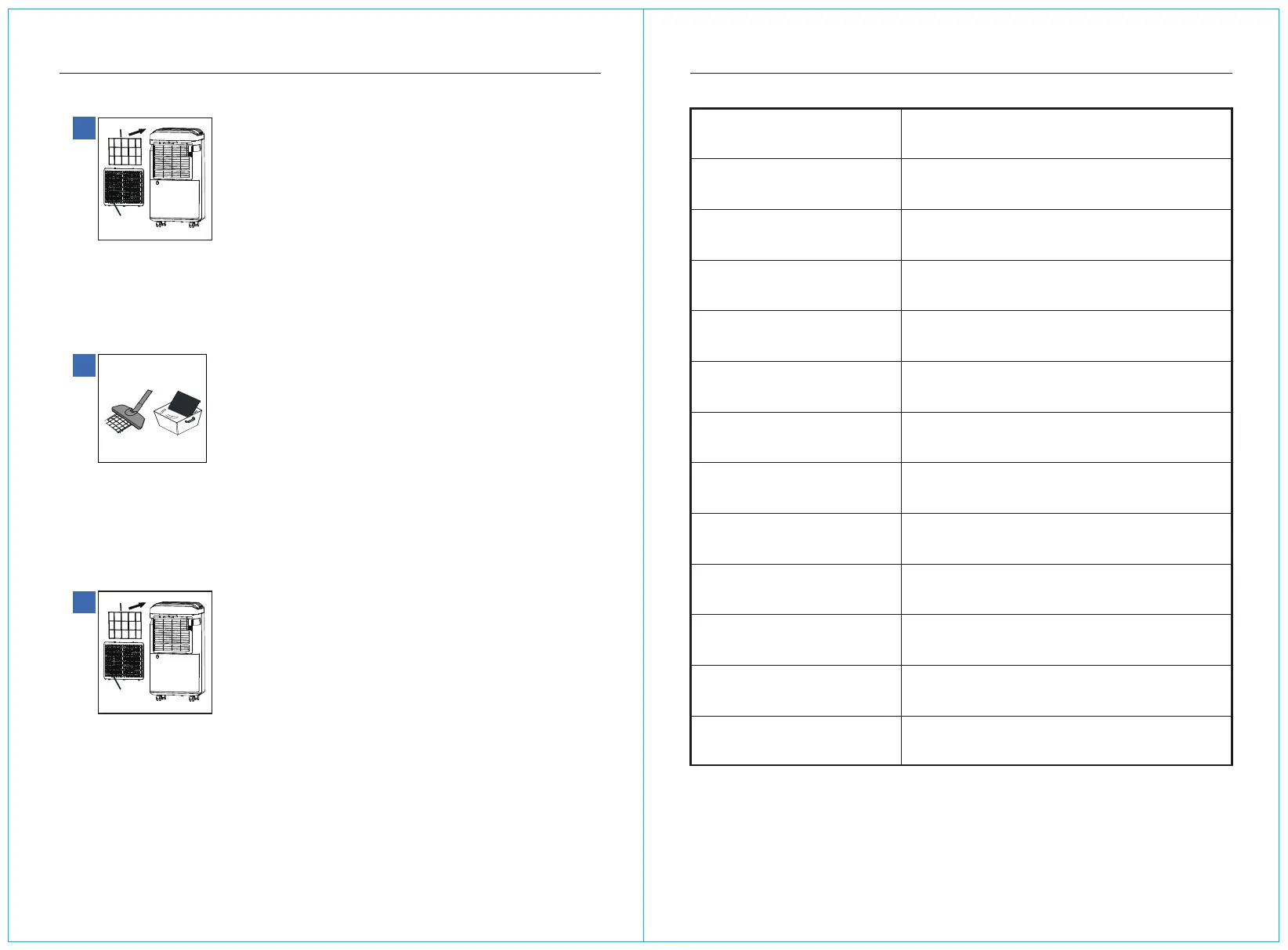
Air inlet grille
Filter screen
Air inlet grille
Filter screen
Clean the strainer BASIC PARAMETER INFORMATION
1
Remove the filter frame
First remove the inlet grille,Then remove the filter frame
2
Dust cleaning
First use the dust collector to dust the air filter, and dry it after cleaning
3
Install the filter frame
nstall the filter screen onto the air inlet grille, and then install the air inlet grille
onto the machine
Product Model
Power Supply
Rated Power/current
Rated Dehumidification Capacity
Daily Dehumidification
Operating Ambient Temperature
Compressor
Refrigerants
Water Tank Volume
Product Weight
Form Factor
Execution Standards
Remark
If the technical parameters are subject to
change, the nameplate shall prevail
AP25-2003EE
115~60Hz
305W/3.11A
0.42KG/H
25L/D
41-86℉
Reciprocating
R134a/5.82oz
4.8L
31.75lb
38×26.8×52cm
GB4706.1-2005 GB4706.32-2012
GB/T19411-2003
(DB80℉ RH60%)
(DB80℉ RH60%)
(DB86℉ RH80%)



 To Next Page