0
0
0
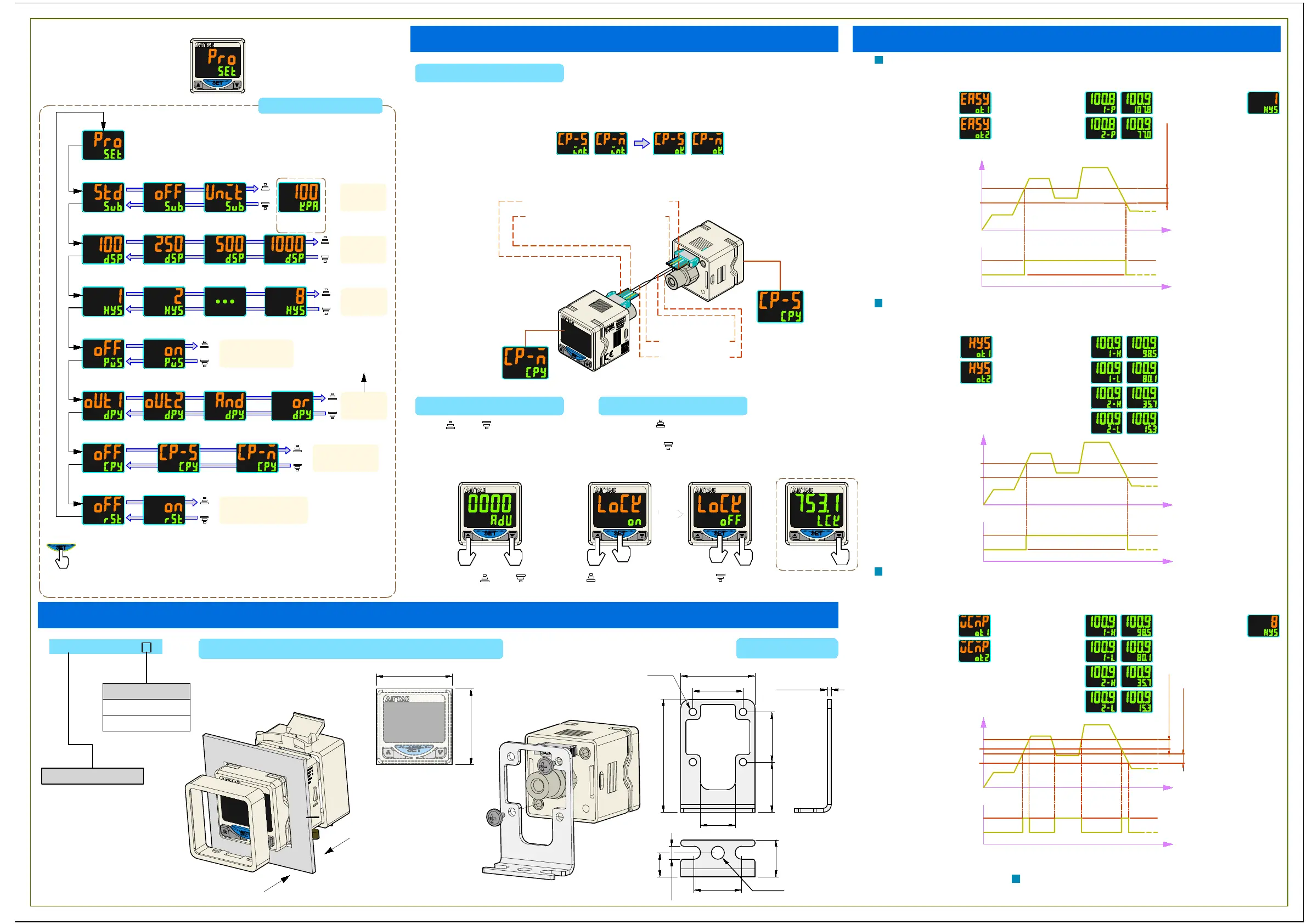
(Advanced mode)
Dimensions/Assembly Instructions
Press the SET button to change menu
Advanced mode
Neither
100ms 250ms 500ms 1000ms
Backlight off Backlight on
Change backlight
Copy function:OFF
Change backlight Change backlight
Change backlight
Copy function:ON Copy function:ON
Slave device Master device
Display
pressure unit
Display
setting value
Display
pressure unit
Press the value up and down
button setting the value
Factory-fresh
state:OFF
Factory-fresh
state:ON
color when
output1 works
color when
output2 works
color when output1
and output2 work
color either output1
or output2 works
Power-saving mode
Copy function
Factory-fresh state
Hysteresis
setting
Bottom row
value
display
Display
period
setting
Color choice in
basic mode
Backlight
setting
Copy Function
2.Software:Set "CP-M" on master device. Set "CP-S" on slave device.
3.Icon of copy completed :
4.Turn off the power,disconnected devices and restart it after setting.
1.Hardware:Connect the second pin of master device with the third pin of slave
device,then power on after connecting.
Repeat step 1 and 2 if copy failed.
Power supply: DC24(+) (Brown)
Power supply: DC24(-) (Blue)
Output1(Black)
Output2(White)
Master device
Slave device
Zero-Clear Funtion Key lock Funtion
Press and simultaneously
Press any button will display "LCK" in lock on mode.
to reset the display value to
zero.
Press and
Lock:Press and the SET button simultaneously.
Release it when the display turns to "LoCK on".
Unlock:Press and the SET button simultaneously.
Release it when the display turns to "LoCK oFF".
Press and the SET
button simultaneously.
Press and the SET
button simultaneously.
simultaneously.
Bracket
Panel mount adapter + Front protective cover
DPS
Assembly type
EB:Panel mount
LB:Bracket
F -
Assembly code
29.6
45
20
20
14
20
9.6
19
14.7
t=1.6
31
0
-0.5
31
0
-0.5
4-∅3
∅5.2
5.2
Step1-Front cover assembly
Step2-Back cover assembly
Panel frame dimension
Unit:mm
Bracket dimension
Unit:mm
-High pressure(1000kPa) Unit:1kPa
-Low pressure(100kPa) Unit:0.1kPa
Hysteresis value
Pressure
Time
Set point value L
Time
Output:OFF
Output:ON
Set point value H
Mode setting- Pressure setting- Hysteresis value-
Window comparator mode:Set the pressure value H/L.When the applied pressure
value is greater than H + hysteresis value or less than L, the display will OFF.
When the applied pressure value is less than L + hysteresis value, the display
will ON.
Hysteresis value
Hysteresis value
Pressure
Time
Set point value L
Time
Output:OFF
Output:ON
Set point value H
Mode setting- Pressure setting-
Hysteresis mode:Set the pressure value H/L. When the applied pressure value is
greater than H, the display will ON. When the applied pressure is less than L,
the display will OFF.
Time
Set point value P
Time
Output:OFF
Output:ON
Pressure
Copy /Key lock /Zero-clear Function Output Mode Description
Mode setting-
Basic mode: Set the pressure value P. When the applied pressure value is
greater than P + hysteresis value, the display will ON. When the applied
pressure value is less than P + hysteresis value, the display will OFF.
Pressure setting- Hysteresis value-
Hysteresis value
Interface of advanced mode


 To Previous Page
 Loading...