10
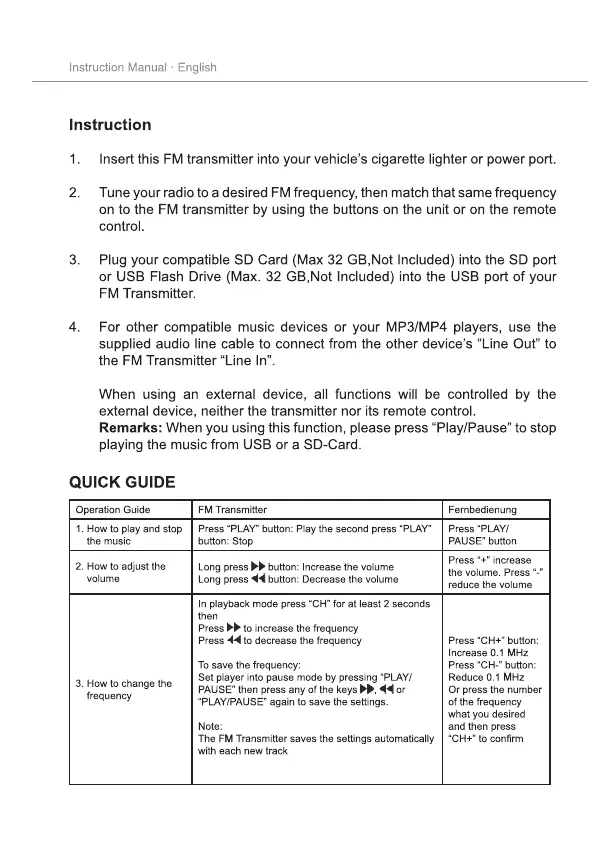
Operation Guide FM Transmitter Fernbedienung
1. How to play and stop
the music
Press “PLAY” button: Play the second press “PLAY”
button: Stop
Press “PLAY/
PAUSE” button
2. How to adjust the
volume
Long press
button: Increase the volume
Long press
button: Decrease the volume
Press “+” increase
the volume. Press “-”
reduce the volume
3. How to change the
frequency
In playback mode press “CH” for at least 2 seconds
then
Press
to increase the frequency
Press
to decrease the frequency
To save the frequency:
Set player into pause mode by pressing “PLAY/
PAUSE” then press any of the keys , or
“PLAY/PAUSE” again to save the settings.
Note:
The FM Transmitter saves the settings automatically
with each new track
Press “CH+” button:
Increase 0.1 MHz
Press “CH-” button:
Reduce 0.1 MHz
Or press the number
of the frequency
what you desired
and then press
³&+´WRFRQ¿UP


 To Next Page
 Loading...