The AIYIMA H1 is a portable headphone amplifier designed to enhance the audio experience for various devices. It serves as an intermediary between an audio source (like a mobile phone, computer, or tablet) and headphones, providing amplification and volume control.
Function Description
The primary function of the AIYIMA H1 is to amplify audio signals, allowing headphones to produce a louder and potentially clearer sound. It features a dedicated headphone output interface and an audio source input interface. The device includes a power on/off and volume adjustment knob, which allows users to control the output volume. An indicator light shows the power status, and a separate charging indicator displays the battery's charging status. The device is equipped with a Type-C charging interface for convenient power replenishment.
Important Technical Specifications
The AIYIMA H1 boasts several key technical specifications that highlight its performance capabilities:
- Maximum Output Level: 170mW/32Ω load, indicating its ability to drive headphones with a 32-ohm impedance to a significant volume.
- Total Harmonic Distortion (THD): 0.03%, suggesting a low level of distortion in the audio output, contributing to sound clarity.
- Load Impedance: 16-300Ω, meaning it is compatible with a wide range of headphones, from low to high impedance.
- Signal-to-Noise Ratio (SNR): 111dB, indicating a high ratio of signal to noise, which translates to a cleaner audio signal with less background hiss.
- Working Voltage: DC 2.8-4.2V, specifying the operational voltage range for the internal components.
- Charging Voltage: DC 5V, indicating the standard USB charging voltage.
- Frequency Response: 20Hz-20KHz (±0.1dB), covering the full range of human hearing with minimal deviation, ensuring accurate sound reproduction.
- Product Size: L110W62H17mm, making it a compact and portable device.
- Machine Weight: 202g, contributing to its portability.
- Packing Size: L135W70H31mm, for reference during shipping and storage.
Usage Features
Operating the AIYIMA H1 is straightforward, with a clear sequence of steps:
- Volume Confirmation: Before connecting, ensure the volume knob is set to its minimum state to prevent sudden loud sounds.
- Audio Source Connection: Connect your desired audio source (e.g., mobile phone, computer, tablet) to the audio source input interface.
- Earphone Connection: Plug your headphones into the headphone output interface.
- Power On: Turn the knob clockwise to power on the device.
- Listening and Adjustment: Put on your headphones and adjust the volume to a comfortable and moderate level.
The device also supports answering calls directly when connected to a mobile phone, provided the input line is a dual 4-section 3.5mm head and the headset also features a 4-section 3.5mm connector with a microphone function.
Common troubleshooting scenarios are addressed:
- No Sound Output: Check if the power indicator is on. If not, turn the power knob. If the indicator still doesn't light up, verify battery installation, charge level, or connect to a charger. If the indicator is on, ensure the volume knob is not at its minimum. Also, check if the playback device is paused, muted, or at minimum volume.
- Power Indicator On, But No Sound: Confirm correct sound source connection, and check if the player is muted/paused or if the battery is too low.
- Buzzing Sound: If an unshielded signal line is used without a load, interference signals can be amplified. Replacing with a shielded signal line or unplugging the signal line is recommended to eliminate the buzz.
- Headphone Impedance Compatibility: The amplifier is designed to drive headphones with impedances ranging from 16 to 300 ohms, so a 200-ohm headphone will work without issues.
Maintenance Features
The AIYIMA H1 includes provisions for battery disassembly and assembly, which is a key maintenance feature for users who might need to replace the battery.
Steps for Disassembly and Assembly of Battery:
- Rear Panel Removal: Use the provided screwdriver to remove the two screws on the rear panel. Once loosened, the rear panel can be taken out.
- Battery Installation: Match the positive and negative poles of the battery correctly, then install it into the machine. After installation, reattach the rear panel and secure it with the screws.
Important Warnings for Maintenance:
- Power Off: Always ensure the power is off before disassembling or assembling the battery to prevent electrical hazards.
- Environmental Conditions: Avoid using the machine in high-temperature and high-humidity environments, as this can affect its performance and lifespan.
- Charger Quality: Use a regular manufacturer-approved charger. Inferior chargers may damage the device or pose safety risks.
The AIYIMA H1 is a well-rounded headphone amplifier, offering a balance of performance, portability, and user-friendly operation, with clear guidelines for maintenance and troubleshooting.

 Need help?
 General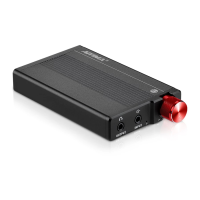

 To Next Page