2
1
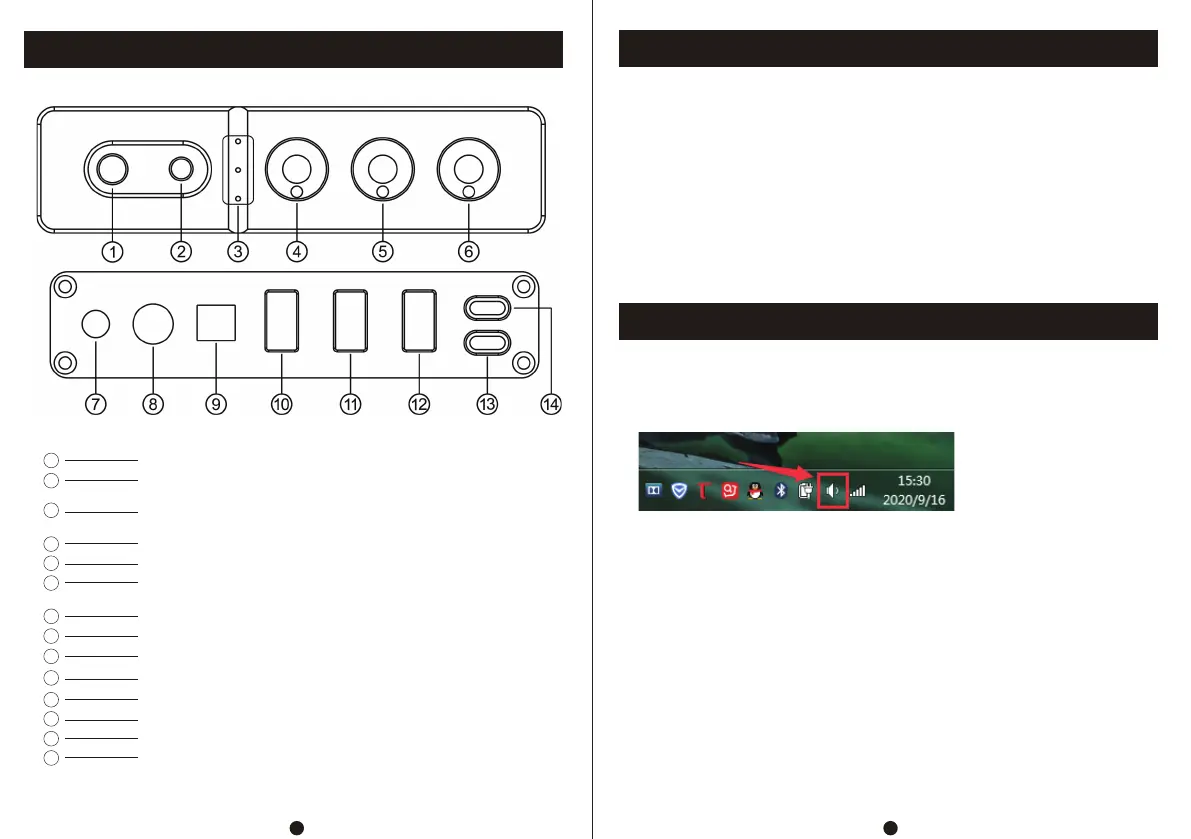
Front and Rear Panel Description
Operation Steps
Type-C Data Input Operation Instructions
2
1
5
6
7
3
4
3.5 microphone input interface
3.5 headphone output + MIC input interface(Support two in one
earphone with microphone and listening function)
Input Channel indicator light (The light flashes when the volume
is minimum or maximum)
Treble adjustment knob
Bass adjustment knob
Encoder knob (short press: start/switch input channel; rotate left
and right to adjust total volume; long press to shut down)
3.5 AUX output interface
9
8
12
13
14
10
11
Coaxial input
Optical fiber input
USB input interface 1(connected to keyboard, mouse, U disk, etc)
USB input interface 2(connected to keyboard, mouse, U disk, etc)
USB input interface 3(connected to keyboard, mouse, U disk, etc)
Type-C data input interface(Support sound recording and OTG functions)
Type C Power Interface (DC voltage shall not be higher than 5V)
1. Connect the audio device to be used to the audio input port.
2. Connect the rear stage equipment to be used to the 3.5AUX output port.
3. Connect the power supply (DC voltage shall not be higher than 5V).
4. Briefly press the encoder knob to start the machine and adjust it to the appropriate volume,
treble and bass.
5. Connect the type-C data input to the computer or mobile phone.
6. Connect the 3.5 microphone you need to use to the microphone input port and the headphone
to the 3.5 output port.
7. Connect the type-A USB device to usb1, 2 、3.
8. Microphone and listening two in one headphone, connected to the 3.5mm headphone
output + microphone input port.
1. Connect the configured USB cable to the computer (USB supports hot plug).
2. Short press the encoder knob to switch to type-C data input.
3. As shown in the figure, find the icon with horn symbol in the lower right corner of PC
1. Connect this device to the mobile phone using the full function cable of double headed type-c.
2. Supports answering calls, recording, data transmission and OTG functions.
4.Right click popup options,click【Playback device】.
5.Select the USB device recognized by the PC in the pop-up box(USB HIFI AUDIO).
6.Click to confirm the recognized digital output and set it as the default value.
7.The mouse, keyboard, U disk can be connected to the USB ports 1, 2, 3 of the machine.
Ⅰ:Connect the computer
Ⅱ:Connect Mobile phone


 To Next Page
 Loading...