๎
>=๎
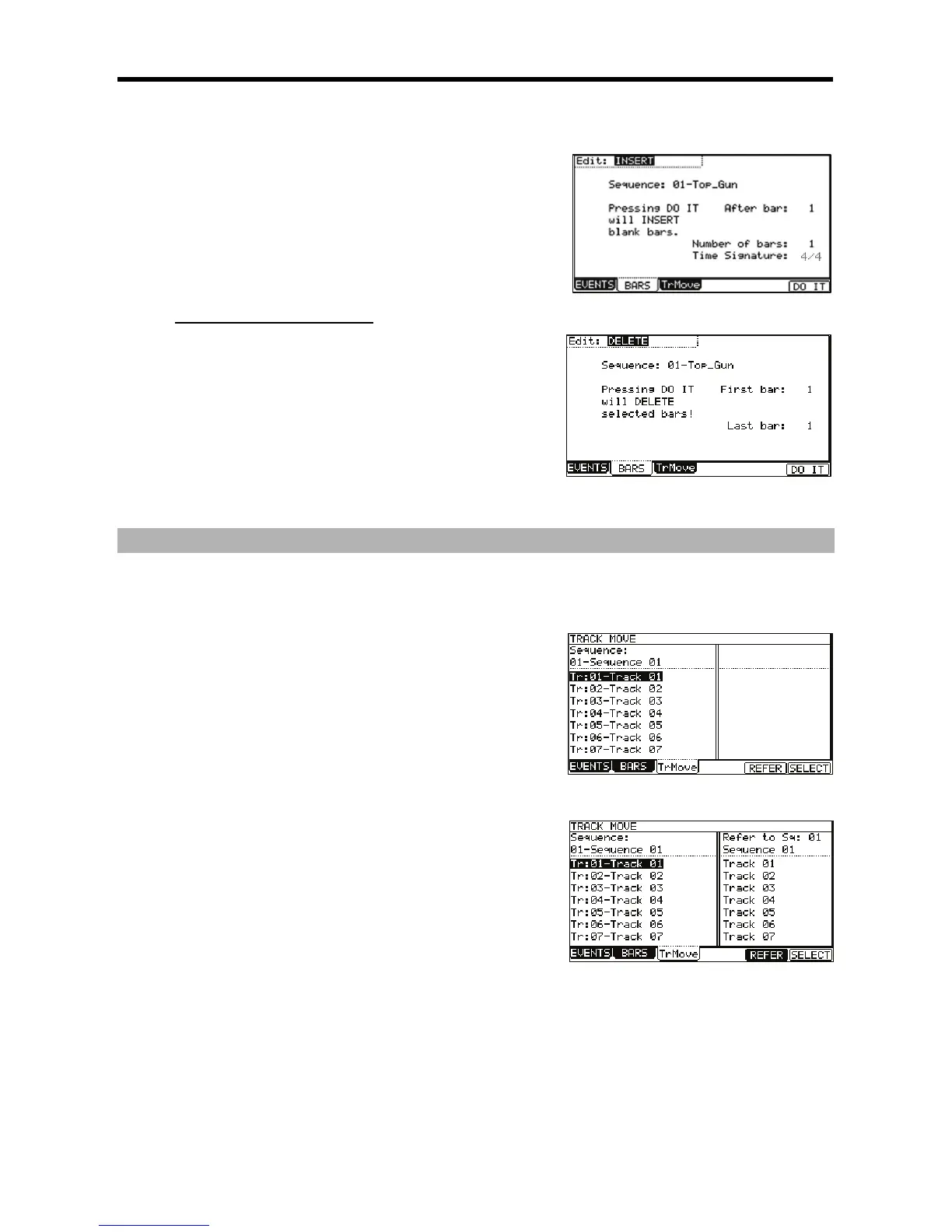
The various fields necessary for inserting bars will be displayed.
๎@๎ 0๎๎๎๎๎๎,/๎"๎๎๎๎๎,๎๎๎๎๎๎#๎๎๎๎๎๎๎๎๎๎๎๎๎๎"๎๎๎๎๎๎๎๎๎
๎๎๎๎๎๎๎๎๎๎๎๎๎๎๎๎๎๎๎๎๎๎๎๎๎๎๎
๎๎๎๎
๎G๎ 0๎๎๎๎๎๎,+๎๎๎๎๎๎๎
๎,๎๎๎๎๎๎#๎๎๎๎๎๎๎๎๎๎๎๎๎๎๎๎
๎๎๎๎๎๎๎๎๎๎๎๎๎๎๎๎๎๎๎๎๎
๎๎๎๎๎๎๎
The selected bars will be inserted at the end of the bar set here.
๎>๎ 0๎๎๎๎๎๎,1๎๎๎๎๎๎๎๎๎๎๎
๎๎,๎๎๎๎๎๎#๎๎๎๎๎๎๎๎๎๎๎๎๎๎๎๎๎๎๎๎๎
๎๎๎๎๎๎๎๎๎๎๎๎๎๎
๎๎๎ 0๎๎๎๎๎๎,๎๎๎๎๎๎๎๎๎๎
๎๎๎๎,๎๎๎๎๎๎#๎๎๎๎๎๎๎๎๎๎๎๎๎๎๎๎๎๎๎๎๎๎
๎๎๎๎๎๎๎๎๎๎๎๎๎๎
๎๎๎
๎๎๎๎๎๎๎๎๎๎๎
๎B๎ ๎๎๎๎๎๎๎๎๎๎4-B6๎);&๎0๎*๎๎๎๎๎๎๎๎๎
The number of empty bars selected will be inserted at the selected location.
๎
5๎(๎$๎๎๎๎"๎8"๎๎95๎๎๎&๎;๎
๎๎๎๎๎๎๎๎๎๎๎๎๎๎๎๎๎๎๎๎๎๎๎๎๎
๎)๎*๎๎๎๎๎๎๎๎๎๎"๎๎๎๎๎#๎๎๎๎๎๎๎๎๎๎
๎๎๎๎๎๎๎๎๎3๎
๎=๎ /๎๎๎๎๎๎๎๎๎๎,5๎๎๎,๎๎๎๎๎๎๎๎๎๎๎๎๎๎(+7/๎๎๎
๎๎๎๎๎๎๎๎๎๎/5$๎5;0๎๎๎๎๎๎#๎
๎
๎๎๎๎๎๎๎๎๎๎;5I5๎5๎
The fields necessary for deleting the bars will be displayed.
๎@๎ 0๎๎๎๎๎๎,/๎"๎๎๎๎๎,๎๎๎๎๎๎#๎๎๎๎๎๎๎๎๎๎๎๎๎๎
๎๎๎๎๎๎๎๎๎๎๎๎๎๎
๎G๎ 0๎๎๎๎๎๎,-๎๎๎๎๎๎๎
๎,๎๎๎๎๎๎#๎๎๎๎๎๎๎๎๎๎๎๎๎๎๎๎๎๎๎๎๎
๎๎๎๎๎๎๎๎๎๎๎๎๎
๎>๎ 0๎๎๎๎๎๎,I๎
๎๎๎๎๎
๎,๎๎๎๎๎๎#๎๎๎๎๎๎๎๎๎๎๎๎๎๎๎
๎๎๎๎๎
๎๎๎๎๎๎๎๎๎๎๎๎๎
๎๎๎ ๎๎๎๎๎๎๎๎๎๎4-B6๎);&๎0๎*๎๎๎๎๎๎๎๎๎
The selected bar(s) will be deleted
.
๎๎๎
๎๎๎๎๎๎๎๎๎๎๎๎๎๎๎๎๎๎๎๎๎๎
๎๎๎๎)๎7+๎E๎๎&D5*๎
๎๎๎๎๎๎๎๎๎๎
๎๎๎๎๎๎๎
๎๎๎๎๎๎
๎๎๎๎๎๎๎๎๎๎๎๎๎๎๎๎๎๎๎๎๎%๎๎๎
๎๎๎๎๎๎๎๎๎๎"๎๎๎๎๎๎#๎๎๎๎๎๎
๎๎๎๎๎๎๎๎๎๎๎๎๎๎๎๎๎๎๎๎๎๎/&18๎๎๎๎
๎๎๎๎๎๎๎๎๎๎๎
๎๎
๎๎
๎๎๎ ๎๎"๎๎๎๎๎๎ ๎๎๎ ๎๎๎๎ ๎๎๎๎๎๎๎๎๎๎ ๎๎๎๎๎๎๎ ๎๎๎๎ ๎๎๎๎๎๎๎๎ ๎๎
๎๎ ๎๎๎%๎๎๎๎ ๎๎๎๎ ๎๎๎๎๎ ๎๎
๎๎
๎ ๎๎๎๎๎ ๎๎๎๎๎๎ ๎๎"๎๎๎๎๎๎๎ ๎๎๎ ๎๎๎๎ ๎๎๎๎๎
๎๎"๎๎๎๎๎๎๎๎๎๎๎๎๎๎๎๎๎#๎๎๎๎๎๎๎๎๎๎๎๎๎๎
๎๎๎
๎๎๎๎๎๎๎๎๎๎๎๎๎๎๎๎๎๎๎๎๎๎๎๎
๎๎๎๎๎๎๎๎๎
๎๎๎๎๎"๎๎๎๎๎๎๎0๎๎๎๎๎๎๎๎๎๎๎๎๎๎#๎๎๎๎๎๎๎๎๎๎๎๎๎
๎๎๎๎๎๎๎
๎๎๎๎๎๎๎๎๎๎๎๎๎๎
๎๎๎๎๎%๎๎๎๎๎๎๎๎๎๎๎๎๎๎๎๎๎
๎๎๎๎๎๎๎๎๎๎๎๎๎๎๎๎๎๎๎๎๎๎๎๎
๎๎๎๎๎๎๎๎
๎๎๎"๎๎๎๎๎๎๎๎๎
J๎๎๎๎๎
๎๎๎๎%๎๎๎๎๎
๎๎๎๎๎๎๎๎๎๎๎๎๎๎&D5๎)๎๎๎
๎๎๎๎๎%๎*๎๎๎
๎๎๎๎๎๎๎๎๎๎/5$๎5;0๎๎
๎๎๎๎#๎ ๎๎๎๎๎๎ ๎๎
๎๎ ๎๎๎ ๎
๎๎๎๎๎๎๎๎ ๎๎๎๎๎๎๎๎๎๎๎๎ ๎๎๎๎ 4๎&;56๎ ๎๎๎๎๎๎๎ ๎
๎๎๎ ๎๎๎๎๎
๎๎๎๎4๎+;๎=@6๎๎
๎=๎ 0๎๎๎๎๎๎/5$๎5;0๎๎๎๎๎๎#๎๎๎๎๎๎๎๎๎๎๎4-G6๎)๎๎๎&D5*๎๎๎๎๎๎๎๎๎๎๎๎๎
๎๎๎&D5๎)๎๎๎
๎๎๎๎๎%๎*๎๎๎
๎๎๎๎๎๎๎๎๎๎๎๎๎๎๎๎๎
๎๎๎๎๎๎
๎@๎ 0๎๎๎๎๎๎,/๎"๎๎๎๎๎,๎๎๎๎๎๎#๎๎๎๎๎๎๎๎๎๎๎๎๎๎๎
๎๎๎๎๎๎
๎๎๎๎๎๎๎๎๎๎๎๎๎๎๎๎๎
๎๎๎๎
๎๎๎๎๎๎๎๎๎๎๎
๎G๎ 0๎๎ ๎๎๎๎ ,7๎๎๎๎๎๎๎๎๎ /๎"๎๎๎๎๎,๎ ๎๎๎๎๎#๎ ๎๎๎๎๎๎๎ ๎๎๎๎ ๎๎"๎๎๎๎๎๎ ๎๎๎ ๎๎๎
๎๎๎๎๎๎
๎๎๎๎๎๎๎๎๎๎๎๎๎๎๎๎๎๎๎๎๎๎๎๎
๎๎๎๎๎๎๎๎๎๎๎๎๎๎๎๎๎
For example, if you want other tracks to follow the order in sequence 01, you should select sequence 01 in the 'Reference Sequence' field.
๎>๎ :๎๎๎๎๎๎๎๎๎๎๎๎๎๎๎๎๎๎๎๎๎๎๎๎#๎๎๎%๎๎๎๎๎๎๎๎๎๎๎๎๎๎๎๎๎๎๎๎๎๎๎
๎๎๎๎๎๎๎๎๎
๎๎๎ J๎๎๎ ๎๎
๎๎ ๎๎๎๎๎๎๎ ๎๎๎๎๎๎๎๎ ๎๎๎๎ ๎๎๎๎๎ ๎๎๎ ๎๎๎๎๎๎๎๎ ๎๎๎๎ 4;+๎+6๎ ๎๎๎๎๎๎๎
/๎๎๎๎๎๎๎๎๎๎๎๎๎
๎๎๎๎๎๎
๎๎๎๎๎๎๎๎๎๎๎๎๎๎๎๎%๎๎๎
๎B๎ ๎๎๎๎๎๎๎๎๎๎4-B6๎)/5I5๎๎*๎๎๎๎๎๎๎๎๎
This selects the track.
To select a track again, press the [F5] (CANCEL) button.
๎C๎ /๎๎๎๎๎๎๎๎๎๎๎๎๎๎๎๎๎
๎๎๎๎๎๎๎๎๎๎๎๎๎๎๎๎๎๎๎๎4;+๎+6๎๎๎๎๎๎๎๎
The list will scroll with the track selected in steps 5 and 6 fixed.
Refer to the list on the left to select the destination position.
๎A๎ ๎๎๎๎๎๎๎๎๎๎4-B6๎)๎&D5*๎๎๎๎๎๎๎๎๎
The track will move to the selected location and the order will be changed.