/
A>
C /,,
The MPC5000 will record for the time set in this field. We recommend you set the time a little longer than the actual recording time. You can finish
the recording manually.
+$"$$.#%
= 4-B6)75&7;*
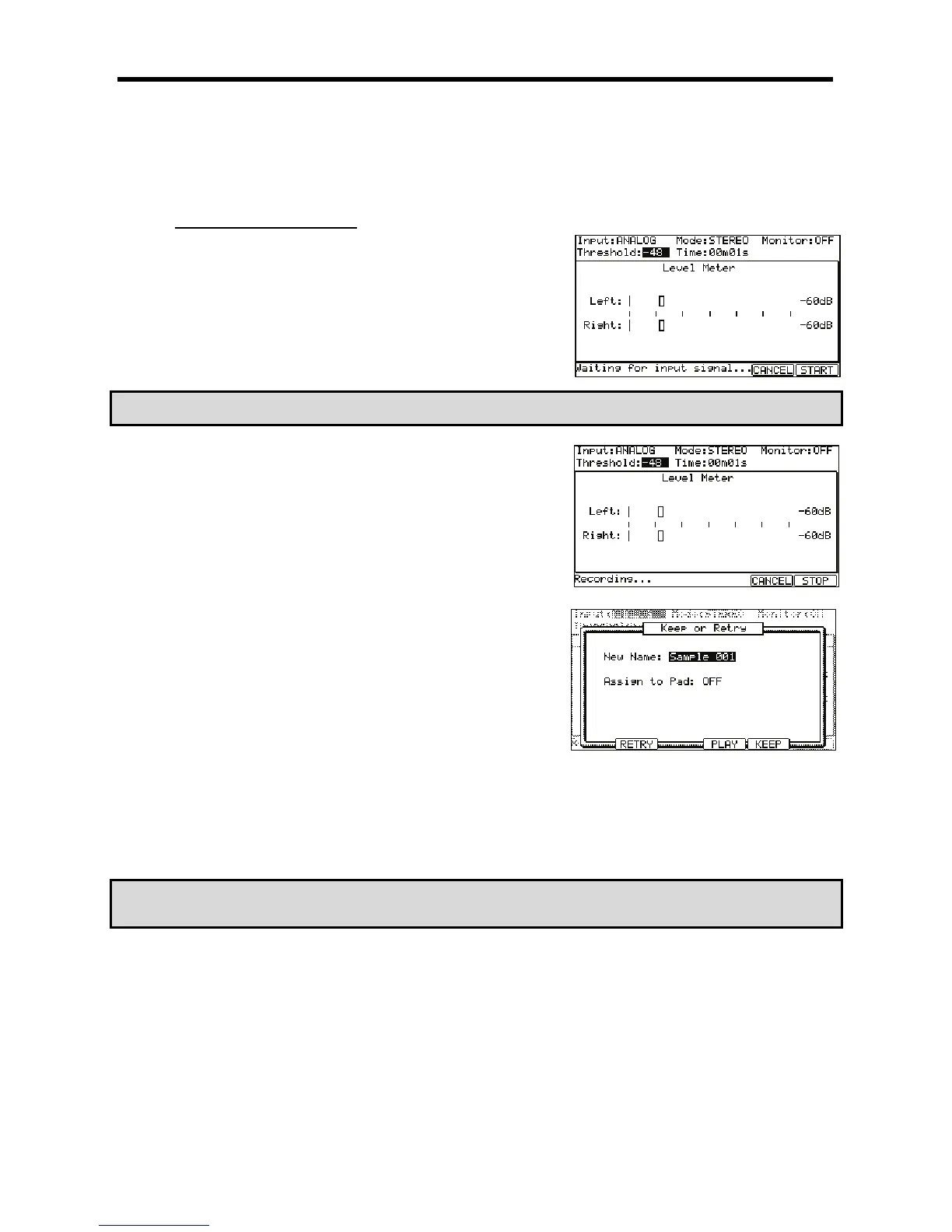
The MPC5000 will be in the Record Ready mode, and the bottom of the screen will
change as shown on the right.
This indicates that the MPC5000 is waiting for the incoming signal. It starts the
recording when the input signal exceeds the threshold level.
Pressing the [F5] (CANCEL) button cancels the record ready mode and resets the
MPC5000.
Pressing the [F6] (START) button starts the recording, even when the incoming signal
does not exceed the threshold level.
!*<%9+)$+4;/'
!*<%9+)$+4;&
@ .
The MPC5000 will start the recording automatically when the level of the input signal
exceeds the threshold level. During the recording, the bottom of the screen will
change as shown on the right.
The MPC5000 stops the recording at the time set in the 'Time' field.
You can stop the recording manually before the time set in the 'Time' field, by
pressing the [F6] (STOP) button. To cancel the recording, press the [F5] (CANCEL)
button.
After the MPC5000 ends the recording, the Keep or Retry window will be displayed:
G 4->6)I+J*
If you press the [F4] (PLAY) button, you can play back the recorded sample until you
release the button.
If you do not like the recording, you can remove the recording and return to the
SAMPLE page by pressing the [F2] (RETRY) button. If you like the recording and
decide to keep it, proceed to the next step.
> /,1,#
In the 'New name' field, the recorded sample will have a new name automatically.
You can select the 'New name' field with the cursor and change the sample name if
needed. For more information about setting the sample name, see the 'Setting
Names' section on page 18.
/+,,
You can select the pad directly by hitting the pad when the cursor is in the Assign to 'Pad' field. If you just wish to keep the recorded sample in the
MPC5000’s memory and not to assign to the pad, select OFF with the [DATA] wheel.
B 4-6)E55*
This closes the Keep or Retry windows and goes back to the SAMPLE page.
#'&#'
,4&*'"'294"J;
=KE&





 To Next Page