5140240905
202012/V1
Installation
2
②
③
1
①
5
⑤
4
④
3
1 2
3 4
5
6
7 8
9 10
11
12
13
14
15
16
17
18
19
20
21
22
23
24
25
26
27
28
29
30
31
32
33
34
35
36
37
38
39
40
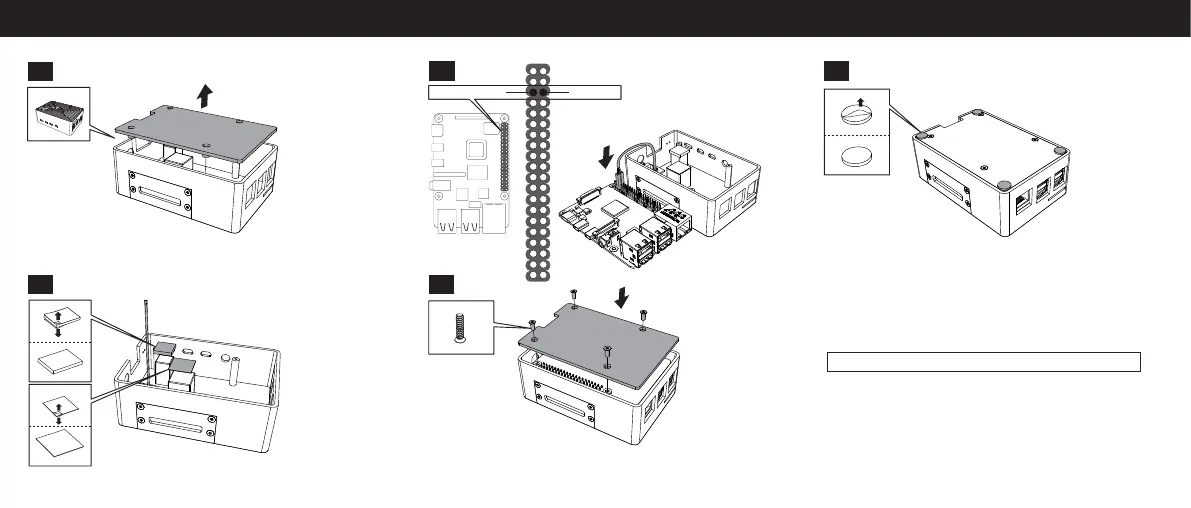
GroundGPIO 3 (SCL)
Power Button Installation
1. Connect one wire to Pin-5 (GPIO 3/SCL) and one wire to Pin-6 (Ground).
(By pressing the power push button, shorting Pin-5 and Pin-6 momentarily,
will wake the Raspberry Pi 4 from a standstill state.)
2. To use the same power button to safely shutdown your Pi 4, you’ll need
to enter a script. Open “Terminal” on Raspberry Pi 4 and enter:
sudo echo “dtoverlay=gpio-shutdown“ >> /boot/config.txt
Note: The GPIO-shutdown overlay enables the Pi 4 to be shutdown when
Pin-5 and Pin-6 are temporarily shorted (when they are connected via
power button).
3. Please reboot the Pi 4.


 To Previous Page
 Loading...