EasyManua.ls Logo

Akron 9313 Series - User Manual

Akron 9313 Series
2 pages
Print Icon
To Next Page IconTo Next Page
Loading...
Valve Actuator moves at the end
of the open or closed function.
Loose screws While some motion is normal from torque, excessive movement
may be caused by loosened screws.
Before tightening the screws, remove them and apply Permabond
LM 113 or Loctite 222 and retighten.
No Power to the
Controller
Bad wiring
Open breaker or blown fuse
Power not connected.
Check all power connections, wires, fuses or breakers.
Be sure a separate power wire is connected to any Controller used
as an Auxiliary.
Valve Actuator does not work.
Motor does not drive.
1. No signal from the Controller
to the Actuator Motor.
2. Defective Actuator Motor
3. Worm Gear system jammed.
4. Planet Gear system jammed.
1. Check all connectors are fully engaged.
Check the voltage through the Wiring Harness
should be at least 11.5 volts for 12 volt systems and
22 volts for 24 volt systems. Check the signal from
the Controller.
2. Remove the Motor from the Actuator and operate
the Motor to be sure the Motor Shaft turns freely.
3. Check the Worm Gear. Operate the Valve using the
Manual Override.
4. Remove the Motor and check the Planet Gears.
Motor Runs but Valve does not
operate
1. Grove Pin is missing from the
Shaft.
2. Gear Sector is not engaging
the Worm Gear.
3. Motor Shaft is disengaged
from the Planet gears.
1. Check the Groove Pin is fully engaging the Worm
Gear and Shaft.
2. Check if the Worm Gear and Sector Gear are
engaged.
3. Remove the Motor and check for engagement of the
Motor Shaft and Planet Gears.
Valve closes when the OPEN
Button is pressed and vice versa.
1. Sector Gear is in the wrong
position.
2. Cable wiring is reversed.
1. Reposition the Sector Gear.
2. Replace the Cable.
Valve OPEN/CLOSE LED’s switch
immediately from Red to Green
and vice versa.
1. Wiring
2. Mechanical Binding
1. Check wiring as explained in Problem #1.
2. Remove the Motor and check the Shaft turns freely. Also, oper-
ate the Valve manually via the Override to check for binding.
APPENDIX
Mating Weather-Pack Connectors for Power Cable
A Mating Weather-Pack connector must be used to connect to the power source.
DO NOT CUT THE CONNECTOR on the power wire of the controller.
Doing so will void the warranty.
Part number 9300-0058 is a packet of (5) mating Weather-Pack connections.
Wiring Harnesses
Part Number Description
7-21-290 10’ long (standard length)
7-21-381 15’ long
9303-0016 20’ long
9303-0012 30’ long (utilizes Potting Shells and 10 gauge wire)
9303-0013 38’ long (utilizes Potting Shells and 10 gauge wire)
9303-0014 50’ long (utilizes Potting Shells and 8 gauge wire)
Auxiliary Cables
Part Number Description
9300-0052 10’ long (standard length)
9300-0055 25’ long
9300-0056 50’ long
ISO 9001 REGISTERED COMPANY
PHONE: 330.264.5678 or 800.228.1161 I FAX: 330.264.2944 or 800.531.7335 I www.akronbrass.com
WARRANTY AND DISCLAIMER: We warrant Akron Brass products for a period of five (5) years after purchase against defects in materials or workmanship. Akron Brass will repair or replace
product which fails to satisfy this warranty. Repair or replacement shall be at the discretion of Akron Brass. Products must be promptly returned to Akron Brass for warranty service.
We will not be responsible for: wear and tear; any improper installation, use, maintenance or storage; negligence of the owner or user; repair or modification after delivery; damage; failure to
follow our instructions or recommendations; or anything else beyond our control. WE MAKE NO WARRANTIES, EXPRESS OR IMPLIED, OTHER THAN THOSE INCLUDED IN THIS WARRANTY
STATEMENT, AND WE DISCLAIM ANY IMPLIED WARRANTY OF MERCHANTABILITY OR FITNESS FOR ANY PARTICULAR PURPOSE. Further, we will not be responsible for any consequential,
incidental or indirect damages (including, but not limited to, any loss of profits) from any cause whatsoever. No person has authority to change this warranty.
© Premier Farnell Corporation. 2012 All rights reserved. No portion of this can be
reproduced without the express written consent of Premier Farnell Corporation.
REVISED: 4/12
Style 9313 Controller Ordering Information
Part Number Description
9313-0001 Controller Only
9313-0002 Controller w/ 10’ Wiring Harness
9313-0003 Controller w/ 10’ Auxiliary Cable
STYLE 9313 CONTROLLER
INSTALLATION & OPERATING INSTRUCTIONS
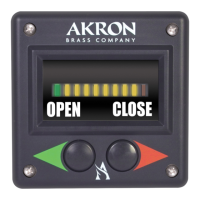
The Style 9313 Controller from Akron is designed to provide reliable and accurate valve control with valve position
indication through 10 LED (Light Emitting Diodes) indicators identifying the degree of Open/Close.
Features of the Akron Style 9313 Controller include:
Protected against EMI (Electro Magnetic Interference), both incoming and outgoing
Programmable Auto Open (not preset)
Works with both 12 and 24 Volt systems
Retrofits to existing apparatus
4 ¼” square face
Meets all aspects of NFPA 1901
Carries Akrons 5 year warranty against manufacturing defects
Standard Components
Controller
Wiring Harness for connection to the valve-10’ length standard
Note: the Controller is designed for use only with Akron Brass Electric Valves. Do not use with any other manufacture of valve. Doing
so will void any warranty.
INSTALLATION INSTRUCTIONS
Select the mounting location for the Controller. The Controller can be mounted from the outside with (4) Screws and
Delrin Nuts (included). Torque requirement is 6-8 lb-in for the nuts. The unit requires 2 ½” clearance behind the panel. Dimensions
for a panel cutout are shown in figure #1.
Warning: The Controller is a sealed unit. Disassembly of the unit will void any warranty. There are no user serviceable parts in the
Controller. If service is required the unit should be returned to the factory. Also, do not cut any connections. Doing so will void any
warranty and prevent product returns.
Note: The Valve and Auxiliary wires are plugged prior to shipment. These plugs must be removed before connections can be made. If
a lead is not being utilized, the plug should be left in place to prevent moisture damage.
CONTROLLER LEADS
Each Controller has three (3) Connectors extending from the back of the unit.
Power Connection lead
The Controller Power connection utilizes a 2 prong Weather-Pack connector. A mating Weather-Pack connector is required (cus-
tomer supplied-see appendix for purchasing information). Proper wire gauge is required to assure a quality connection. 12 gauge wire
is recommended. Heavier gauge wire is required for runs over 10’.
Note: when using larger than 12 gauge wire, be sure to use a 12 gauge connector and splice after the connector so as to not void any
warranty. The splice should be made close to the Controller.
121568

Question and Answer IconNeed help?

Do you have a question about the Akron 9313 Series and is the answer not in the manual?

Overview

The Akron Style 9313 Controller is a robust device designed for reliable and accurate valve control, offering clear valve position indication through 10 LED indicators that show the degree of Open/Close. It is specifically engineered to work exclusively with Akron Brass Electric Valves; using it with any other manufacturer's valve will void the warranty.

Key Features:

  • EMI Protection: The controller is protected against both incoming and outgoing Electro Magnetic Interference, ensuring stable operation in various environments.
  • Programmable Auto Open: While not preset, this feature allows the pump operator to open a fully closed valve by momentarily pressing the "OPEN" button. This setting can be enabled or disabled in the Setup Mode.
  • Voltage Compatibility: It is designed to work seamlessly with both 12 Volt and 24 Volt systems, making it versatile for different apparatus.
  • Retrofit Capability: The controller can retrofit to existing apparatus, simplifying upgrades.
  • Compact Design: It features a 4 1/4" square face, suitable for various panel installations.
  • Compliance: The device meets all aspects of NFPA 1901 standards, ensuring safety and performance.
  • Warranty: Akron provides a 5-year warranty against manufacturing defects, highlighting its commitment to quality.

Technical Specifications:

  • Electrical Inputs:
    • Power: 9-32VDC @ 300mA max (no load).
    • Valve Control: 12 or 24 Volts DC.
    • Communication: Modbus Serial Connection.
  • Environmental:
    • Operating Temperature: -40°C to +80°C.
    • Storage Temperature: -40°C to +85°C.
  • Voltage Requirements:
    • Minimum Operations Voltage: 11.5 Volts DC.
    • Maximum Operations Voltage: 32 Volts DC.
  • Display Type: LED.
  • Current Draw (Typical): For a 2"-3" valve, 2-4 amps in a 12-volt system (1-2 amps for 24-volt). This may be slightly higher for larger valves. When mechanical stops are reached (full open or full closed), current draw can reach 28 amps in a 12-volt system and 14 amps in a 24-volt system.
  • Wiring: 12 gauge wire is recommended for power connections, with heavier gauge wire required for runs over 10'. For 12-volt systems, a minimum of 11.5 volts at the valve under full load (28 amps) is required. For 24-volt systems, a minimum of 22 volts at the valve under full load (14 amps) is required.

Installation Instructions:

  1. Mounting Location: Select a suitable mounting location. The controller can be mounted from the outside using four screws and Delrin nuts (included). The torque requirement for the nuts is 6-8 lb-in.
  2. Clearance: The unit requires 2 1/2" clearance behind the panel.
  3. Panel Cutout: Dimensions for the panel cutout are provided in Figure #1.
  4. Connections: The Valve and Auxiliary wires are plugged prior to shipment. These plugs must be removed before connections can be made. If a lead is not being utilized, the plug should be left in place to prevent moisture damage.
  5. Power Connection: The controller's power connection uses a 2-prong Weather-Pack connector. A mating Weather-Pack connector is required (customer supplied). Proper wire gauge is crucial for a quality connection; 12 gauge wire is recommended, with heavier gauge wire for runs over 10'. When using wire larger than 12 gauge, use a 12 gauge connector and splice after the connector to avoid voiding the warranty. The splice should be made close to the controller.
  6. Grounding: For best connections, all grounds should be made to either the frame or a similar solid surface. A faulty ground will lead to unit malfunction.
  7. Direct Runs: Added loads on any power wire should be avoided, and direct runs are recommended for all connections.
  8. Electric Valve Connection: Use an Akron Wiring Harness to connect the controller to the Valve Motor. The standard length is 10'. All Wiring Harnesses have Deutsch connectors.
  9. Auxiliary Connection: The controller's auxiliary connection is a 3-prong Weather-Pack connector. An Auxiliary Cable is required to connect a Master to an Auxiliary (standard length 10'). A separate power lead is required for the Auxiliary.

Usage Features:

  • Initial Setup/Calibration: The controller must be calibrated when used for the first time with a new or different valve. The LED Bar Graph Display will flash, indicating calibration is needed. Calibration is performed by accessing the Setup Mode.
  • Setup Mode Access: Press and hold both the "OPEN" and "CLOSE" buttons for 15 seconds. For software versions 1.30 and higher, the version will blink out after 2 seconds. If buttons are held for 10 more seconds, the Setup Menu is accessed.
  • Calibrate Display to Valve: In Setup Options, the middle YELLOW LED will be the only LED on. Pressing the "CLOSE" button once selects the calibrate function. This function will cause the valve to cycle automatically (fully closed, fully open, then back to fully closed).
  • Auto Open Option: In Setup Options, use the "OPEN" button to navigate until only the GREEN LED is on. If the green LED is blinking, Auto Open is DISABLED. If the green LED is ON SOLID, Auto Open is ENABLED. The "CLOSE" button can be pressed to change this setting.
  • Exit Setup: In Setup Options, use the "OPEN" button to navigate until only the RED LED is on. Press the "CLOSE" button once. The unit will flash the LEDs once and return to normal operation.
  • Important Note: The truck engine must always be running before operating the controller.

Maintenance and Troubleshooting:

  • Loose Screws: If the valve actuator moves excessively, it may be caused by loosened screws. Remove them, apply Permabond LM 113 or Loctite 222, and retighten.
  • No Power to Controller: Check all power connections, wires, fuses, or breakers. Ensure a separate power wire is connected to any auxiliary controller.
  • Valve Actuator Not Working/Motor Not Driving:
    1. Check all connectors are fully engaged. Check voltage through the Wiring Harness (at least 11.5 volts for 12-volt systems, 22 volts for 24-volt systems). Check the signal from the controller.
    2. Remove the motor from the actuator and operate it to ensure the motor shaft turns freely.
    3. Check the worm gear. Operate the valve using the manual override.
    4. Remove the motor and check the planet gears.
  • Motor Runs but Valve Not Operating:
    1. Check the groove pin is fully engaging the worm gear and shaft.
    2. Check if the worm gear and sector gear are engaged.
    3. Remove the motor and check for engagement of the motor shaft and planet gears.
  • Valve Closes When OPEN Button Pressed (and vice versa):
    1. Reposition the sector gear.
    2. Replace the cable.
  • Valve OPEN/CLOSE LEDs Switch Immediately from Red to Green (and vice versa):
    1. Check wiring as explained in Problem #1.
    2. Remove the motor and check the shaft turns freely. Operate the valve manually via the override to check for binding.
  • Red or Green LEDs Don't Illuminate but Valve Operates: This indicates too much voltage drop or not enough current for the unit to sense the end of travel. Solutions include ensuring the truck engine is running, checking controller voltage (11.5V for 12V, 22V for 24V), checking all wiring (minimum 12 gauge, heavier for runs over 10'), and checking all connections and grounds for looseness.
  • Red and Green LEDs Illuminate Prematurely: This suggests a short in the motor or controller, a jammed gear system, or a damaged seat or valve ball. Solutions include measuring motor amps (approx. 1.5A for 12V, 0.75A for 24V), operating manual override to check for damaged parts, and checking the valve waterway for obstructions.
  • Yellow LED Illuminates but Valve Doesn't Move: This indicates a disengaged worm gear. Solution is to remove the gear housing cover and check for damaged parts, especially the groove pin in the worm gear.

Important Notes:

  • The controller is a sealed unit. Disassembly will void any warranty. There are no user-serviceable parts. If service is required, the unit should be returned to the factory.
  • Do not cut any connections, as this will void the warranty and prevent product returns.
  • A Mating Weather-Pack connector must be used to connect to the power source. Do not cut the connector on the power wire of the controller, as this will void the warranty. Part number 9300-0058 is a packet of (5) mating Weather-Pack connections.

Akron 9313 Series Specifications

General IconGeneral
BrandAkron
Model9313 Series
CategoryController
LanguageEnglish