
 Need help?
Do you have a question about the Alcatel LINK KEY and is the answer not in the manual?
Instructions on how to access the device's web interface by entering a specific IP address.
Details on connecting/disconnecting from the Internet and network information display.
Details on local and roaming data usage, volume, and duration limits for connections.
Managing PIN codes, including disabling, modifying, and PUK requirements.
Guidance for handling PIN or PUK lock situations on the SIM card.
Warnings regarding potential interference with sensitive electronic medical devices.
Precautions for using the wireless device in hospital and healthcare facilities.
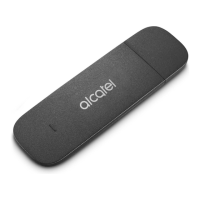
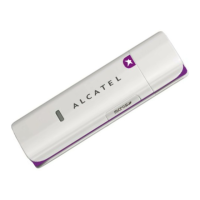
This document serves as the User Manual for the Alcatel LINK KEY, a wireless device designed for internet connectivity.
The primary function of the Alcatel LINK KEY is to provide wireless internet access. Users can connect to the internet via 2G, 3G, or 4G networks, with support for various technologies such as EDGE, GPRS, GSM, HSPA, HSUPA+, UMTS, and FDD LTE. The device's operation is managed through a Web UI configuration page, accessible via a web browser at http://192.168.1.1. This interface allows users to monitor and control their internet connection, manage data usage, send and receive SMS messages, and configure various device settings.
The Web UI provides a "Connection" area where users can connect or disconnect from the internet. This section displays crucial connection information, including the operator name, and indicates if the network is roaming with an "R" icon. It also shows the current network technology (2G, 3G, or 4G) and the number of devices currently connected to the LINK KEY. The connection status is clearly indicated as either "Connected" or "Disconnected."
The device provides visual cues for signal strength, ranging from "no signal" to "excellent," using a series of bars. The signal icon is grey when there is no service. The network technology in use (2G, 3G, or 4G) is also displayed, with the icon being empty when disconnected or without service.
The "Usage" area allows users to monitor their data consumption. It displays both local (home) and roaming data usage, including upload and download volumes. For home usage, it shows the current volume against a total volume, and a reminder icon appears if usage exceeds 100%. For roaming, it displays current and total roaming data. The duration of each connection and the total duration for a specified period are also tracked, with a reminder icon appearing if time limitations are exceeded.
Users can clear their usage history through the "Clear History" option in the top-right menu. The device automatically clears the entire usage database on the billing day. If usage or time limits are exceeded, and a new plan is set, the previous database is cleared. However, if limits are not exceeded, the database remains intact when a new plan is set. The "Usage settings" option allows users to configure their data usage parameters.
The "SMS" interface enables users to send and receive text messages. Key features include:
The "Settings" area offers comprehensive control over the device's operation:
The device supports online software updates. It automatically checks for new software versions. When an update is available, users can initiate the "Update" process. It is crucial not to power off the device during an upgrade, as it will restart automatically after completion.
The "Help" section provides access to the User Manual, offering guidance on device operation. The device comes with a twelve-month warranty against technical specification deviations from the original invoice date. Users must inform their vendor and provide proof of purchase for any conformity defects. Repaired or replaced devices are warranted for one month, unless statutory provisions dictate otherwise. The warranty does not cover damages resulting from not following instructions, non-compliance with technical/safety standards, improper maintenance, accidents, unauthorized modifications, misuse, external interferences, or faulty connections. The warranty is also void if markings or serial numbers are removed or altered.
The manual emphasizes several safety precautions:
The manual also includes a Q&A section addressing common issues such as browser and OS support, troubleshooting "No service" situations, and resolving "PIN lock" or "PUK lock" issues. It also provides instructions on how to connect/disconnect from 4G, set a new PIN, find internet connectivity information, check usage volume/time, manually search for networks, check model/firmware versions, back up/restore configurations, connect automatically to the internet, and change the login password.
 General
| Model | Alcatel LINK KEY |
|---|---|
| Category | Modem |
| Connectivity | 4G LTE |
| USB | USB 2.0 |
| LTE Category | Cat 4 |
| Maximum Download Speed | 150 Mbps |
| Maximum Upload Speed | 50 Mbps |
| Wi-Fi | No |





 To Next Page