Phone web interface
1. To nd out your phone’s IP address long
press # key; the IP address will be read out
2. Open a web browser on your computer.
Enter http:// and the IP address in the
address bar and validate.
3. Default login and password are
« admin/admin » for administrator.
4. Minimum required conguration is one sip
account. Check administrator guide for
details.
Installation
Package content:
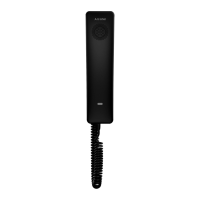
Handset, base, handset cord, Quick start guide
Wall mounting
- Drill 2 holes on the wall, with 131.2 or
162.2mm vertical separation
- Insert screws and anchors (not included)
- Plug phone connections
- Align phone mounting holes with screws and
slide down
Making a call
Direct dialing: Lift the handset and enter the
number. To end the call hang up the handset.
Handsfree: Enter the number and press ,
or viceversa. Press again to end the call.
Accepting a call
Lift the handset or press .
Redial
Lift the handset and press to redial last
dialed number.
Putting a call on hold
To put a call on hold press .
To resume the call press again.
Speed dial
Congure up to 10 speed dial memories on the
web interface.
To dial out, long press the corresponding digit
key (0 to 9)
Environment
Please help us protect the environment in which we live!
Notice of copyright and trademarks
Declaration of conformity for the European Community
Connections
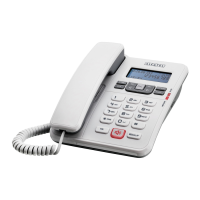
Temporis IP10
Idle mode / ringing:
ringervolumen control
In conversation: speaker /
earpiece volumen control
Call Hold / Resume
Handsfree mode
Redial
Programmable key
Ringing: mute ringer
In conversation: mute /
unmute microphone
Status indicator
QUICK START GUIDE
ATLINKS declares that Temporis IP10 telephone complies
with the basic health, safety and environmental requirements
in all relevant EU directives.
You can download the declaration of conformity from the
following address: www.alcatel-business.com.
The CE logo shown on the products indicates that they are
compliant with the basic requirements of all the
applicable directives.
Electrical and electronic appliances are liable to contain
parts that are necessary in order for the system to work
properly but which can become a health and environmental
hazard if they are not handled or disposed of in the
proper way. Consequently, please do not throw out your
inoperative appliance with the household waste. If you are
the owner of the appliance, you must deposit it at the
appropriate local collection point or leave it with the vendor
when buying a new appliance.
(a) - If you are a professional user, please follow your
supplier's instructions.
(b) - If the appliance is rented to you or left in your care,
please contact your service provider.
Copyright © 2020 ATLINKS. All rights reserved. ATLINKS
reserves the right to change the technical specifications of
its products without prior notice, so as to make technical
improvements or respect new regulations.
Alcatel and Temporis are registered trademarks. Alcatel
logo and Alcatel name are trademarks of Alcatel-Lucent
and used under license by ATLINKS.
ATLINKS
147 avenue Paul Doumer
92500 RUEIL-MALMAISON France
RCS Nanterre 508 823 747
IP-Addresse des Telefons
1. Um die Telefon-IP-Adresse zu prüfen,
drücken Sie # lang; Die IP-Adresse wird
angegeben.
2. Önen Sie einen Internetbrowser auf Ihrem
Computer. Geben Sie http:// und die
IP-Adresse in die Adresszeile ein und
validieren.
3. Das standardmäßige Login und Passwort
sind „admin/admin“ für den Administrator..
4. Die Minimum-Konguration ist ein SIP-Kon
to. Einzelheiten nden Sie in der Administra
tor-Anleitung.
Installation
Lieferumfang:
Hörer, Basisstation, Hörerkabel, Kurzanleitung
Wandhalterung Installation
- Bohren Sie 2 Löcher in die Wand, Vertikaler
Abstand 131,2 oder 162,2mm
- Fügen Sie Schrauben und Haken ein
(nicht im Lieferumfang enthalten)
- Verbinden Sie die Kabel
- Setzen Sie das Telefon entsprechend der
Bohrungen auf der Rückseite auf die
Schrauben und schieben Sie es herunter
Telefonieren
Direkte Anwahl: Nehmen Sie den Hörer ab und
geben Sie die Telefonnummer ein. Um den
Anruf zu beenden, hängen Sie den Hörer auf.
Freisprechen: Geben Sie die Telefonnummer
ein und drücken Sie (oder umgekehrt).
Erneut drücken um den Anruf zu beenden.
Anruf annehmen
Nehmen Sie den Hörer ab, oder drücken Sie
.
Wahlwiederholung
Nehmen Sie den Hörer ab und drücken Sie ,
um die zuletzt gewählte Nummer zu wählen.
Anruf halten
Taste drücken. Um den Anruf
zurückzuholen, drücken.
Schnellwahltasten
Richten Sie bis zu 10 Schnellwahltasten in der
Internet-Oberäche ein. Um einen Anruf
zutätigen, drücken Sie lange auf die zugewi-
esene Taste (0 bis 9).
Umweltschutz
Bitte helfen Sie mit beim Umweltschutz!
Produktgarantie
Konformitätserklärung für die Europäische Union
Anschlüsse
Temporis IP10
Ruhemodus/Klingelton:
Klingeltonlautstärkeeinstellung
Während eines Gespräches:
Lautsprecher/
Kopfhörerlautstärkeeinstellung
Halten des Gesprächs
Freisprechen
Wahlwiederholung
Programmierbare
Funktionstaste
Klingelton: Klingelton aus
Im Gesprächsmodus:
Mikrofon aus-/einschalten
Statusanzeige
KURZANLEITUNG
ATLINKS erklärt, dass das Temporis IP100 Telefon den
grundlegenden Gesundheits-, Sicherheits- und Umweltan-
forderungen aller relevanten europäischen Richtlinien
entspricht. Hier können Sie die Konformitätserklärung
herunterladen: www.alcatel-business.com.
Das CE-Logo auf dem Gerät bedeutet, dass es allen
grundlegenden Anforderungen der anwendbaren Richtlinien
entspricht.
Elektrische und elektronische Geräte enthalten Stoffe, die
für die Funktion des Systems vonnöten sind, die aber bei
unsachgemäßer Handhabung und Entsorgung zu einer
Gefahr für Umwelt und Gesundheit werden können. Bitte
werfen Sie daher keine defekten Geräte in den Hausmüll.
Der Eigentümer des Gerätes hat dafür zu sorgen, dass das
Gerät zu einer Sammelstelle gebracht wird. Alternativ
können Sie das Gerät bei Kauf eines neuen Gerätes auch
bei Ihrem Händler abgeben.
(a) Gewerbliche Anwender werden gebeten, den
Anweisungen Ihres Lieferanten zu folgen.
(b) Wenn Sie die Anlage gemietet haben oder sie sich in
Ihrer Obhut befindet, wenden Sie sich bitte an Ihren
Dienstleister.
Sie haben die gesetzlichen Gewährleistungsrechte für
dieses Produkt entsprechend den Vorschriften über den
Kauf von Verbrauchsgütern, die in dem Land gelten, wo Sie
diese Ware gekauft haben. Bitte wenden Sie sich für alle
Informationen zu der gesetzlichen Gewährleistungspflicht
an Ihren Einzelhändler. Unbeschadet der gesetzlichen
Gewährleistungsrechte für das Produkt garantiert Atlinks
Europe; Sitz: 22, quai Galliéni, 92150 Suresnes, Frankreich,
für die Dauer der nachgenannten Garantiezeit, dass das
Produkt in dieser Packung (im Folgenden: das „Produkt“)
den technischen Spezifikationen in der beigefügten
Bedienungsanleitung entspricht. Die Garantiezeit beträgt
vierundzwanzig (24) Monate für das Telefon, nicht
eingeschlossen Verbrauchsmaterialien, Zubehör und
Batterien.
Sie beginnt an dem Tag, an dem das neue Produkt gekauft
wurde. Maßgebend dafür ist Ihre Rechnung oder Ihr
Kassenbon, auf der/auf dem auch der Name des
verkaufenden Fachhändlers angegeben ist.
Um mehr Details auf den Termin der Garantie zu haben,
können Sie die verfügbare Merkschrift auf
www.alcatel-business.com nachsehen.
Hinweise auf Copyright und MarkenCopyright © 2020
ATLINKS. Alle Rechte vorbehalten. ATLINKS behält sich
die Änderung der technischen Spezifikationen seiner
Produkte für technische Verbesserungen oder die
Beachtung neuer Bestimmungen vor. Alcatel und Temporis
sind eingetragene Marken. Das Alcatel-Logo und der Name
Alcatel sind geschützte
Warenzeichen von Alcatel-Lucent. Sie werden von
ATLINKS als Lizenznehmer genutzt.
ATLINKS
147 avenue Paul Doumer
92500 RUEIL-MALMAISON France
RCS Nanterre 508 823 747
This symbol means that your inoperative electronic
appliance must be collected separately and not
mixed with the household waste. The European
Union has implemented a specific collection and
recycling system for which producers' are responsible.
This appliance has been designed and manufactured with
high quality materials and components that can be recycled
and reused.
Dieses Symbol bedeutet, dass Ihr
elektronisches Altgerät getrennt entsorgt
werden muss und nicht im Hausmüll landen
darf. Die Europäische Union hat ein besonderes
Sammel- und Recycling-System eingeführt, für welches die
Hersteller verantwortlich sind.
Dieses Gerät wurde mit qualitativ hochwertigen Materialien
hergestellt, die recycelt und wieder verwendet werden
können.

 Need help?
 General






 To Next Page