EasyManua.ls Logo

Alecto FR115GS - User Manual

Alecto FR115GS
18 pages
Print Icon
To Next Page IconTo Next Page
Loading...
USER MANUAL
INTRODUCTION
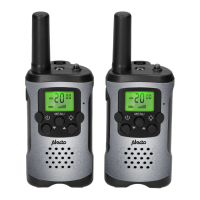
The Alecto FR115 is a PMR-446 walkie-talkie.
This walkie-talkie allows you to not only commu-
nicate with each other free of charge, but also
with other (Alecto) walkie-talkies provided they
meet the PMR-446 standard.
DISPLAY FUNCTIONS
VOX = Voice Controlled Transmitting
SCAN = Channel Scan
Channel number
CTCSS subcode
= Standby
Battery level = receiving
= Sending
Key lock
Set volume level
FUNCTIONS INSTALLATION
POWER:
The FR115 is powered through 3x AAA penlite
batteries.
1. Open the battery compartment by pressing
the tab at the bottom of the battery cover
upwards, the battery cover can then be
removed.
In order to avoid the risk of
suffocation when used by small
children, because the belt clip is
a relatively small part, the belt clip
has been glued by the factory.
Removal and re-installation of the
battery cover may be more difficult.
2. Install the batteries according
to the markings in the battery
compartment and close the
battery compartment.
HEADSET:
On top of the FR115 you’ll find the connector for
a headset with a 2.5mm plug. We advise you to
use an Alecto FRH-10 headset for this.
USE
Attention: for a connections between 2
walkie-talkies, both walkie-talkies must
be set to the same channel, with the same sub-
code. See further on in this manual how to set
the channel and sub-codes.
TO SWITCH ON/OFF:
Press and hold the button for 2 seconds to
switch the walkie-talkie on or off.
VOLUME CONTROL:
Repeatedly and briefly press the or button
to adjust the volume. The set volume level is
shown in the lower part of the display.
TO SEND:
Press the P button to send. Keep this button
depressed while speaking. Talk at a normal
voice volume and approximately 3 to 5 cm from
the walkie-talkie’s microphone.
TO RECEIVE:
Release the P button to receive.
CALL ALERT TONE:
Press the P button briefly to transmit a call alert
tone. This call alert tone is adjustable, see ‘To
change the call alert tone’ further on in this
manual.
BACKGROUND LIGHTING:
Each time you press a function button (except
the flash light button) the background lighting of
the display will illuminate. This lighting will auto-
matically switch off 10 seconds after pressing
the last button
FLASH LIGHT:
Use the button to switch on the built-in flash
light. This light remains lit for as long as you
keep this button depressed.
The walkie-talkie doesn’t need to be switched
on to use this function.
Attention: Don’t stare directly into the light when
lit and don’t shine it in other people’s eyes.
The light can be bright and may damage your
eyesight.
ADDITIONAL FUNCTIONS
VOX FUNCTION:
When the VOX function is enabled (VOX =
Voice Activated Transmission), the FR115 starts
sending as soon as you speak into the micro-
phone.
To switch the VOX function on/off:
1. press 3x the MENU button, the word “VOX”
will illuminate in the left part of the display
2. use the buttons or to set the trigger sen-
sitivity (‘OF’ is off, ‘1’ is the lowest sensitivity,
‘3’ is the highest sensitivity)
3. press the P button to confirm
Preferably, use this function in combination with
headsets. Keep in mind that it can take over a
second after you’ve started talking before the
walkie-talkie enables the transmitter.
CHANNEL MONITORING: (listening)
Use this function to disable the noise reduction,
allowing you to also listen to weak transmitters
on the current channel.
To switch the MONITOR function on/off:
1. press and hold the button for 2 seconds to
disable the noise reduction and to monitor the
channel
2. release the button to turn the noise reduc-
tion on again
CHANNEL SCAN:
Use the scan function to listen in on all channels
one after the other.
1. Press and hold the button for 2 seconds to
start the scan
2. briefly press the or button to continue
scanning if you’re only receiving noise on a
certain channel
3. press the P or MENU button to end the scan
KEYPAD LOCK:
When the keypad lock is activated, the , and
MENU buttons are blocked.
1. press and hold the MENU button until
appears in the display after approx. 2 sec-
onds
2. press and hold the MENU button again for
2 seconds to release these buttons again
SETTINGS
TO CHANGE THE SEND/RECEIVE
CHANNEL:
1. press 1x the MENU button and the channel
indication starts flashing
2. press the or button to select the desired
channel
3. press the P button to confirm
TO CHANGE THE SUB-CHANNEL (CTCSS):
1. press 2x the MENU button and the sub-chan-
nel indication starts flashing
2. use the or button to set the desired
sub-channel (1-38) or disable this function by
selecting OF
3. press the P button to confirm
Keep in mind that the walkie-talkie at the receiv-
ing end must be set to the same sub-channel.
Sub-channel explanation, (CTCSS code):
Continuous Tone Controlled Squelch System
is a tone code that’s included while transmit-
ting. This tone code is not audible. Only when
the tone code of the transmitting walkie-talkie
matches the tone code of the receiving walkie-
talkie, the receiving walkie-talkie will reproduce
the signal. This prevents you from being dis-
turbed by other PMR-446 walkie-talkies commu-
nicating on the same channel.
SCAN
VOX
Microphone
Flash light
Headset output
Antenna
Display
P button
(send button)
Charging contacts
(rear)
Speaker
SCAN
VOX
HI
LO
MENU
1.5V AAA
1.5V AAA
1.5V AAA
FR115GS

Question and Answer IconNeed help?

Do you have a question about the Alecto FR115GS and is the answer not in the manual?

Overview

The Alecto FR115GS is a PMR-446 walkie-talkie designed for free-of-charge communication with other PMR-446 standard compliant walkie-talkies.

Function Description:

The FR115GS operates as a transceiver, transmitting and receiving radio waves on the 446 MHz band. It features a display that shows various information, including channel number, CTCSS subcode, battery level, key lock status, and set volume level. The device includes a microphone for speaking, a speaker for listening, and a P button for sending transmissions. A built-in flash light and a headset output are also integrated.

Display Functions:

  • VOX (Voice Controlled Transmitting): Indicates when voice-activated transmission is enabled.
  • SCAN (Channel Scan): Indicates when the device is scanning channels.
  • Channel number: Displays the current operating channel (00-88).
  • CTCSS subcode: Shows the Continuous Tone Controlled Squelch System subcode (00-88).
  • Battery level: A graphical indicator of the remaining battery charge.
    • Full bars: Batteries full.
    • One bar: Batteries 1/3 full, replacement needed.
    • Flashing symbol with double beep every 3 seconds: Battery low, device will switch off within minutes.
  • Standby: Indicated by a specific icon.
  • Receiving: Indicated by a specific icon.
  • Sending: Indicated by a specific icon.
  • Key lock: Indicates when the keypad is locked.
  • Set volume level: Displays the current volume setting.

Important Technical Specifications:

  • Operating frequency: 446.00625 MHz to 446.09375 MHz.
  • Power output: <27dBm.
  • Power supply: 3x 1.2V AAA penlite batteries.
  • Usage duration: Approximately 24 hours (based on 5% transmit, 5% receive, 90% standby with alkaline batteries).
  • Headset connector: 2.5mm stereo plug (Alecto FRH-10 headset recommended).
  • Range: Up to 5km (optimal range achieved with a free view of the receiver, dependent on local conditions like tall buildings, high voltage towers, and overhead wires).
  • Weight: 67g (battery excluded).
  • Dimensions: 91(128) x 49 x 35mm.
  • Suitability: Suitable for people >6 years.

Usage Features:

Installation:

  1. Battery Installation: Open the battery compartment by pressing the tab at the bottom of the battery cover upwards. Install 3x AAA batteries according to the markings and close the compartment. Note: The belt clip is factory-glued to prevent suffocation risk for small children, making battery cover removal/re-installation potentially difficult.
  2. Headset Connection: Connect a 2.5mm headset (e.g., Alecto FRH-10) to the connector on top of the FR115.

Basic Operation:

  • Switching On/Off: Press and hold the power button for 2 seconds.
  • Volume Control: Repeatedly and briefly press the up or down buttons to adjust the volume. The volume level is shown on the display.
  • Sending: Press and hold the P button. Speak at a normal voice volume, 3 to 5 cm from the microphone.
  • Receiving: Release the P button.
  • Call Alert Tone: Briefly press the P button to transmit a call alert tone. This tone is adjustable.
  • Background Lighting: The display illuminates for 10 seconds after any function button (except the flash light button) is pressed.
  • Flash Light: Press and hold the light button to switch on the built-in flash light. The light stays on as long as the button is depressed. The walkie-talkie does not need to be switched on for this function. Caution: Do not stare directly into the light or shine it into others' eyes, as it can be bright and cause eyesight damage.

Additional Functions:

  • VOX Function (Voice Activated Transmission):
    1. Press the MENU button 3 times; "VOX" will appear on the display.
    2. Use the up or down buttons to set sensitivity ('OF' for off, '1' for lowest, '3' for highest).
    3. Press the P button to confirm.
    • Note: This function is best used with headsets. There may be a delay of over a second before transmission begins after speaking.
  • Channel Monitoring (Listening):
    1. Press and hold the down button for 2 seconds to disable noise reduction and monitor the current channel for weak transmitters.
    2. Release the down button to re-enable noise reduction.
  • Channel Scan:
    1. Press and hold the up button for 2 seconds to start scanning all channels.
    2. Briefly press the up or down button to continue scanning if only noise is received on a channel.
    3. Press the P or MENU button to end the scan.
  • Keypad Lock:
    1. Press and hold the MENU button until a key lock icon appears (approx. 2 seconds). The up, down, and MENU buttons will be blocked.
    2. Press and hold the MENU button again for 2 seconds to release the buttons.

Settings:

  • Change Send/Receive Channel:
    1. Press the MENU button once; the channel indication will flash.
    2. Use the up or down buttons to select the desired channel.
    3. Press the P button to confirm.
    • Note: Both walkie-talkies must be set to the same channel for communication.
  • Change Sub-Channel (CTCSS):
    1. Press the MENU button twice; the sub-channel indication will flash.
    2. Use the up or down buttons to set the desired sub-channel (1-38) or select 'OF' to disable.
    3. Press the P button to confirm.
    • Note: The receiving walkie-talkie must be set to the same sub-channel. CTCSS (Continuous Tone Controlled Squelch System) uses an inaudible tone code during transmission. The signal is only reproduced by a receiving walkie-talkie if its tone code matches the transmitting one, preventing interference from other PMR-446 devices on the same channel.
  • Change Call Alert Tone:
    1. Press the MENU button 4 times; 'CA' will flash.
    2. Use the up or down buttons to select one of 10 call alert tones or 'oF' (tone off). The selected tone will play through the speaker for preview.
    3. Press the P button to confirm.
  • Key Tones On/Off:
    1. Press the MENU button 5 times; 'to' will flash, followed by 'on' or 'oF'.
    2. Use the up or down buttons to enable ('on') or disable ('oF') key tones.
    3. Press the P button to confirm.
  • Roger Beep On/Off:
    1. Press the MENU button 6 times; 'ro' will flash, followed by 'on' or 'oF'.
    2. Use the up or down buttons to enable ('on') or disable ('oF') the Roger Beep tone.
    3. Press the P button to confirm.
    • Note: When enabled, a signal tone sounds at the receiving end when transmission stops, indicating the other person can talk.

General Tips:

  • The FR115 is authorized for use in all EU countries. For use outside the EU, consult local PMR446 equipment restrictions.
  • The signal may be heard by other walkie-talkies or receivers.
  • Do not make changes to the electronics or antenna. Service should only be performed by qualified electricians.
  • Do not use outdoors during thunderstorms.

Maintenance Features:

  • Cleaning: Clean the FR115 only with a moist cloth.
  • Environment: Do not place in direct sunlight or humid environments.
  • Protection: Prevent water and/or sand from penetrating the device.
  • Troubleshooting: In case of failure, first check if the FR115 works at a different location. If problems persist, switch off the handsets, wait several minutes, and switch them on again. If the issue remains, contact Alecto customer service (www.alecto.nl).
  • Battery Disposal: Exhausted batteries should be returned to the supplier or a local depot for chemical waste. Never discard empty batteries as regular household waste.
  • Device Disposal: If the device needs replacement, return it to your supplier for environmentally friendly processing.

Alecto FR115GS Specifications

General IconGeneral
BrandAlecto
ModelFR115GS
CategoryRadio
LanguageEnglish