EasyManua.ls Logo

Alesis Matica 500 - User Manual

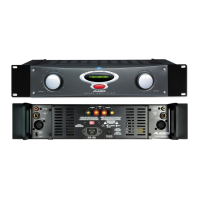
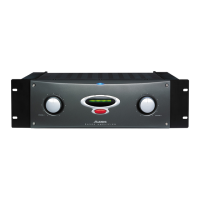
Alesis Matica 500
22 pages
Print Icon
To Next Page IconTo Next Page
Loading...
ALESIS
MATICA 500/900
(A4/A8)
Service Manual
P/N: 8-31-0030-A

Other manuals for Alesis Matica 500

Questions and Answers

  • A
    Ariana HinesJul 25, 2025
    What to do if my Alesis Amplifier has no power?
    • K
      Keith WilliamsJul 25, 2025
      If your Alesis Amplifier has no power, meaning no LED and no fan, it could be due to a tripped or faulty breaker. Try resetting the breaker first. If that doesn't work, the breaker might need replacement. Other potential causes include a faulty transformer, which would require replacing the transformers and retesting, or an issue with the A.C. Be sure that a 30 amp service is available without significant voltage drop.
  • H
    Heidi ScottAug 5, 2025
    What to do if Clip LED is on Alesis Matica 500 Amplifier but there is no output?
    • J
      Jeremy SheltonAug 5, 2025
      If the Clip LED is on but there's no output from your Alesis Amplifier, this could be due to a blown output section. In this case, replace all active components following the diver I.C. (U2-channel A U3 channel B) in the blown channel. Also, replace any out of tolerance resistors in the output section. Another cause might be poor solder on the large power supply capacitors, which causes ground reference to drift, so troubleshooting and repair would be necessary. Also check if J1 or J14 are loose, if so, reseat the cable and apply hot glue to prevent re loosening.
  • K
    Karen GatesAug 15, 2025
    Why Alesis Amplifier has no output, no LED, but Fan running full on?
    • C
      Christopher ParkAug 15, 2025
      If your Alesis Amplifier has no output, no LED, but the fan is running full on, it could be due to a disconnected fan board or main harness. Try reconnecting and retesting. It could also be a faulty +15V regulator, which would require troubleshooting and repair.

Summary

1.00 Theory of Operation

1.10 Input Section

The input stage uses a dual Signetics 5532A op amp for a low noise, balanced to unbalanced converter with a maximum input level of +21dBm.

1.20 Pre-Amp Section

The pre-amp section uses Signetics 5532A op amps for push-pull characteristics, providing 15.7 dB gain per channel, with channel A inverting and B non-inverting.

1.30 Main Amplifier Section

The main amplifier is inverting, composed of front end, voltage gain stage, output driver, and output stage, with a closed-loop gain of 10X or 20dB.

1.40 Output Device Protection

Output device protection uses Q17 (NPN) and Q18 (PNP) complimentary circuits to prevent damage from short circuits or DC offset.

1.50 Bias Circuit

The bias circuit is an active shunt regulator, providing lower impedance and better control of bias voltage compared to single-device regulators.

1.60 Speaker Protection

Speaker protection has two sections: a quad comparator with low-pass filter and a discrete bipolar transistor circuit controlling speaker relays.

1.70 Fan Speed Control

The fan circuit has three modes: elevated speed at power-up, slow speed, and speed modulated by amplifier drive or heat sink temperature.

1.80 Thermal Management System

The extruded aluminum heat sink with forced air cooling manages heat dissipation, with fan speed controlled by amplifier demands and heat sink temperature.

2.00 Updates and Corrections

2.10 Stripped Heat Sinks

Procedure for reusing stripped heat sinks using a machine screw and threaded standoff to maintain clamp pressure.

2.20 New Case Bracket Insulator(s)

Replacement of insulators to prevent wire insulation from being cut by case brackets, protecting the user from electric shock.

2.30 Transformer Insulators

Foam insulators added for electrical isolation and resistance to mechanical shock, placed on the case top over transformers.

3.00 Troubleshooting

4.00 A4 Service Parts List

4.10 A8 Service Parts List

Alesis Matica 500 Specifications

General IconGeneral
TypePower Amplifier
Channels2
Input Impedance20 kOhms balanced, 10 kOhms unbalanced
S/N Ratio>100 dB
THD<0.03%
InputsXLR and 1/4" TRS
OutputsBinding posts
Frequency Response20Hz - 20kHz
CoolingConvection
Dimensions19" x 3.5" x 15.75" (483 x 89 x 400 mm)
Weight35 lbs (15.9 kg)

Related product manuals