14
ROUTE
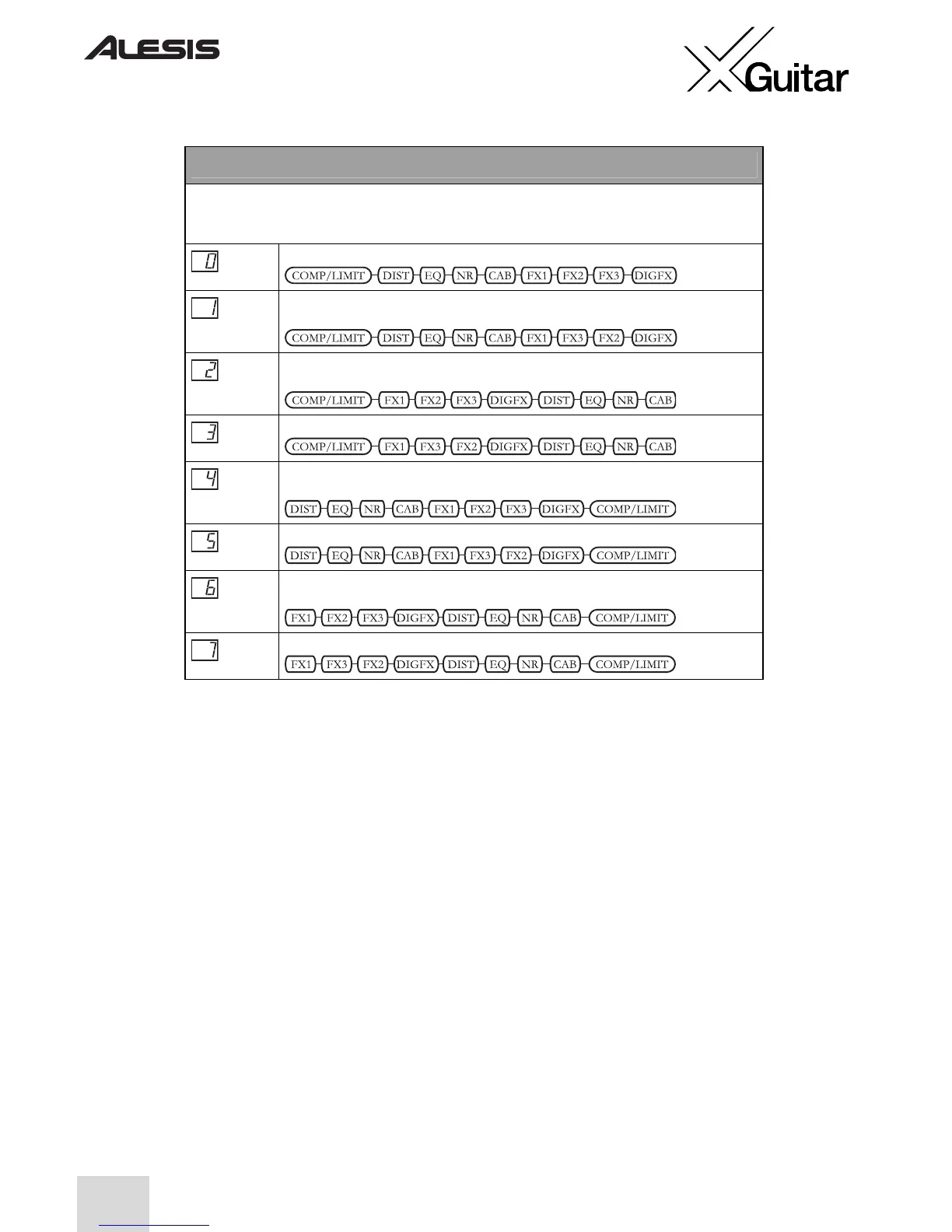
In this position, the display indicates the current signal-routing order of the FX modules. This ordering
can have a big effect on your sound, as each effect in the configuration feeds into the next. Whatever
the configuration, the LEVEL setting always comes last in line.
This is the default order.
This one is the default order with FX2 and FX3 swapped to put the delay effects in
the middle of the modulation effects.
This order places the cabinet simulator at the end, allowing it to emulate multiple
effects pedals feeding into a cabinet.
This one is order 2 with FX2 and FX3 swapped.
This order is the default order with the compressor/limiter placed at the end, making
this one ideal for recording.
This one is order 4 with FX2 and FX3 swapped.
This is the one to go for if you’re recording and want to sound like you’re running
several effects pedals into a cabinet.
This configuration is order 6 with FX2 and FX3 swapped.


 To Next Page