20
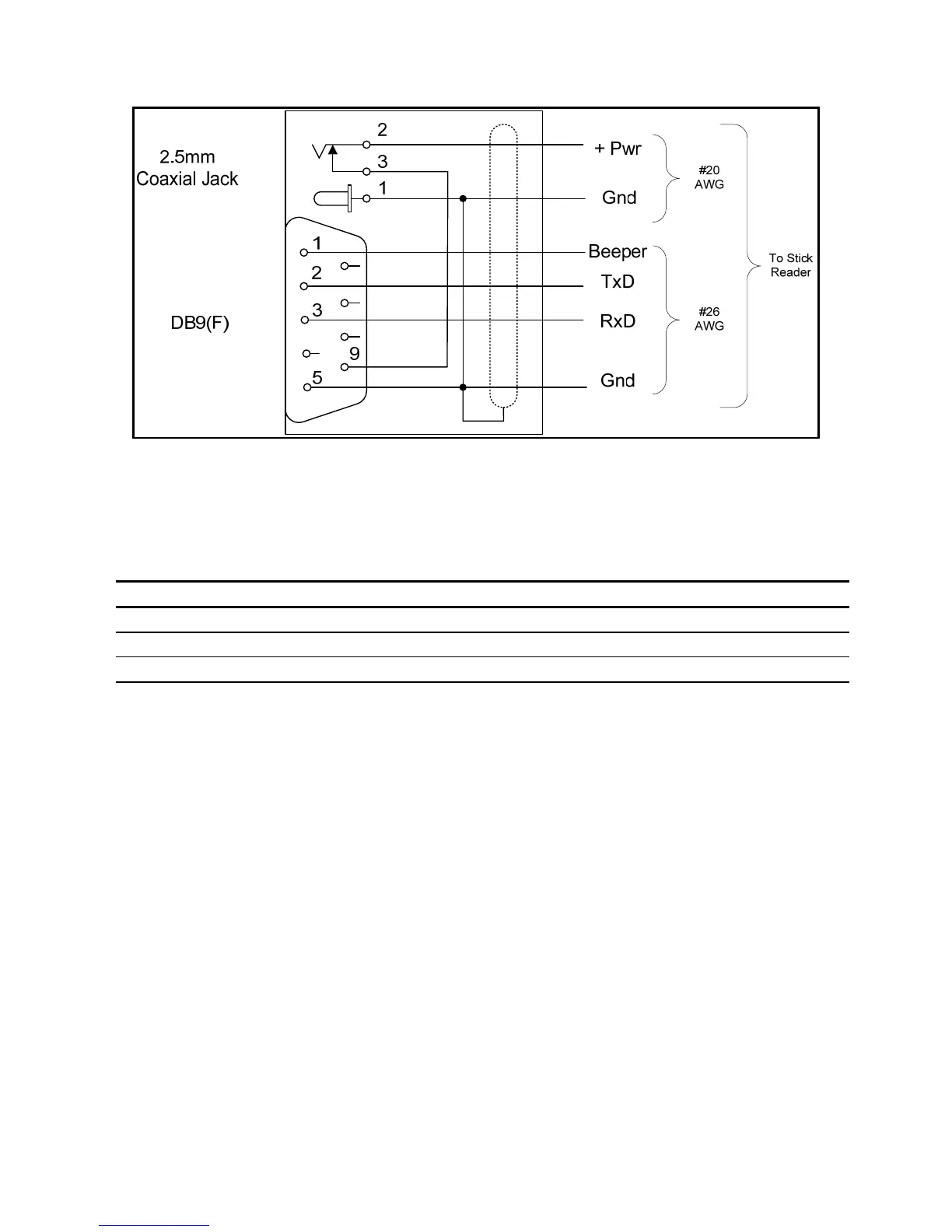
Figure 3 - Stick Reader Power Jack and Data Connector Wiring Diagram
Serial output data appears on the Stick Reader’s TxD/pin 2 connection in ASCII
format, which is compatible with most PC terminal emulator programs, such as
HyperTerminal®.
Table 3- Default Serial Data ID Code Formats
Tag Type Default Format
HDX ISO LA_982_000001088420{CR}{LF}
HDX Industrial LR_0006_0000000018514243{CR}{LF}
FDX-B ISO LA_982_000000255895{CR}{LF}
Note: _ = space; {CR} = carriage return; {LF} = line feed
Interpreting Tag ID Code Information
Table 3 lists the default data formats that are transmitted from the Stick Reader’s
serial communications port, in response to reading compatible type tags. For ISO
type tags, there is no contextual differentiation between HDX and FDX-B outputs.
Both types of tags produce a default format:
LA_982_000001088420{CR}{LF}
Where the underscore “_” represents a space character, and {CR}{LF} is a carriage
return /line feed (unprinted / invisible control characters which cause a PC’s display
cursor to jump to the beginning of the next line prior to displaying the next ID
number).



 To Next Page