3. Insert the stem into the body and lock it tight.
4. Park with the kickstand. Step on the folding latch,
hold the handlebar and push forward to unfold the
scooter.
Make sure there are no loose fasteners and damaged components.
Check all functional parts like the frame, handlebar, tires and make sure the steering system is well adjusted.
Ensure that all locking devices are engaged.
NOTICE
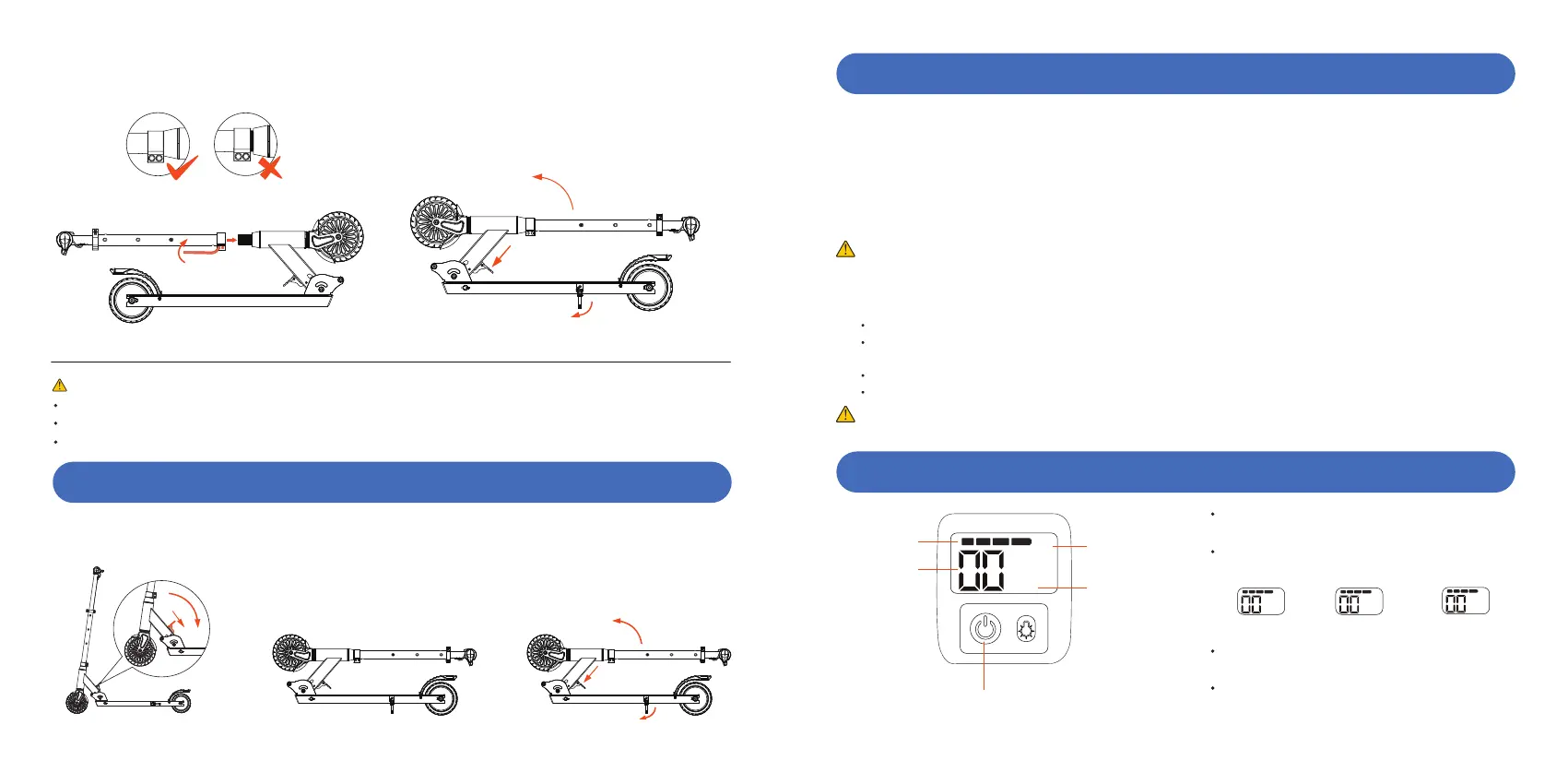
How to fold: Step on the folding latch while pushing the handlebar forward slightly. Then fold the handlebar down.
Unfold the scooter: Step on the folding latch, hold the handlebar and push forward to unfold the scooter.
*Conrm that the folding mechanism has been xed. (Make sure you hear a sound)
fold unfold
HOW TO FOLDING
LCD DISPLAY AND FUNCTION OPERATION
CHARGING YOUR SCOOTER
Step 1: Ensure that the charging port is clean and dry.
Step 2: Plug the charger into the power socket, then connect the cable with the power supply (100V ~ 240V; 50,60Hz), make
sure the light on the charger is GREEN.
Step 3: Male DC connector plug into the charging port ofthe scooter. The indicator light on the charger should change to
RED, indicating that your scooter is now, being charged. When the RED indicator light on your charger turns GREEN
then your scooter is fully charged. A full charge typically occurs within 4 hours.
Step 4: Please unplug the charger from your scooter and power outlet.
IMPORTANT NOTES ABOUT CHARGING
If the green light on your charger does not turn RED when you plug it into your scooter, it could mean you have to check
the cables to ensure you have a proper connection; or that your scooter is already fully chaged. Turn on the display to check
the battery status.
Do not overcharge, as this will aect the life of the battery.
The optimum charging temperature is between 32-113°F(0-45 ° C). Extreme cold and heat can prevent your
battery from being fully charged.
Make sure to unplug your charger before standing or operating you scooter, as this can be very dangerous.
Use only the scooter charger you received in your box.
NOTE
Only the indicator light on the charger will tell you the charging status of the battery.
Power button
Speed
Power display
Speed mode
Unit
Instructions:
Press and hold the power button for about 2 seconds to
turn on/o the scooter.
Single press the power button to switch the speed
mode:
Click the power button three times to switch between
km/h and mph.
Click the power button twice to turn on/o the cruise
control. (Cruise only when you keep your speed at a
mode's maximum speed for more than 5 seconds.)
E
km/h
mph
E: 3.7 mph(6km/h)
E
km/h
N: 7.4 mph(12km/h)
N
km/h
S:11 mph(18km/h)
S
km/h
0504


 To Next Page
 Loading...