Connect to APP
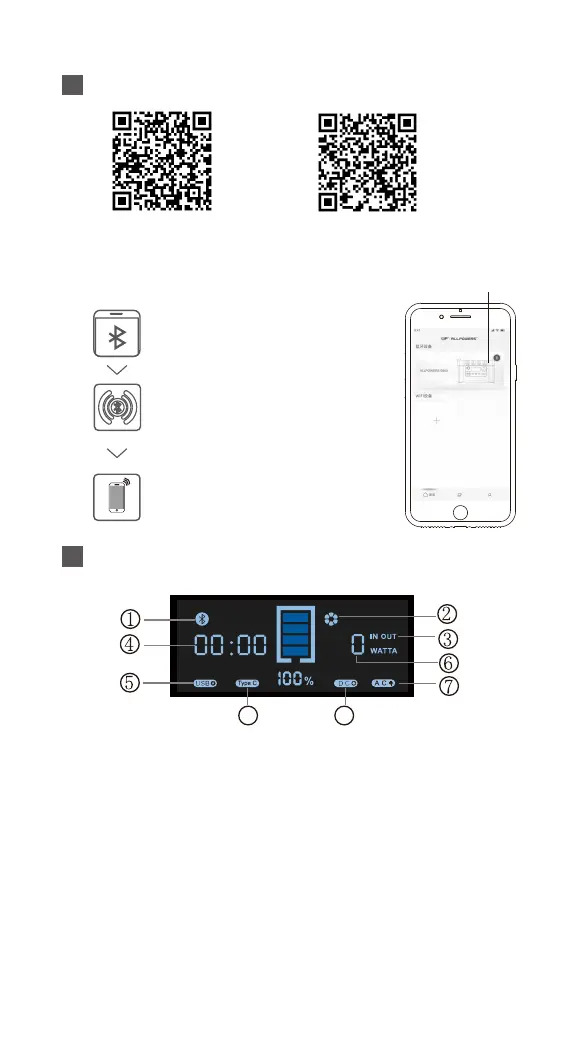
LCD screen interpretation
Android 4.3 or above IOS 9.0 or above
8 9
The first connection requires scanning the code to download the APP.
After a successful Bluetooth connection, a picture of the connected
device will be displayed
① Bluetooth symbol: When using Bluetooth mode, please try to stay away
from other electronic devices as much as possible to avoid interference
with Bluetooth transmission. Compared to indoor environments,
electromagnetic interference is relatively weak in outdoor environments.
② When AC is turned on, the cooling fan will automatically start. When AC
is turned off, the cooling fan will automatically turn off.
③ Input/output flags
④ The remaining charging/discharging time is 23:51 (23 hours and 51
minutes).
⑤ USB output symbol.
⑥ Output/input power.
⑦ AC output symbol.
⑧ USB-C output symbol.
⑨ Car charging port and wireless charging output symbols.
Turn on the Bluetooth function of
the phone and ensure that the
phone positioning is turned on
Long press the DC button to turn on
Bluetooth, and the Bluetooth icon
will be displayed on the screen
Open the APP and select AP S300
V2.0 for pairing on the "Select Your
Device" interface


 To Next Page
 Loading...