I‐Beforeusing
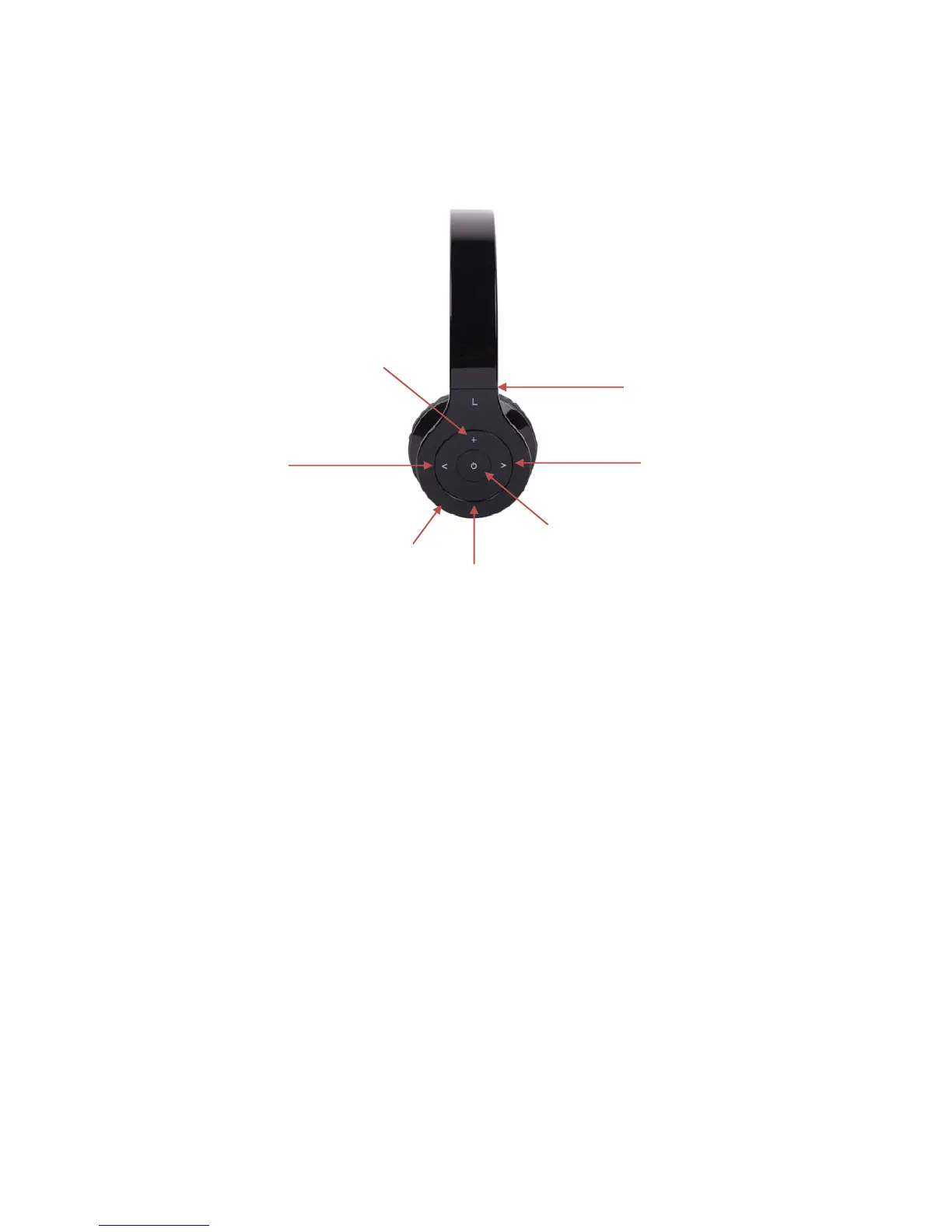
1)Overview
• 1.extensionpanelcanfitdifferentsizeuser.
• 2.>key:nextsong
• 3.<key:lastsong
• 4.LEDIndicatorfordifferentstates
• 5.Multifunctionbutton(MFB):Switchon/offtheheadset,answer,stopcall,voicedial,
rediallastnumber,pauseandplay
• 6/7.+key:volumeup/–key:volumedown
2)Chargingtheheadset
• Firsttimecharging:firsttimechargerbattery,pleasebesurethebatteryhasbeen
chargedfullybeforeuse.
• Nexttime:Whenyouhearwarningtonesof“DUDUDU”outandatthesametimethe
redlightblinkstwotimes.
Itmeansbatteryisalmostrunout,youneedtochargeit.
A.ChargingthebatterywithMicroUSBcable
• Step1:InsertUSBchargingcableintoUSBportwhichhavesupport5Vpower(suchas
AC/DCUSBadapterorPCUSBport)
• Step2:Connectchargingcabletothecharging
portofheadset.
1.
2.
3.
4.
5.
7.
6.



 To Next Page