Schedule Mode
In Manual Mode you will
permanently override the schedule.
Exit Manual Mode by switching
to Schedule or turning off the
thermostat.
Frost protection temperature can be set between 5.0ºC and
9.0ºC. To turn on Frost Mode activate Off Mode or Holiday Mode
via the App.
Frost Mode can also be de-activated or activated on the device,
by pressing the frost button once.
After the Holiday Mode ends, the thermostat will follow the
previous setting (Schedule, Manual or Off .)
RXBC605 App
Features available only on the App:
• Temperature format
• Clock format
• Time zone
• Daylight Saving Time
• Heating or Cooling Mode
• Temperature accuracy
• Display tolerance
• Temperature off set
• Schedule/Manual/Off Mode
• Holiday Mode
• Location Mode
• Delay Start
Download the ALPHA CONNECT
App, create an account and
register your device. Follow
the on screen instructions to
complete all the steps.
Customize your setttings according to
your preferences. Time and date will be
set automatically once connected to the
internet. Set the mode (heat/cool). Heat
Mode is used for controlling a heating boiler.
Cool Mode is used for controlling a cooling
device. In Cool Mode, you can choose
temperature accuracy between ± 0.5 °C and
± 0.25 °C. In Heat Mode, you can select as
well between a lower comfort level (6 on/off
cycles per hour) and a higher comfort level
(9 on/off cycles per hour). Also, in order to
calibrate the temperature, you can off set it
using a ± 3 °C range.
Registration
All 5/2 Individual
Set one
schedule
for the
entire
week
(each day
the same)
Set a
schedule
for the
working
days and
for the
weekend
Set a daily
schedule
(each day
diff erent)
1
4
321
1
3
2
1 2
3
00000000
00000000
00
2
3 4
6 7
5
i
If the internet connection is lost the thermostat will follow
the schedule. If it was in Frost Mode you can disable the
Frost function from the device and continue following
the schedule (see Frost Mode section of the guide).
There are 3 program settings. 1. Schedule (7 days, 5-2 days and 24
hours), 2. Manual and 3. Off .
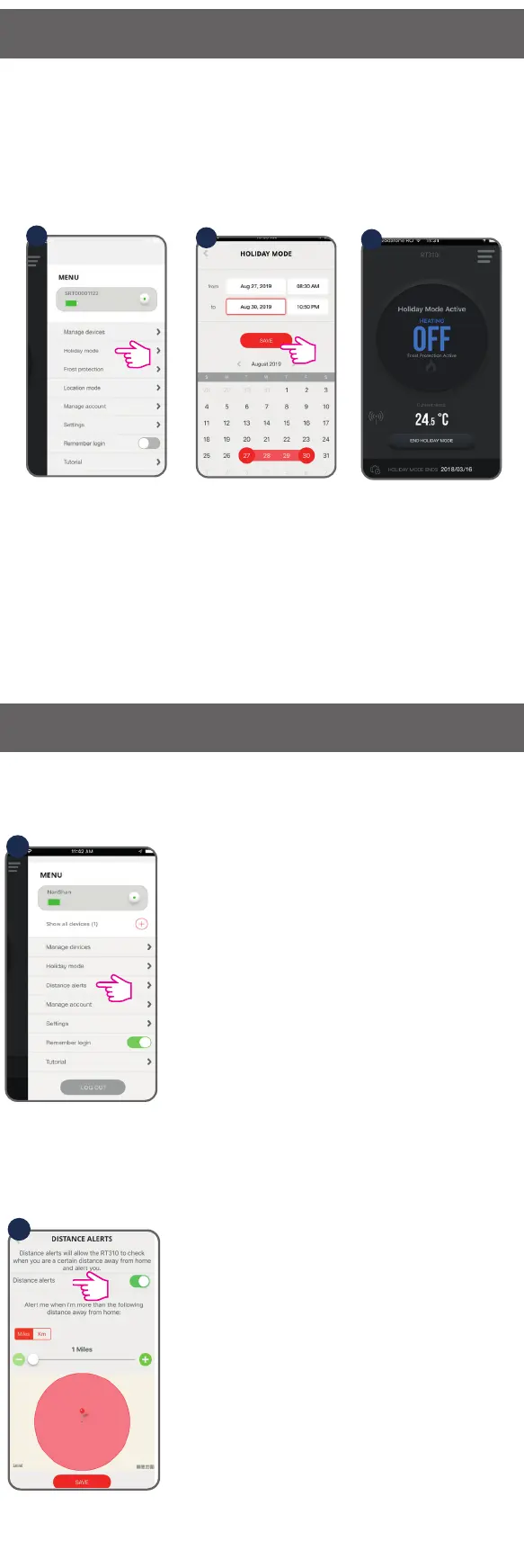
Location Mode is an automated task
designed to change your heating settings
according to the current distance from your
home.
1
If Location Mode is enabled, you can drag
the slider in order to set the distance limit.
Go to “Setting” to manage your settings.
2
Frost Mode
General Operation
Device Settings Via the App
Select the period for this function. Frost Mode temperature will be
activated during this period.
Holiday Mode
Location Mode


 To Next Page
 Loading...