Side View
Remote Installation Notes:
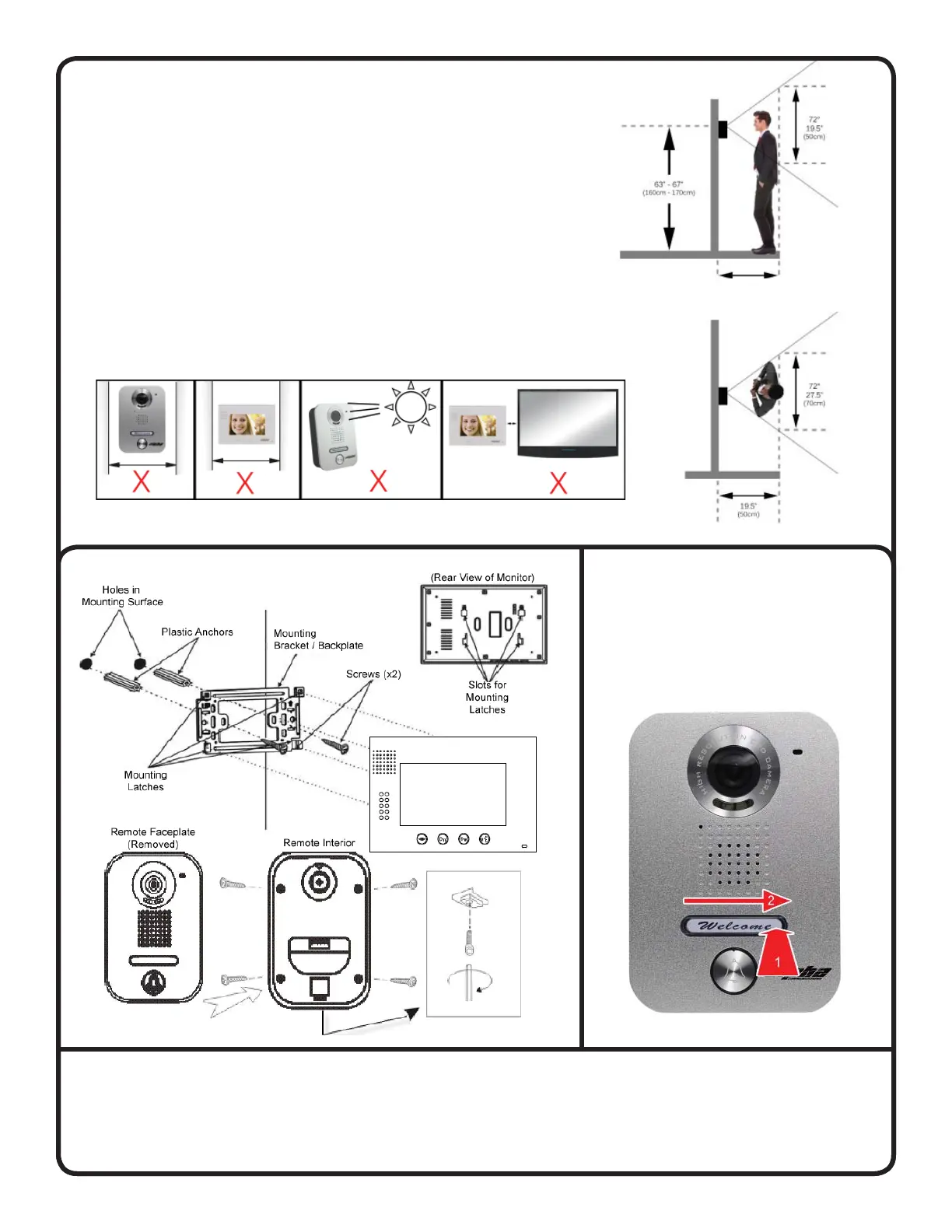
• The proper height of monitor or door camera is between 63”-67”
(160-170cm) from the ground. This may vary on each installation.
View range should be actively tested before complete.
• Viewing window of door camera is about 19.5” (50cm)vertically,
and 27.5” (70cm) horizontally.
• Narrow space may cause feedback echo on monitor voice function.
• Direct sunshine can cause blurry or ghost-like picture on monitor.
• Installing units too close to electrical lines, dimmers, ballasts, or
other electrical devices may cause audio and/or video interference.
Press down on one side of the
plastic nameplate cover and then
slide the plastic cover towards
that side. The opposite side will
pop up allowing you to remove it.
Top View
Mounting Instructions
Removing Remote Nameplate
Secondary Door Chime (Option)
A secondary door chime push button can be connected to a monitor to the terminal located on the back of the
monitor marked CN5. This can be used as a notifi cation that a visitor has reached a second door after being let
through the fi rst door. When the push button is depressed the monitor will chime twice.
Page 4



 To Previous Page
 Loading...