EasyManua.ls Logo

Alpine 7980M - Page 7

Alpine 7980M
94 pages
Print Icon
To Next Page IconTo Next Page
To Previous Page IconTo Previous Page
Loading...
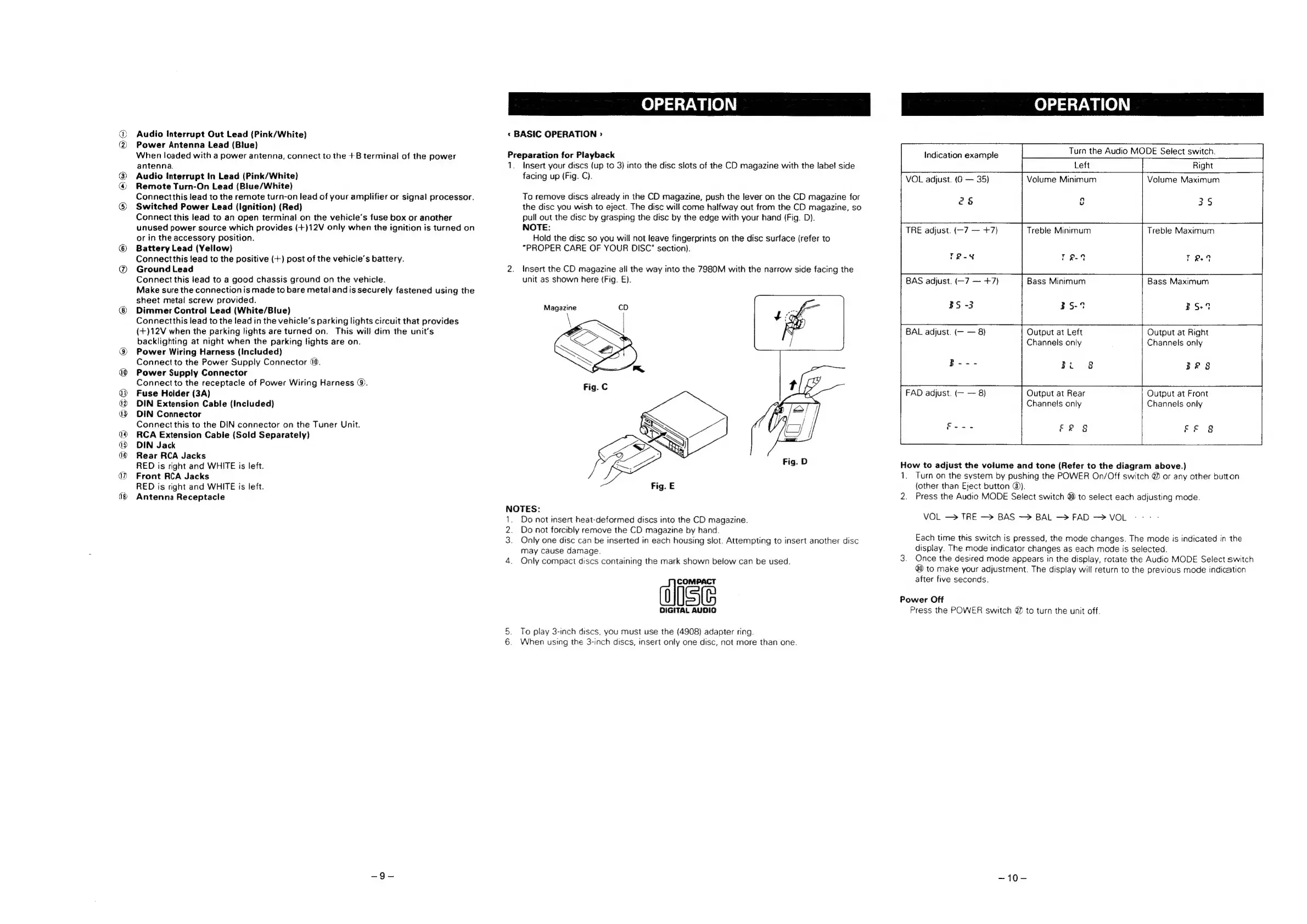
i)
CS)
6
Audio
Interrupt
Out
Lead
(Pink/White)
Power
Antenna
Lead
(Blue}
When
loaded
with
a
power
antenna,
connect
to
the
+B
terminal
of
the
power
antenna.
Audio
Interrupt
In
Lead
(Pink/White)
Remote
Turn-On
Lead
(Blue/White)
Connectthis
lead
to
the
remote
turn-on
lead
of
your
amplifier
or
signal
processor.
Switched
Power
Lead
(Ignition)
(Red)
Connect
this
lead
to
an
open
terminal
on
the
vehicle’s
fuse
box
or
another
unused
power
source
which
provides
(+)12V
only
when
the
ignition
is
turned
on
or
in
the
accessory
position.
Battery
Lead
(Yellow)
Connectthis
lead
to
the
positive
(+)
post
of
the
vehicle’s
battery.
Ground
Lead
Connect
this
lead
to
a
good
chassis
ground
on
the
vehicle.
Make
sure
the
connection
is
made
to
bare
metal
and
is
securely
fastened
using
the
sheet
metal
screw
provided.
Dimmer
Control
Lead
(White/Blue)
Connectthis
lead
to
the
lead
in
the
vehicle’s
parking
lights
circuit
that
provides
(+)12V
when
the
parking
lights
are
turned
on.
This
will
dim
the
unit's
backlighting
at
night
when
the
parking
lights
are
on.
Power
Wiring
Harness
(Included)
Connect
to
the
Power
Supply
Connector
40.
Power
Supply
Connector
Connect
to
the
receptacle
of
Power
Wiring
Harness
@.
Fuse
Holder
(3A)
DIN
Extension
Cable
(Included)
DIN
Connector
Connect
this
to
the
DIN
connector
on
the
Tuner
Unit.
RCA
Extension
Cable
(Sold
Separately)
DIN
Jack
Rear
RCA
Jacks
RED
is
right
and
WHITE
is
left.
Front
RCA
Jacks
RED
is
right
and
WHITE
is
left.
Antenna
Receptacle
OPERATION
«
BASIC
OPERATION
>
Preparation
for
Playback
1.
Insert
your
discs
(up
to
3)
into
the
disc
slots
of
the
CD
magazine
with
the
label
side
facing
up
(Fig.
C).
To
remove
discs
already
in
the
CD
magazine,
push
the
lever
on
the
CD
magazine
for
the
disc
you
wish
to
eject.
The
disc
will
come
halfway
out
from
the
CD
magazine,
so
pull
out
the
disc
by
grasping
the
disc
by
the
edge
with
your
hand
(Fig.
D).
NOTE:
Hold
the
disc
so
you
will
not
leave
fingerprints
on
the
disc
surface
(refer
to
“PROPER
CARE
OF
YOUR
DISC"
section).
2.
Insert
the
CD
magazine
ail
the
way
into
the
7980M
with
the
narrow
side
facing
the
unit
as
shown
here
(Fig.
&).
Magazine
Fig.
E
NOTES:
1.
Do
not
insert
heat-deformed
discs
into
the
CD
magazine.
2.
Do
not
forcibly
remove
the
CD
magazine
by
hand.
3.
Only
one
disc
can
be
inserted
in
each
housing
slot.
Attempting
to
insert
another
disc
may
cause
damage.
4.
Only
compact
discs
containing
the
mark
shown
below
can
be
used.
Ist,
DIGITAL
AUDIO
5.
To
play
3-inch
discs,
you
must
use
the
(4908)
adapter
ring.
6.
When
using
the
3-inch
discs,
insert
only
one
disc,
not
more
than
one.
OPERATION
Turn
the
Audio
MODE
Select
switch.
Right
Volume
Maximum
Indication
example
VOL
adjust.
(G
35)
Volume
Minimum
2
&
c
3$
TRE
adjust.
(-7
+7)
Treble
Minimum
Treble
Maximum
Bass
Minimum
Bass
Maximum
BAS
adjust.
(—7
+7)
£S
-3
39-4
BS
BAL
adjust.
(—
8)
Output
at
Left
Output
at
Right
Channels
only
Channels
only
alae
Bes
FAD
adjust.
(—
8}
Output
at
Rear
Output
at
Front
Channels
only
Channels
only
Peale
Fe
8
FF
g
How
to
adjust
the
volume
and
tone
(Refer
to
the
diagram
above.)
1.
Turn
on
the
system
by
pushing
the
POWER
On/Off
switch
@
or
any
other
button
(other
than
Eject
button
@).
2.
Press
the
Audio
MODE
Select
switch
@
to
select
each
adjusting
mode.
VOL
—>
TRE
—>
BAS
—>
BAL
—>
FAD
—>
VOL
Each
time
this
switch
is
pressed,
the
mode
changes.
The
mode
is
indicated
in
the
display.
The
mode
indicator
changes
as
each
mode
is
selected.
3.
Once
the
desired
mode
appears
in
the
display,
rotate
the
Audio
MODE
Select
switch
80
to
make
your
adjustment.
The
display
will
return
to
the
previous
mode
indication
after
five
seconds.
Power
Off
Press
the
POWER
switch
@
to
turn
the
unit
off.
~10—

Related product manuals