EasyManua.ls Logo

Alpine 7980M - Page 90

Alpine 7980M
94 pages
Print Icon
To Next Page IconTo Next Page
To Previous Page IconTo Previous Page
Loading...
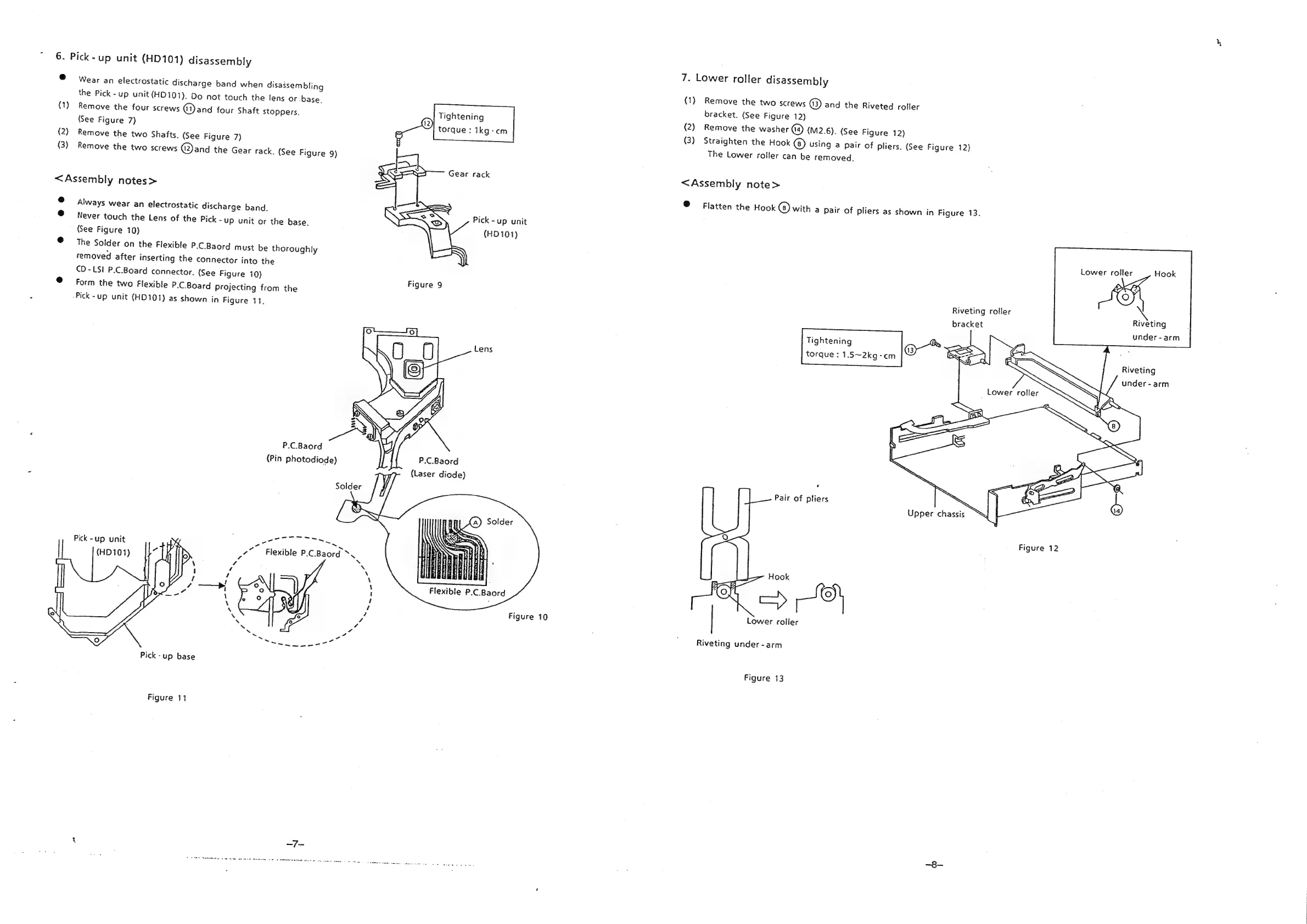
6.
Pick-up
unit
(HD101)
disassembly
7.
Lower
roller
disassembly
e
Wear
an
electrostatic
discharge
band
when
disassembling
(1)
the
Pick
-up
unit
(HD101).
Do
not
touch
the
lens
or
base.
(1)
Remove
the
four
screws
@)and
four
Shaft
stoppers.
(See
Figure
7)
(2)
Remove
the
two
Shafts.
(See
Figure
7)
(3)
Remove
the
two
screws
@and
the
Gear
rack.
(See
Figure
9)
Remove
the
two
screws
@)
and
the
Riveted
roller
bracket.
(See
Figure
12)
Tightening
(2)
Remove
the
washer
(4)
(M2.6).
(See
Figure
12)
torque:
1kg-cm
(3)
Straighten
the
Hook
()
using
a
pair
of
pliers.
(See
Figure
12)
The
Lower
roller
can
be
removed.
<Assembly
note>
<Assembly
notes>
®
Flatten
the
Hook
@)
with
a
pair
of
pliers
as
shown
in
Figure
13.
e
4s
age
Always
wear
an
electrostatic
discharge
band.
Pick-up
unit
@
Never
touch
the
Lens
of
the
Pick-up
unit
or
the
base.
(HD
101)
(See
Figure
10)
@
=
The
Solder
on
the
Flexible
P.C.Baord
must
be
thoroughly
roller
Hook
removed
after
inserting
the
connector
into
the
CAD)
CD
-
LS!
P.C.Board
connector.
(See
Figure
10)
Figute:9
(9)
@
form
the
two
Flexible
P.C.Board
Projecting
from
the
Riveting
roller
aie
“Pick-up
unit
(HD101)
as
shown
in
Figure
11.
bracket
veting
under-arm
Tightening
Cl
"5s
fess
torque
:
1.5~2kg-cm
a
ay
Riveting
under
-
arm
Lower
roller
:
Was
SS
(4)
SS
P.C.Baord
(Pin
photodiode)
P.C.Baord
(Laser
diode)
Pair
of
pliers
Solder
Figure
12
Pick
-up
unit
3
Hook
sa
iol
Flexible
P.C.Baord
=>
Figure
10
|
Lower
roller
Riveting
under
-arm
Pick-up
base
Figure
13
Figure
11
1
—7-

Related product manuals