29-EN
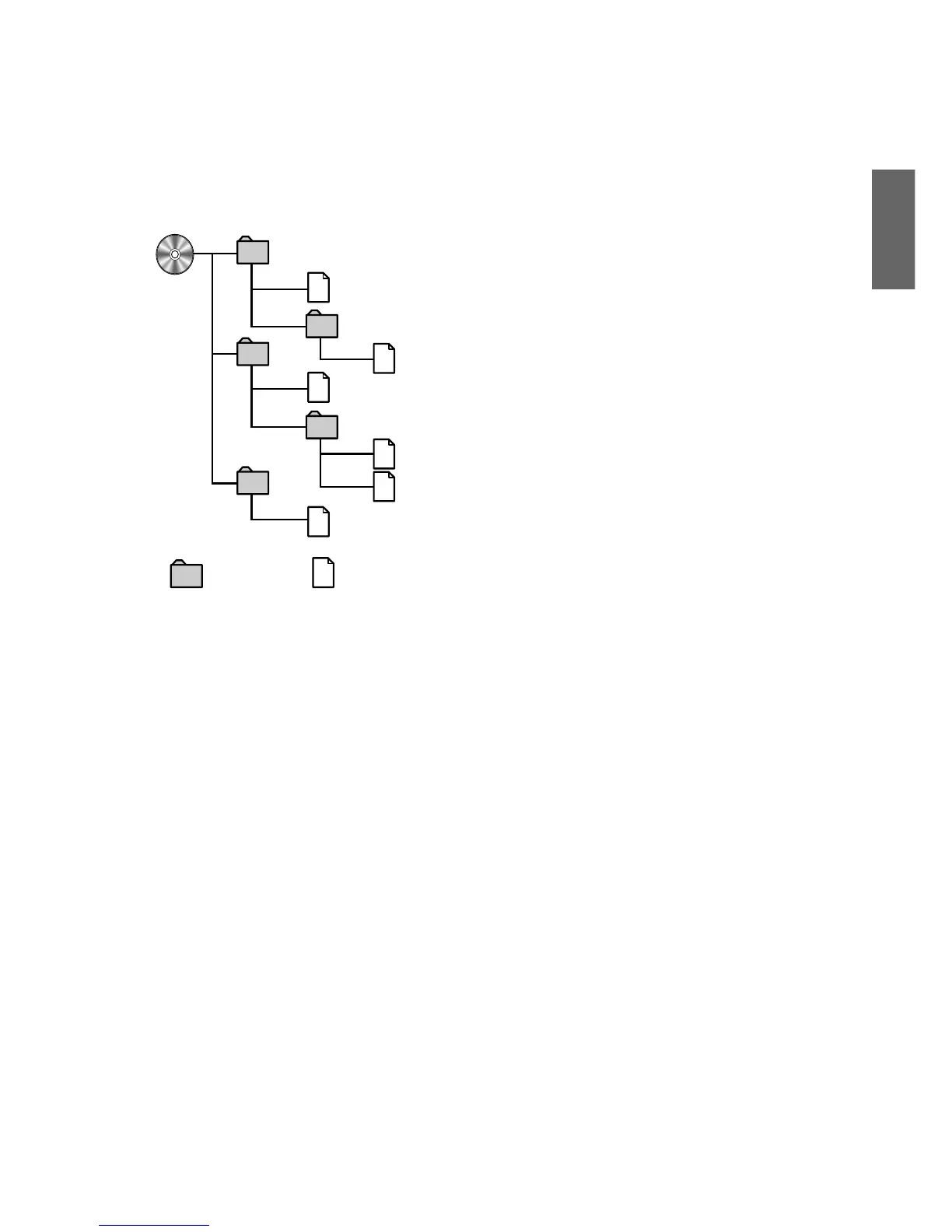
• Order of tracks
The unit plays the files in the order that the writing
software writes them. Therefore, the playing order may
not be the same as the order you input. The playback
order of the folders and files is as follows. However, the
folder and file playback order differs from the folder no.
and file no. indicated on the display.
Folder MP3/WMA File
Terminology
Bit rate
This is the “sound” compression rate specified for
encoding. The higher the bit rate, the higher the sound
quality, but also the larger the files.
Sampling rate
This value shows how many times per second the data
is sampled (recorded). For example, music CDs use a
sampling rate of 44.1 kHz, so the sound level is
sampled (recorded) 44,100 times per second. The
higher the sampling rate, the higher the sound quality,
but also the larger the volume of data.
Encoding
Converting music CDs, WAVE (AIFF) files, and other
sound files into the specified audio compression
format.
Tag
Song information such as track titles, artist names,
album names, etc., written into MP3/WMA files.
• MP3: ID3 tag
• WMA: WMA tag
1
2
3
5
4
1
2
3
4
6
5



 To Next Page