Owner's
manual
Apple
CarPlay
(Optional)
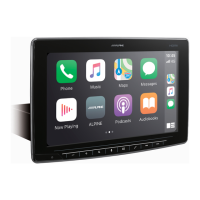
Apple CarPlay Operation (Optional)
Apple CarPlay
is
a smarter, safer way
to
use
your
iPhone in
the
car.
Apple CarPlay takes
the
things
you
want
to
do
with
your iPhone
while
driving and puts
them
right
on
this unit.
You
can
get
directions, make calls, send and
receive messages, and listen
to
music, all in a way
that
allows you
to
stay focused
on
the
road.
1 Press
the
BBB
(HOME) button.
The
HOME
screen
is
displayed.
2 Touch [Apple CarPlay].
The
Apple
CarPlay
screen
is
displayed.
• Refer
to
"Apple Car Play" in the
Owners
Ma
n
ual
for
information
on
how
to operate
App
le Car Play.
-
Owner's
manual
Android
Auto™
(Optional)
Android Auto™ (Optional)
Android
Auto
brings your favorite smartphone apps
into
one
place, making
it
easier for drivers
to
access
their
favorite navigation, media, and
communication
apps
on
the
road
while
minimizing
the
distractions. Talk
to
Google
on
Android Auto™ and
get
things
done
with
your
voice
so
you can keep
your
eyes
on
the
road and hands
on
the
wheel. Easily send messages,
get
directions, control media and more. Just short-press
or
long-press
the
voice
control
button
on
your
steering wheel.
1
Press
the
BBB
(HOME)
button.
The
HOME
screen
is
displayed.
2 Touch [Android Auto].
The Android Auto
screen
is
displayed.
• Refer to "Android Auto" in the
Owners
Manua
l
for
information on h
ow
to
operate
Android
Auto.
• See reference content below.
1.
Bring
your
vehicle to a complete stop at a safe location.
2.
Engage the parking brake.
3.
Release the parking brake. (For safety, release the parking brake while depressing the
foot
brake pedal).
4.
Engage the parking brake again. For automatic transmission vehicles, place the transmission lever in the Park position.
5. Connect
your
phone
using the USB cable.
6.
Follow the
prompt
on
the phone to install
Android
Auto.
Android
Auto
is included in
Android
10
and
higher.
7. Pair the phone
to
the
unit
via Bluetooth.
8.
You
may
be prompted to download or update apps.
9. Select
Android
Auto
on the radio
home
screen
and
follow the instructions.
8
-EN










 To Next Page