ALPINE X800D-U QRG 68-24567Z45-A (EN)
12-EN
Owner’s manual BLUETOOTH Setting, BLUETOOTH Operation
Hands-Free Phone Control
Hands-free calls are possible when using an HFP (Hands-Free Profile) compatible mobile phone with the
X800D-U/INE-W987D.
How to connect to a BLUETOOTH
compatible device (Pairing)
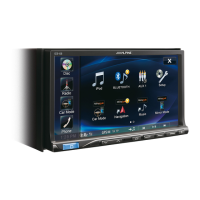
1 Touch [Setup] icon of Top banner.
[SETUP] icon
2 Touch [ ] (BLUETOOTH).
3 Touch [BLUETOOTH].
4 Touch [o] or [p] of “BLUETOOTH” to set to
“On”.
5 Touch [ ].
6 Touch [Set BLUETOOTH Device].
7 Touch [Search] of “No Device”.
The Device list displays up to 10 items.
8 Touch [Audio] or [Hands-free] of the device
you want to connect from the list.
Audio: Sets for use as an Audio device.
Hands-free: Sets for use as a Hands Free Device.
9 When the device registration is complete, a
message appears and the device returns to
normal mode.
The BLUETOOTH registration process differs depending
on the device version and SSP (Simple Secure Pairing). If
a 4 or 6 character Passcode appears on this device, enter
the Passcode using the BLUETOOTH compatible device.
If a 6 character Passkey appears on this device, make
sure the same passkey is displayed on the BLUETOOTH
compatible device and touch “Yes”.
Answering a Call
1 An incoming call triggers the ringtone and
an incoming call display.
2 Touch [ ] or press (PHONE) button.
The call starts.
Hanging up the Telephone
1 Touch [ ].
The call finishes.
•
Mirr
MirrorLin
smartpho
Using Mi
applicati
o
When
Car Mo
is disco
1 Pre
The
2 To
The
3 Pre
The
4 To
The Me
Operab
HDM
The devic
audio and
cannot o
1 Pre
2 To
W
3 In
mi
Not all
•
•
•
•


 To Next Page
 Loading...