26
5.4.3 Misc. Setup submenu
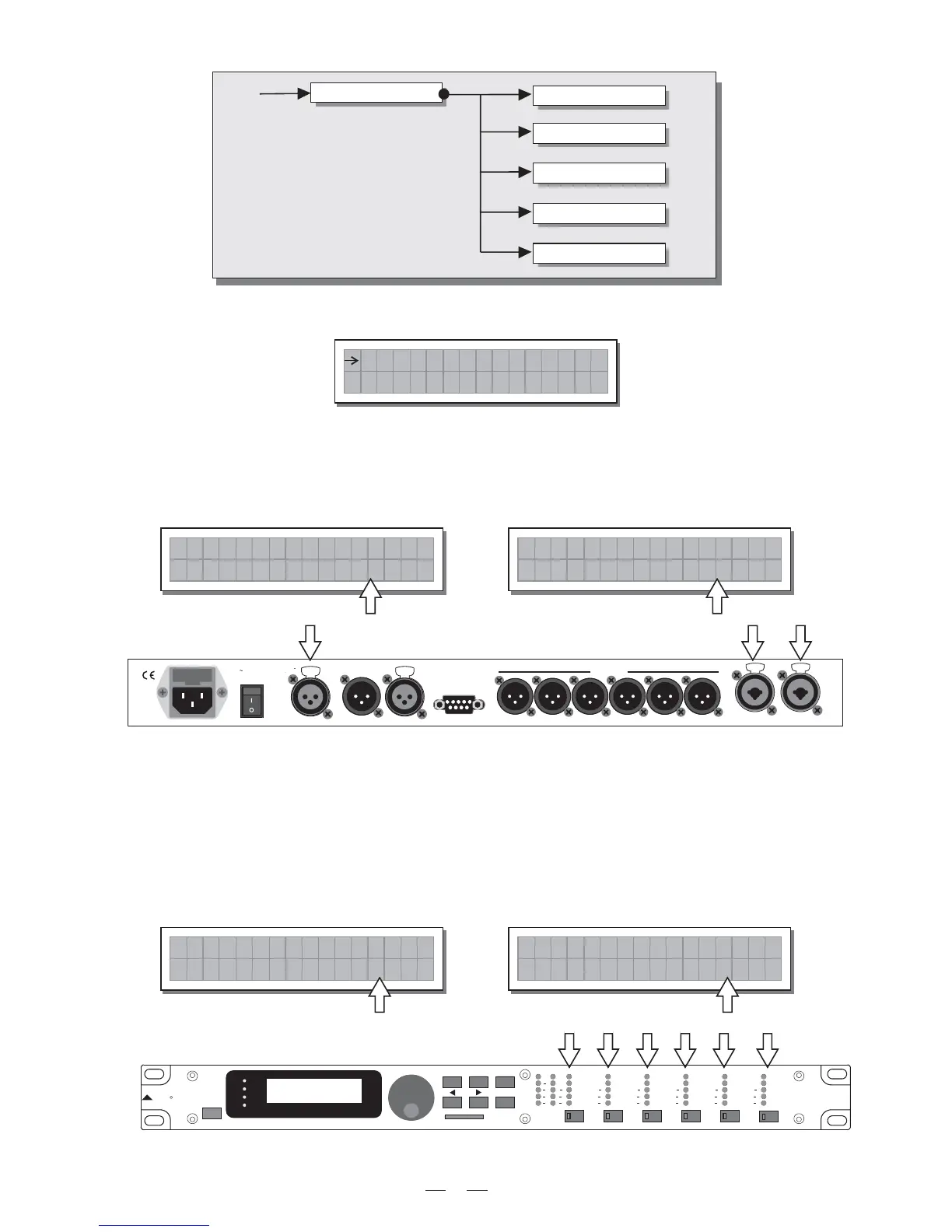
Use this submenu to set a series of system options.
a. Input Select
Used to choose which MAXIDRIVE3.4 should use.inputs
The options include:
The inputs selected become and .
Any signal on the inputs not selected is ignored.
Input A Input B
b. Output Meters
Used to decide whether to display the outputs signal before or after MUTE.
The options include:
Input Select
Output Meters
Misc. Setup
Temperature
Wake Up
LCD Contrast
Mi sc . Se tup
Input Sele
c
t
An a l o
g
PreMute
the signal is always shown
no matter what the MUTE status
utput Mete
r
s
PreM t
e
O
u
PostMute
the signal is only shown if
the output isn't in MUTE
utput Mete
r
s
ostM t
e
O
uP
PUSH
21
3
NEW TIDE
PUSH
21
3
NEW TIDE
Apparaten skall anslutas till
jordat uttag nar den ansluts
till ett natverk
PWR
OFF
ON
AC INPUT 14W
95-240V 50/60Hz
FUSE: 95-120V T500mAL
210-240V T315mAL
DIGITAL IN
RS485 OUT RS485 IN RS232
INPUT AINPUT B
4
3
21
OUTPUTS
56
A102
3-WAY STEREO
DIGITAL CROSSOVER
MAXIDRIVE3.4
ENTER
R
LTO
PREV NEXT
ESC
MODE
CLIP
6
12
18
24
AB
INPUT LEVEL
MUTE
CLIP
6
12
24
LIMIT
OUTPUT
2
LEVEL
CLIP
6
12
24
LIMIT
CLIP
6
12
24
LIMIT
CLIP
6
12
24
LIMIT
CLIP
6
12
24
LIMIT
CLIP
6
12
24
LIMIT
OUTPUT
1
LEVEL
OUTPUT
3
LEVEL
OUTPUT
4
LEVEL
OUTPUT
5
LEVEL
OUTPUT
6
LEVEL
MUTE MUTE MUTE MUTE
MUTE
EDIT
UTILITY
DELAY
PRESET
CARD
Input Sele
c
t
igi ta
l
D
PUSH
1
3
2
NEW TIDE
PUSH
1
3
2
NEW TIDE
Digital Inputs Analog Inputs


 To Next Page