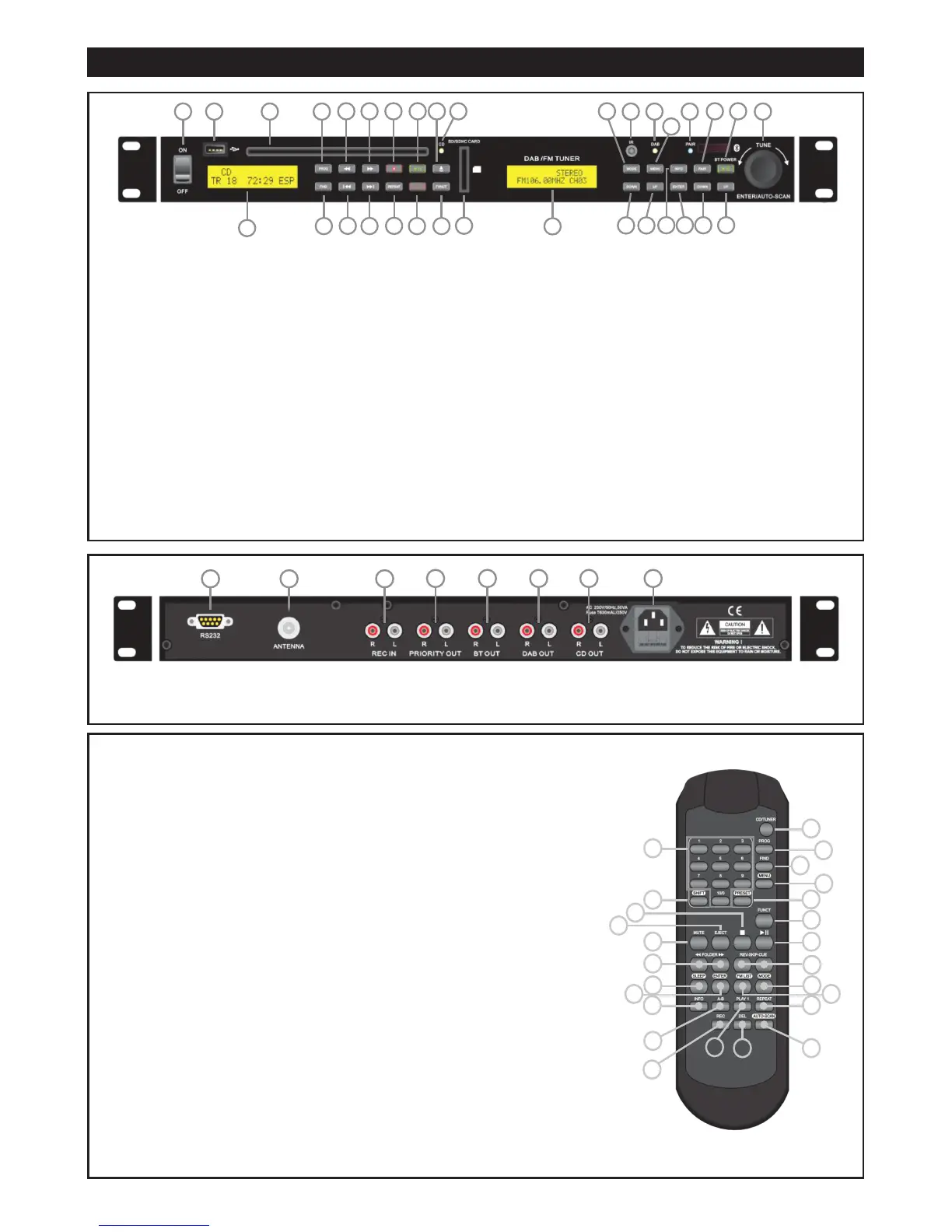
Figure 3. REMOTE CONTROL
1. CD/TUNER – Switch between CD and Tuner
sections operation.
2. 1 - 10 Station preset keys (when in Tuner
mode). Numerical 0 - 9 Track selection keys
(when in CD/USB/Card mode). To play a
selected track, press Play / Pause button.
3. Prog - Program button for playlist creation and
storage
4. Find – Used in MP3 playback modes. Search
alphabetically for tracks or for folder number.
5. Menu – Offers more control options for tuner,
setting parameters
6. SHIFT – Press to access highlighted functions.
7. PRESET – Press to recall or store stations in the
memory.
8. FUNCT – Function command (see above).
9. MUTE – Suspend or recover audio output
during playback (all modes).
10. Eject
11. Stop.
A
12 Play / Pause.Pn.
13. QQ FOLDER PP - Skip to the next folder or
previous folder
14. SKIP (REV / CUE) – Also used to navigate menu
options. Hold for Review and Fast Forward.
15. SLEEP – Press to set the time until the unit
ceases playback and enters sleep state.
16. Enter – Selection button
17. FM LIST – FM Station Scan List.
18. Mode - Switches between DAB+ and FM radio
receivers
19. Info – Changed between RDS (FM) and DLNS
(DAB+) data i.e. time, track, album, etc. See
Tuner section for more details.
20. A-B – Press to mark beginning and end of
playback segment in any media (CD/USB/Card
mode only). “A-B” appears on the LCD when
active.
21. PLAY 1 – Play one selected track once and then
stop. “1 >>” will appear on screen. Cancels
REPEAT modes if active
22. REPEAT (CD/USB/CARD mode only) – See
description below, which will appear on screen.
23. REC – In AUX mode, press this button to start
encoding
24. DEL – Press to DELETE items stored in USB /
SD Card.
25. AUTOSCAN – Scanning and storing new
stations and frequencies in FM and DAB+
modes.
REDBACK® DAB+/
FM Tuner & CD/MP3 Disc Player
Page 2
Figure 2. REAR PANEL
1. RS232
2. FM antenna connection
3.REC IN (RCA)
4. PRIORITY OUT (RCA)
5. BT OUT (RCA)
6. DAB OUT (RCA)
7. CD OUT (RCA)
8. 240V AC input
Figure 1. FRONT PANEL
Media Player Section
1. Power switch
2. USB socket input
3. CD player slot
4. CD/Audio Player LCD readout
5. Prog - Program button for playlist creation and
storage
6. Rev QQ - Skips to the previous track. Press and
hold for review.
7. Cue PP - Skips to the next track. Press and
hold for fast forward.
8. Stop A
9. Play/Pause Pn
10. Eject R
11. CD on indicator LED
12. SD/MMC card socket input
13. Funct - Switches mode from CD to USB to Card
and back to CD function
14. Rec/Del – Activates the Record or Delete
functions
15. Repeat – Press to repeat a track or an album or
Programmed playlist
16. PPF - Skip to the next folder
17. FQQ - Skip to the previous folder
18. Find – Used in MP3 playback modes. Search
alphabetically for tracks or for folder number.
FRONT PANEL – Receiver Section
(DAB+ / FM Tuner and Bluetooth)
19. Tuner LCD readout
20. IR Receiver window
21. DAB+ tuned mode LED
22. Pair – Bluetooth indicator LED
23. Tune / Enter / Autoscan – Jogwheel knob for
tuning radio and entering a selection or starting
station or frequency scan function
24. Mode - Switches between DAB+ and FM radio
receivers
25. Menu – Offers more control options for tuner,
setting parameters
26. Info – Changed between RDS (FM) and DLNS
(DAB+) data i.e. time, track, album, etc. See
Tuner section for more details.
27. Pair – Initiate a pairing or synching action for
Bluetooth
28. Pn / BT Power – Play/Pause and power
on/off for BT mode
29. Down - Skip back a track with each press in BT
Mode
30. Up - Skip forward a track with each press in BT
Mode
31. Enter – Selection button
32. Down – Change frequency, search frequencies,
move through menus
33. Up - Change frequency, search frequencies,
move through menus.


 To Next Page
 Loading...