20 21
4 Using the Nanoface Using the Nanoface 4
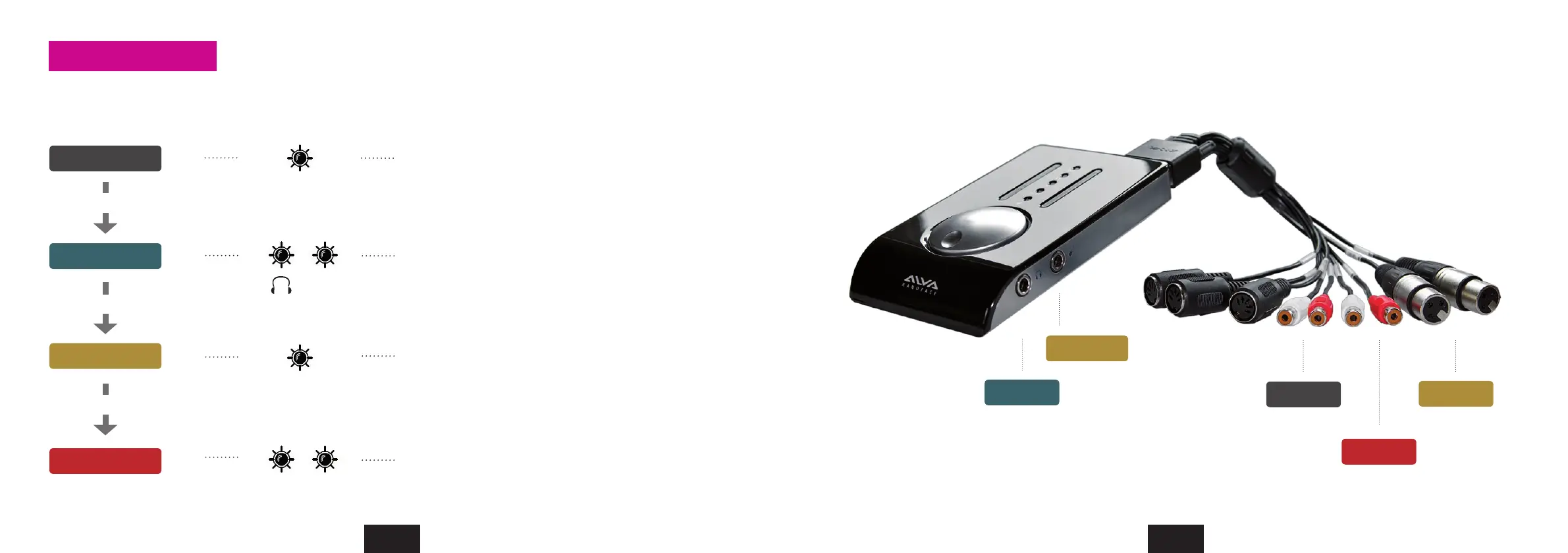
Gain control for inputs and outputs
Press the encoder to switch between the input/output modes. Turn encoder to the right to increase and turn to the left to decrease the gain.
Output 1/2
Output 3/4
Input 1/2
Input 3/4
Out
In
In
3/4
3/4
Press Encoder
Press Encoder
Press Encoder
The encoder controls the analog outputs 1/2 (RCA
connectors) on the breakout cable.
The encoder controls the analog inputs 3/4 (RCA
connectors) on the breakout cable.
The encoder controls the Phones/Line output 3/4 (1/4”
connector on right side).
The encoder controls the preamps before the analog inputs
1/2 (XLR connectors) on the breakout cable.
Gain on channel 1: press/hold encoder and turn it one step
to the left. Switch back to 1+2: press/hold turn right.
Gain on channel 2: press/hold encoder and turn it one step
to the right. Switch back to 1+2: press/hold turn left.
Mode LEDs on
Output 1/2
Output 3/4
Input 1/2
Input 2 (Hi-Z)
Input 3/4
Analog inputs and outputs on the Nanoface
Encoder operations


 To Next Page