SET-UP
1. Install the included Li-poly battery into the truck.
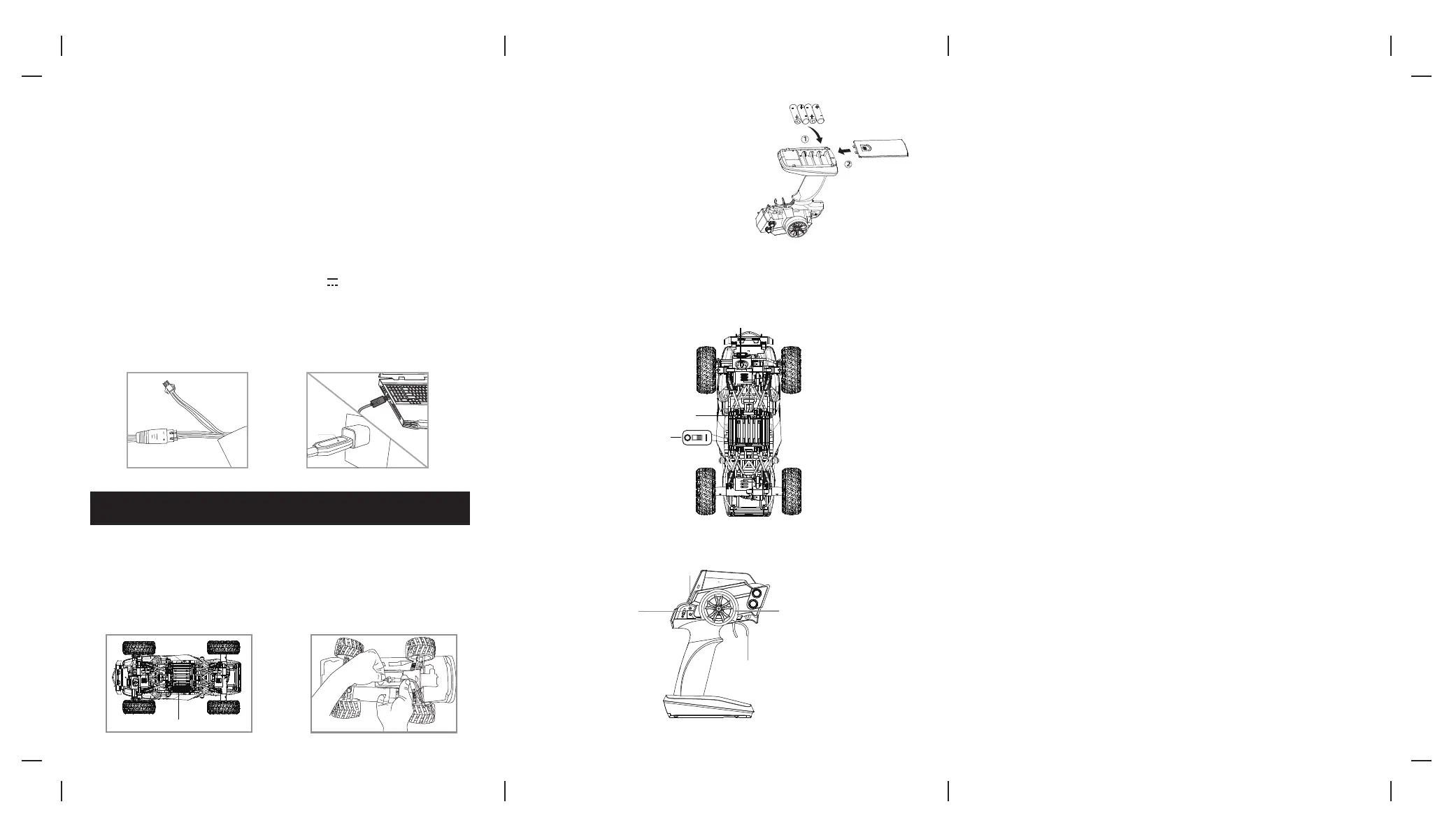
a) Remove the battery compartment cover on the bottom side of the truck (see diagram C).
b) Connect the rechargeable Li-poly battery cord directly to the ROCK FORCE™s power cord socket, make sure the
connection is secure. The Li-poly battery connecting plug and the ROCK FORCE™s socket fit in only one direction
never force a connection ( See diagram D).
c) Carefully replace the battery compartment.
2. Install batteries into the remote control.
Open the battery cover on the bottom of the remote
control (see diagram E). Insert 4 AA batteries (not
included) into the battery compartment, matching
polarity (+ and -) marked inside. Replace the battery
cover.
CHARGING THE BATTERY
1. Insert the white, 3-wire battery charging plug into the USB charger's socket. The charging plug and
the USB charger's socket fit only one way. Dot not force them (see illustration A).
2. Connect the USB end of the cable to your computers USB port or a USB wall charger (see diagram B),
The Red CHARGE indicator light turns stay to show that charging is in progress.
3. Average charging time is approximately 2.5 hours( via 5.0V 2A USB wall charger). The truck
operates for approximately 40 minutes on full charge.
4. The red charging indicator turns off when the battery is fully charged.
Note: Periodically examine the charger for external damage. External damage to the charger may result
in the risk of fire, electric shock, or injury to persons. Never use a damaged adapter.
OPERATION
THIS IS A HIGH-SPEED OUTDOOR RC TRUCK. DO NOT PLAY INSIDE YOUR HOME OR OTHER SMALL ENCLOSED AREAS.
1. Turn your truck on:
• Pick up your truck and turn it over to make sure the battery is properly installed and the battery
compartment door is properly closed and locked.
• Sync your truck and remote control and set the truck on the ground.
2. Driving your truck:
• Pull the throttle to drive forward.
• Push the throttle forward to make truck move in reverse.
• Turn the steering control to the counterclockwise to turn the truck left. Turn steering to the clockwise to
turn the truck right.
• To break or quickly stop simply pull or push the throttle in the opposite direction and release the throttle.
Batteries Not Included (4xAA)
PACKAGE CONTENTS
• ROCK FORCE™
Radio Controlled High Speed Vehicle
• Remote Control
• USB Charger
• 7.4V Li-poly Battery Pack
BA
C
D
E
TRUCK DIAGRAM (Bottom View)
REMOTE DIAGRAM
Your
ROCK FORCE™
features an automatic 2.4G channel selection system that allows up to 8 people to
race side by side in the same wireless range.
For One Player:
1. Before starting, make sure that the power on both your remote control and truck are in the OFF
position. Make sure that there are no other 2.4G devices in the area.
2. Turn ON the truck and set it down on a flat surface.
3. Turn ON the remote control. When the remote control's power indicator flashes, pull the throttle all
the way down and the power indicator lights continuously. This indicates that your truck and
remote control have successfully synced. If pairing fails, repeat steps 1-3.
For Multiple Players:
1. Before starting, make sure that the power on all trucks and controllers are in the OFF position.
Make sure that there are no other 2.4G devices in the area.
2. Each person will have to sync a truck individually at a different time to avoid interference.
Follow steps 1 to 3 above, making sure to keep away from other people while also making sure that
no one else is syncing at the same time.
3. After syncing, leave the truck ON until all players have synced their trucks.
4. If there is interference, all players must turn off their controllers and trucks and restart the syncing
process.
SYNCING YOUR ROCK FORCE™
Steering Wheel Trim
ON/OFF Switch
Battery Compartment
Steering
Throttle
ON/ OFF Switch
Power Indicator
Battery Compartment
Red
Charging
Light
IMPORTANT: ALWAYS DISCONNECT CHARGER CORD AFTER CHARGING. NEVER LEAVE CHARGER CONNECTED TO
BATTERY OVERNIGHT OR FOR EXTENDED PERIODS OF TIME.
Rock Force™ is the registered trademark of Amax Group USA, LLC.
AMAX Group USA Address: 12645 Memorial Dr Suite F1 #388 Houston, TX 77024
© 2021 All Rights Reserved. visit us at www.amaxbrands.com


 To Previous Page
 Loading...