Need help?
Do you have a question about the Amazon Echo Buds and is the answer not in the manual?
Install the Alexa app for full Echo Buds functionality and setup.
Open the case and wait for the LED to pulse blue for pairing.
Complete setup in the Alexa app for latest software updates.
Step-by-step guide to pairing your Echo Buds with other devices via Bluetooth.
The Amazon Echo Buds are a pair of wireless earbuds designed for audio playback, communication, and interaction with Amazon's Alexa voice assistant. These earbuds are engineered to provide a personalized and secure fit, offering various features to enhance the user's audio experience and daily interactions.
The primary function of the Amazon Echo Buds is to deliver high-quality audio for music, podcasts, and calls. They integrate seamlessly with the Amazon Alexa app, which is essential for activating their full functionality and receiving software updates. Once activated, users can leverage Alexa for a wide range of tasks, from playing music and getting information to controlling smart home devices, all through voice commands. The earbuds feature active noise cancellation (ANC) to minimize ambient distractions, allowing users to immerse themselves in their audio. Additionally, a Passthrough mode is available, which allows ambient sounds to be heard, keeping users aware of their surroundings when needed. This dual functionality makes the Echo Buds versatile for various environments, whether commuting, working out, or relaxing at home.
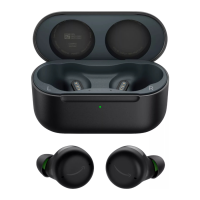
The Echo Buds also serve as a communication tool, enabling hands-free calls. They are equipped with microphones that capture the user's voice clearly, and the tap controls allow for easy answering or ending of calls. For users who prefer other voice assistants, the Echo Buds can be configured to activate Siri or Google Assistant, expanding their compatibility and utility. The charging case plays a crucial role in the overall functionality, not only protecting the earbuds but also providing on-the-go charging, ensuring that the earbuds are always ready for use. The case also features an LED indicator that displays the earbud charge level when closed, offering a quick visual check of battery status.
Getting started with the Echo Buds involves a straightforward activation process. Users first need to install the latest Amazon Alexa app and open the charging case. The case LED will pulse blue, indicating that the earbuds are in pairing mode. Following the on-screen instructions in the Alexa app completes the setup, ensuring access to all features and future software updates. The earbuds are designed for a personalized fit, which is crucial for both comfort and optimal audio quality. Users are guided to identify the left and right earbuds by "L" and "R" indicators on their inner surface. The earbuds should be oriented so the "smile" logo is right-side up before being placed in the ear and rotated slightly for a snug and secure fit. An ear tip fit test is available in the Alexa app to help users achieve the best possible fit.
To further personalize the fit, the Echo Buds come with various ear tips and optional wing tips. For the best audio quality, the ear tip should feel snug yet comfortable. Users can choose from different sizes (S, M, L, XL), with size medium preinstalled. The wing tips are particularly useful for securing the earbuds during exercise. When installing wing tips, users are advised to hold them by the wing and gently pull them over the earbud to avoid tearing, ensuring not to cover the IR sensor.
Control of the Echo Buds is intuitive, primarily through tap controls located at the center of either earbud. These controls can be customized in the Alexa app to perform various actions. A single tap, double tap, triple tap, or long hold can be assigned to functions such as play/pause, next track, active noise cancellation, Passthrough mode, answer/end call, or activating Siri/Google Assistant. This customization allows users to tailor the controls to their preferences and most frequent actions.
Voice interaction with Alexa is a core usage feature. Users can simply say "Alexa" followed by a question or command to engage with the voice assistant. The Echo Buds are designed with privacy in mind; Alexa only begins listening when the wake word ("Alexa") is detected, and an audible tone confirms when audio is being sent to Amazon's secure cloud. Users have control over their privacy settings, including the ability to mute microphones via the Alexa app or a custom tap control. Removing an earbud from the ear also disables Alexa access for that earbud. Furthermore, users can view and delete their voice recordings in the Alexa app, providing transparency and control over their voice history.
Connecting the Echo Buds to other devices is also a simple process. After opening the charging case and pressing the case button for 3 seconds, the front LED will pulse blue, indicating discoverability. Users then place the earbuds in their ears and complete the pairing on their device. It's important to note that pairing and activating the Echo Buds through the Alexa app is a prerequisite for pairing with other devices.
Maintaining the Amazon Echo Buds primarily involves managing their battery life and ensuring cleanliness. The charging case is central to battery maintenance. When the earbuds are placed in the case, they begin to charge. The case itself can be charged via a USB-C port located on its back. The battery LEDs on the earbuds and the case provide clear indicators of the charge level. For earbuds, a green light signifies more than 40% charge, yellow indicates less than 40%, and red means battery low. Similarly, for the case, a green light indicates more than 1 full charge, yellow less than 1 full charge, and red signifies a low battery. When the case is closed, its LED displays the earbud charge level, offering a convenient way to check battery status without opening the case.
A crucial maintenance tip highlighted in the manual is to always wipe off any sweat or moisture from the Echo Buds before charging. This prevents potential damage to the charging contacts and internal components, ensuring the longevity and proper functioning of the earbuds. Regular cleaning of the earbuds and the charging case, especially the charging pads and ear tips, is also recommended to maintain hygiene and optimal performance. While not explicitly detailed as a maintenance feature, the provision of different ear tip sizes and the option for wing tips can be seen as contributing to maintenance by allowing users to replace worn or lost components, thereby extending the usable life of the earbuds and ensuring a consistent fit.
The Alexa app also serves as a hub for troubleshooting and support. Users are encouraged to go to "Help & Feedback" within the app for more information and assistance. This integrated support system allows users to address common issues and access resources directly, contributing to the overall ease of maintenance and user experience. Amazon also encourages users to provide feedback, indicating a commitment to continuous improvement and support for their products.
 General
| Wi-Fi | Yes |
|---|---|
| 2.5 mm connector | No |
| USB connector | Micro-USB |
| Bluetooth version | 5.0 |
| Bluetooth profiles | A2DP, AVRCP, HFP |
| Connectivity technology | Wired |
| Headset type | Binaural |
| Product type | Headset |
| Product color | Black |
| Wearing style | In-ear |
| Volume control | Touch |
| Recommended usage | - |
| Protection features | Splash proof, Sweat resistant, Water resistant |
| International Protection (IP) code | IPX4 |
| Microphone type | Built-in |
| Number of microphones | 6 |
| Mobile operating systems supported | Android, iOS |
| Charging source | USB |
| Fast charging time | 15 min |
| Continuous audio playback time | 5 h |
| Talk time (with charging case) | 16 h |
| Continuous audio playback time (with charging case) | 20 h |
| Impedance | - Ω |
| Driver type | Balanced |
| Ear coupling | Intraaural |
| Headphone frequency | - Hz |
| Noise canceling type | Active |
 Weight and Dimensions
| Depth | 23 mm |
|---|---|
| Width | 22 mm |
| Height | 24 mm |
| Weight | 7.6 g |
| Charging case weight | 70 g |
| Charging case dimensions (W x D x H) | 57 x 77 x 29 mm |

 To Next Page