EasyManua.ls Logo

AMC K-LCD - User Manual

AMC K-LCD
4 pages
Go to English
Print Icon
To Next Page IconTo Next Page
Loading...
pag 1 rev. 1.1
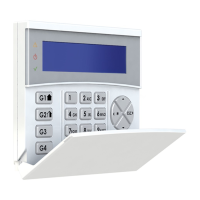
K-LCD Keyboard
CARATTERISTICHE e FUNZIONAMENTO
Tensione di alimentazione: 13.8Vdc
Corrente nominale: 25mA
Corrente massima: 160mA
Compatibile con: tutte le centrali prodotte AMC.
Indirizzi regolabili da menù senza l’uso di dip-switch meccanici
Tempo retroilluminazione regolabile
Selezione lingua
Buzzer per tempo di ingresso e uscita sonori
Abilitazione e disabilitazione dello switch tamper da menù
Leds di segnalazione:
o Led verde acceso: sistema pronto (tutte le zone chiuse)
o Led rosso acceso: nuovo evento da leggere in memoria eventi
o Led giallo acceso: centrale inserita
Regolazioni Tastiera.
Per entrare nel menù delle impostazioni dei parametri Tastiera, premere contemporaneamente i simboli
“canc X” e “invio V” per alcuni secondi.
Utilizzare le frecce SU e GIU’ per spostarsi tra:
ID Tastiera (per impostazione indirizzo hardware della Tastiera) premere invio “V” e con le frecce
Destra e Sinistra, impostare un valore tra 01 e 16 ( selezione automatica degli indirizzi liberi)
Tempo Luminosità premere invio “V” con le frecce Destra e Sinistra, regolare la durata.
Imposta lingua le lingue disponibili sono Italiano e Inglese, premere invio e selezionare la lingua
con le frecce SX e DX.
Attivazione tamper premere invio e selezionare con le frecce SX e DX l’abilitazione della
protezione tamper antiapertura.

Other manuals for AMC K-LCD

Question and Answer IconNeed help?

Do you have a question about the AMC K-LCD and is the answer not in the manual?

AMC K-LCD Specifications

General IconGeneral
BrandAMC
ModelK-LCD
CategoryKeyboard
LanguageEnglish

Summary

Features and Operation

Power Supply and Current Ratings

Details the voltage and current specifications for the keyboard, including nominal and maximum current.

Compatibility and Configuration

Covers compatibility with AMC panels and adjustable features like addresses and backlighting.

Functionality and Controls

Describes the buzzer, language selection, tamper switch control, and LED indicators.

Keyboard Adjustments

Keyboard ID Configuration

Procedure for setting the hardware address of the keyboard using arrow keys.

Display Brightness Adjustment

How to adjust the duration of the display backlighting using arrow keys.

Language Selection

Steps to select the keyboard language between Italian and English using arrow keys.

Tamper Protection Setting

Enabling or disabling the anti-aperture tamper protection feature.

Fixation and Connections

Keypad Housing Opening

Instructions on how to open the keypad housing using a screwdriver.

Wall Mounting and Tamper Switch

Guidance on fixing the posterior part to the wall, including anti-tearing protection.

Wiring and Power Off

Instructions for connecting supply and data terminals, emphasizing wiring only when unsupplied.

Closing the Case

Steps to reassemble the keypad housing by clicking the anterior part into place.

Related product manuals