NOTE:
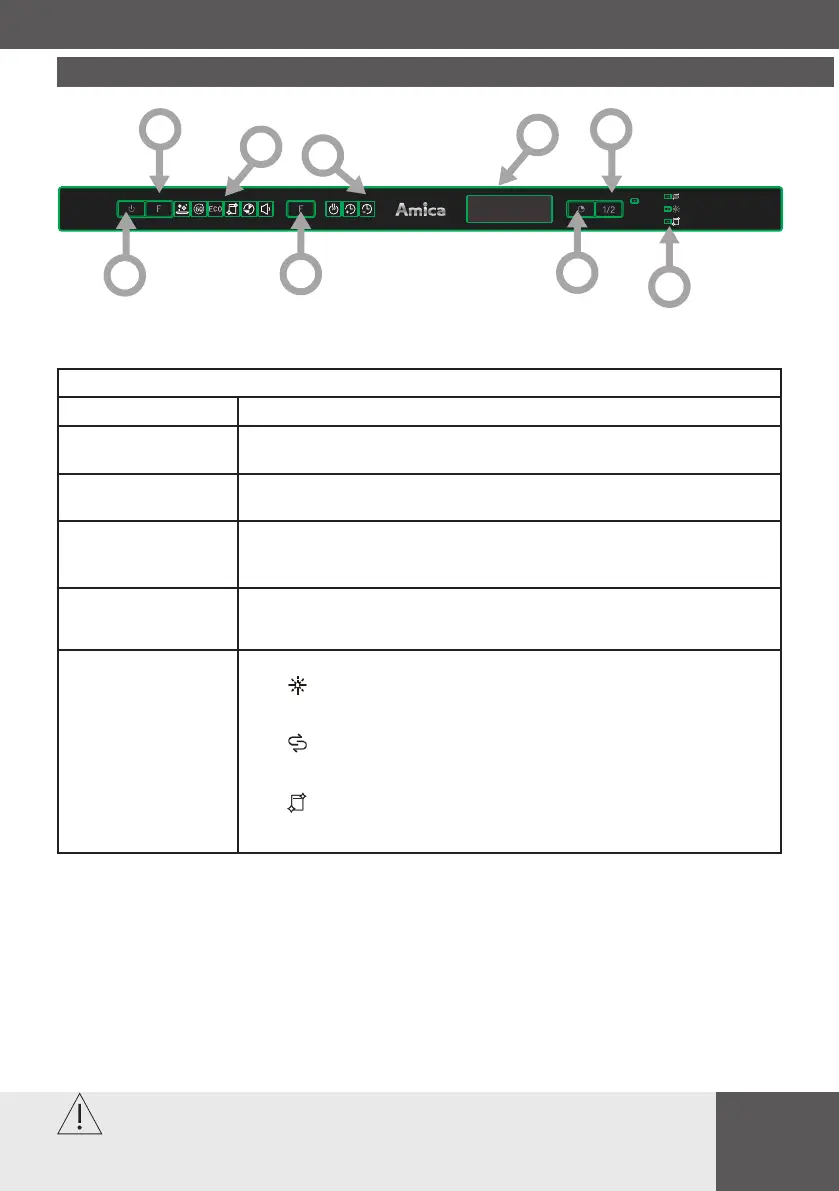
Operation (Button)
1. Power Press this button to turn on your dishwasher, the screen lights up.
2. Program Press this button to select the appropriate washing program, the
selected program indicator will be lit.
3. Function Press the button to select a function, corresponding indicator will
be lit.
4. Delay Press this button to set the delayed hours for washing. You can
delay the start of washing up to 24 hours. One press on this
button delays the start of washing by one hour.
5. Half load
When you have about or less than half of full place settings dishware to wash,
you can choose this function to save energy and water. (It can only be used with
Hygiene, 1 hour and ECO).
6. Warning
indicator
Rinse aid
If the indicator is lit, it means the dishwasher is low on dishwasher rinse
aid and requires a rell.
Salt
If the indicator is lit, it means the dishwasher is low on dishwasher salt
and needs to be relled.
Self-Cleaning
If the indicator is lit, it means the dishwasher needs
to clean itself after 20 cycles, the indicator will ash for 5
seconds, this will last 3 cycles.
1
2
3
4
5
6
7
8
9




 To Next Page