OPERATING THE CART
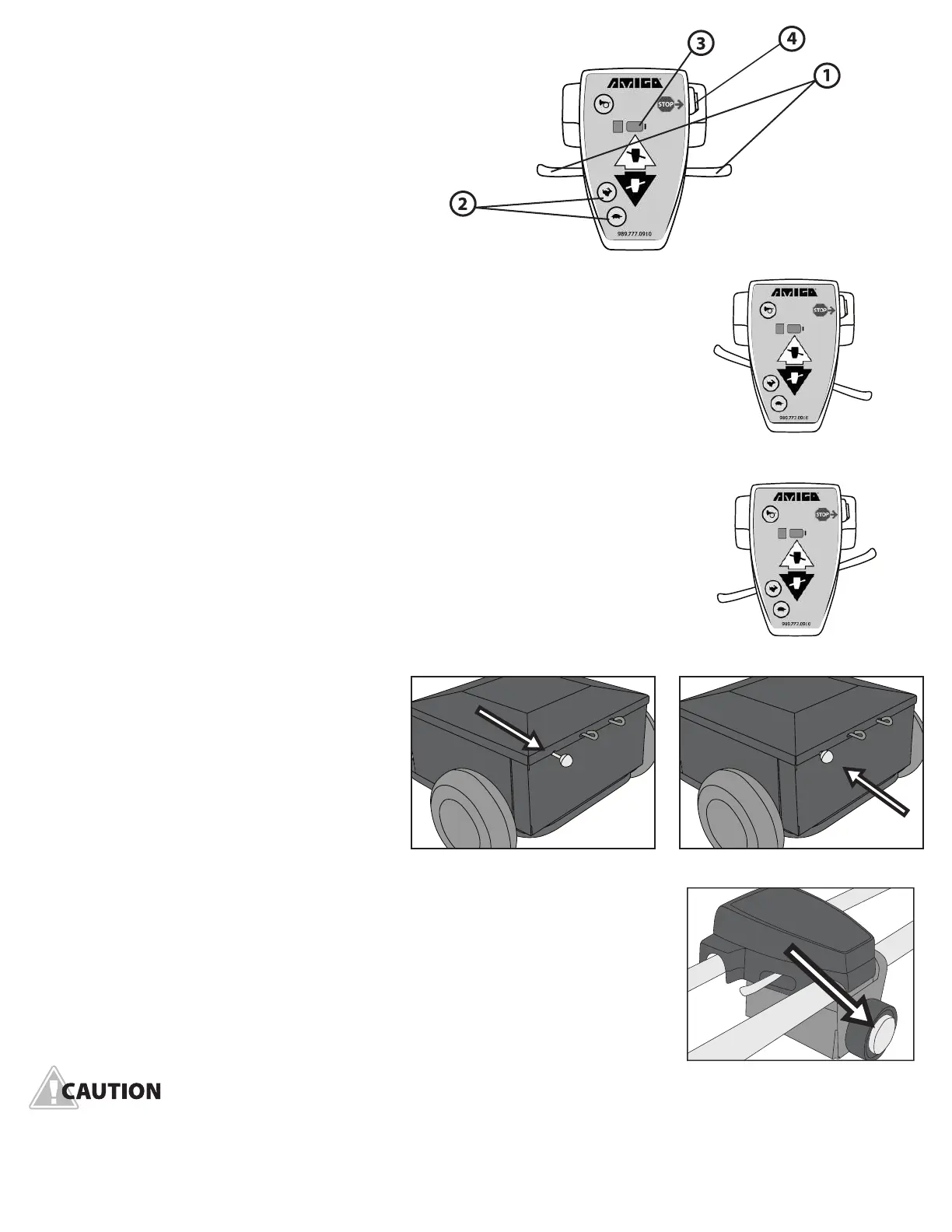
Handle controls
1. Hand control lever.
2. HI/LO speed push buttons.
3. Battery indicator light.
4. ON/OFF key/Emergency stop.
Driving
To move forward, pull the right side of the hand control lever toward you (Figure
2). You may also move forward by pushing the left side of the control lever away
from you. By releasing the control lever, you will come to a gradual stop. To operate
in reverse, pull the left side of the hand control lever toward you or push the right
side control lever away from you (Figure 3).
HI/LO speed control handle
Handle controls include: HI/LO speed push buttons, ON/OFF key and battery
indicator light. The key located on the right side of the handle control cover will
turn the power of the cart on or off. Turning it “OFF” will prevent drainage
of batteries. Pressing the rabbit button raises the cart’s top speed (max of 6mph/
9.7kph on select models). Pressing the turtle button reduces the cart’s top speed.
Manually moving the material handling cart
To engage the freewheeling mode, pull the
brake lever out (Figure 4). To terminate the
freewheeling mode, push the brake lever in
(Figure 5).
Stopping
To stop, release the hand control lever and
the cart will come to a gradual stop.
Emergency stop
Max™ and Max Pro™ are equipped with an emergency stop belly switch. When
activated, the switch will stop the unit from operating. The emergency stop belly
switch is located underneath the handle controls (Figure 6).
A QUICK STOP OF THE MATERIAL HANDLING CART CAN BE ACCOMPLISHED BY REVERSING THE
HANDLE CONTROL, OR BY TURNING THE CART OFF. THIS PROCEDURE IS NOT RECOMMENDED
EXCEPT IN EMERGENCY SITUATIONS.
4 www.amigocarts.com
FIGURE 3 (reverse)
FIGURE 4 FIGURE 5
FIGURE 6
FIGURE 2 (forward)
FIGURE 1


 To Next Page
 Loading...