Patch MODE
DRUM Rhythm
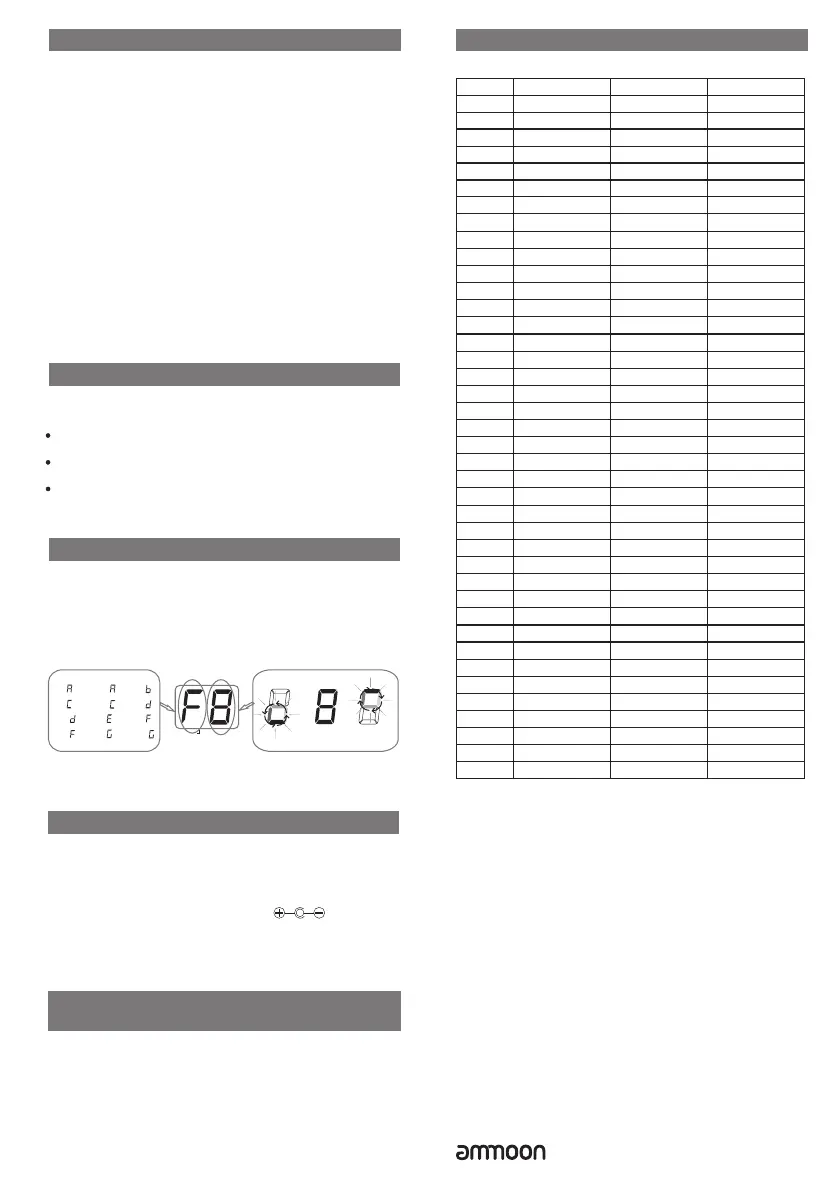
TUNER
A-
C-
D -
#
F -
#
A -
#
C -
#
E-
G-
B-
D-
F-
G -
#
The left side shows the current pitch.
BANK PATCH
#
The right side indicates how much the tuning
is off.
The indication rolls faster, the more the pitch
is off.
Flat Correct Sharp
Guitar Input: 1/4” mono jack
Output:: 1/4” mono jack
Phones: 1/8” stereo jack
Aux In: 1/8” stereo jack
Power requirements: AC adapter 9V DC
Dimensions: 128.5mm (W) × 84mm (D) × 45mm (H)
Weight: 160g
Accessories: Owner's Manual
Specification
.
.
.
.
.
Appendix
120 BP
M
16B
ea
t
1
D
rum R
h
y
t
h
m L
ist
0
1
02
03
0
4
05
06
07
08
09
1
0
1
1
12
1
3
1
4
1
5
1
6
17
18
1
9
2
0
2
1
2
2
2
3
2
4
2
5
2
6
2
7
2
8
29
30
31
32
33
34
3
5
3
6
3
7
3
8
39
4
0
4/4
4
/
4
4/4
4/4
4/
4
4
/
4
4/
4
4/4
4
/
4
4/4
3/4
6
/
8
4/4
4/
4
4
/
4
4/4
4/4
4
/
4
4/
4
4/4
4/
4
4
/
4
4/4
4/
4
4/4
4/
4
4/4
4/
4
4/
4
4
/
4
4/
4
4
/
4
4
/
4
4
/
4
2/4
3/4
4/4
5/
4
6
/
8
1
2
0 B
PM
1
2
0 B
P
M
1
2
0 B
P
M
12
0 BPM
120 BP
M
12
0 BP
M
120 BP
M
1
20 BPM
120 B
P
M
1
2
0 B
P
M
12
0 BP
M
1
2
0 B
PM
10
8 B
PM
135 BP
M
12
0 B
P
M
1
6
2 BPM
96 BPM
84 BP
M
1
2
0 B
PM
15
6 B
P
M
180 BP
M
1
0
8 B
P
M
12
0 B
P
M
144 BPM
12
0 B
P
M
9
0 B
P
M
1
35 BP
M
1
14 BPM
120 BP
M
13
5 BP
M
120 BPM
1
20 BPM
1
0
8 B
PM
120 BPM
120 B
PM
1
2
0 B
P
M
1
2
0 BPM
120 B
PM
T
y
p
e
Tim
e Sig
natur
e
No.
D
efa
u
l
t Te
m
po
8
Beat1
8Bea
t
2
8
Be
a
t
3
8
Beat4
8Be
at
5
16
B
e
at
2
16B
e
a
t
3
16Bea
t
4
16Beat5
3/4
B
eat
6
/
8
Be
a
t
P
o
p
F
u
n
k
Ha
r
d Ro
c
k
Met
al
Pu
n
k
H
i
p H
o
p
T
ri
p H
o
p
D
ance
Bre
a
k B
e
at
B
l
u
e
s
J
a
z
z
Sw
i
n
g
F
usi
o
n
R
egg
ae
La
t
i
n
Co
u
n
t
r
y
Bos
s
anova
R
u
m
b
a
Tang
o
Polka
Wo
r
l
d
M
e
t
r
o 2
/
4
M
e
t
r
o 3/
4
M
etr
o 4
/
4
M
e
t
r
o 5
/
4
M
et
r
o 6/
8
M
e
t
r
o
D
rum n
’
B
a
ss
N
on
e
120 BP
M
* Disclaimer: Any specification’s update won't be
amended in this manual.
www.ammoon.com
The Patch button will be illuminated and "A0" will be
displayed on the LCD SCREEN
In this mode all parameter values will be recalled from the
currently selected preset
A = Patch Bank
0 = Preset number
Rotate the DRUM/VALUE control to scroll through presets
POCKROCK has 16 factory presets (Bank 0-3)
And 16 User presets (Bank A-D)
Each Bank contains 4 Presets
Storing Presets
Press the Store button once
The LCD SCREEN will display a preset patch and will be
flashing
Rotate the DRUM/VALUE control to select desired storage
destination
Press the Store button again to save the preset
Press the DRUM/VALUE control to cancel storage process
Press the START/STOP button to start or stop the
DRUM rythm
Press the DRUM/VALUE control once and then rotate to
adjust Drum rhythm type
Press the DRUM/VALUE control twice and then rotate to
adjust Drum rhythm volume
Press the DRUM/VALUE control three times and then rotate
to adjust Drum rhythm tempo
Press and hold the DRUM/VALUE control for about 2
seconds to access the tuner
Play one guitar string at a time and adjust the string tension
until it reaches the desired pitch
Press the DRUM/VALUE control once to exit the Tuner
center
negative,or 2 AAA batteries


 To Previous Page
 Loading...