Indicator Light
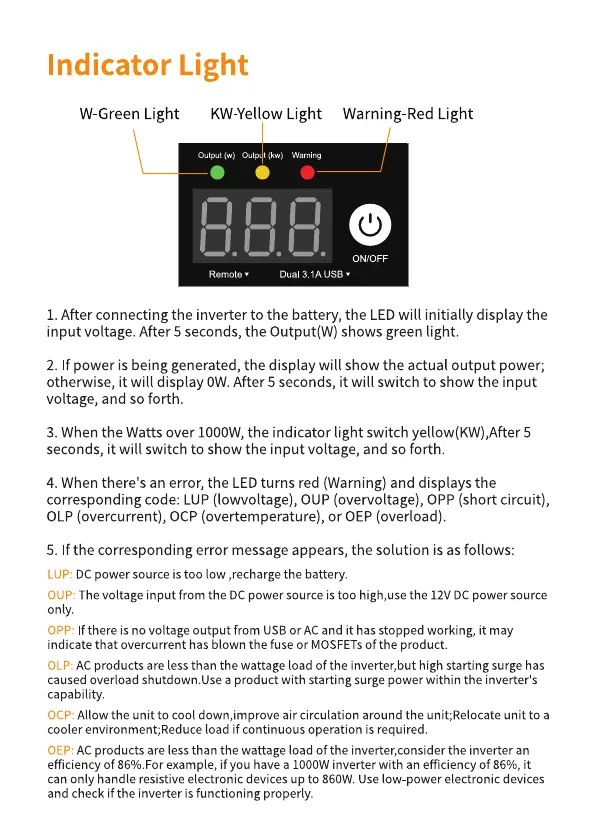
W-Green Light KW-Yellow Light
Output (w) Ou (kw) Warning
Warning-Red Light
(1)
ON/OFF
Remote • Dual 3 IA USB
I. After connecting the inverter to the battery, the LEDwill initially display the
input voltage. After 5 seconds, the Output(W) shows green light.
2. If power is being generated,the display will show the actual output power;
otherwise, it will display OW.After 5 seconds, it will switch to show the input
voltage, and so forth.
3. When the Watts over IOOOW,the indicator light switch 5
seconds, it will switch to show the input voltage, and so forth.
4. When there's an error, the LEDturns red (Warning) and displays the
corresponding code: LUP(lowvoltage), OUP(overvoltage), OPP(short circuit),
OLP (overcurrent), OCP (overtemperature), or OEP (overload).
5. If the corresponding error message appears, the solution is as follows:
DC power source is too low ,recharge the battery.
LUP:
The voltage input from the DCpower source is too high,use the 12VDC power source
OUP:
only.
f there is no voltage output from USBor ACand it has stopped working, it may
OPP:
indicate that overcurrent has blown the fuse or MOSFETsOfthe product.
ACproducts are less than the wattage load Ofthe inverter,but high starting surge has
OLP:
caused overload shutdown.Use a product with starting surge power within the inverter's
capability.
Allow the unit to cool down,improve air circulation around the unit;Relocate unit to a
ocp:
cooler environment;Reduce load if continuous operation is required.
ACproducts are lessthan the wattage load Ofthe inverter,consider the inverter an
OEP:
efficiency Of860/0.Forexample, if you have a inverter with an efficiency Of86%, it
can only handle resistive electronic devices up to 860W. Uselow power electronic devices
and check if the inverter is functioning properly.


 To Next Page
 Loading...