7
SMART SOCKET OVERVIEW
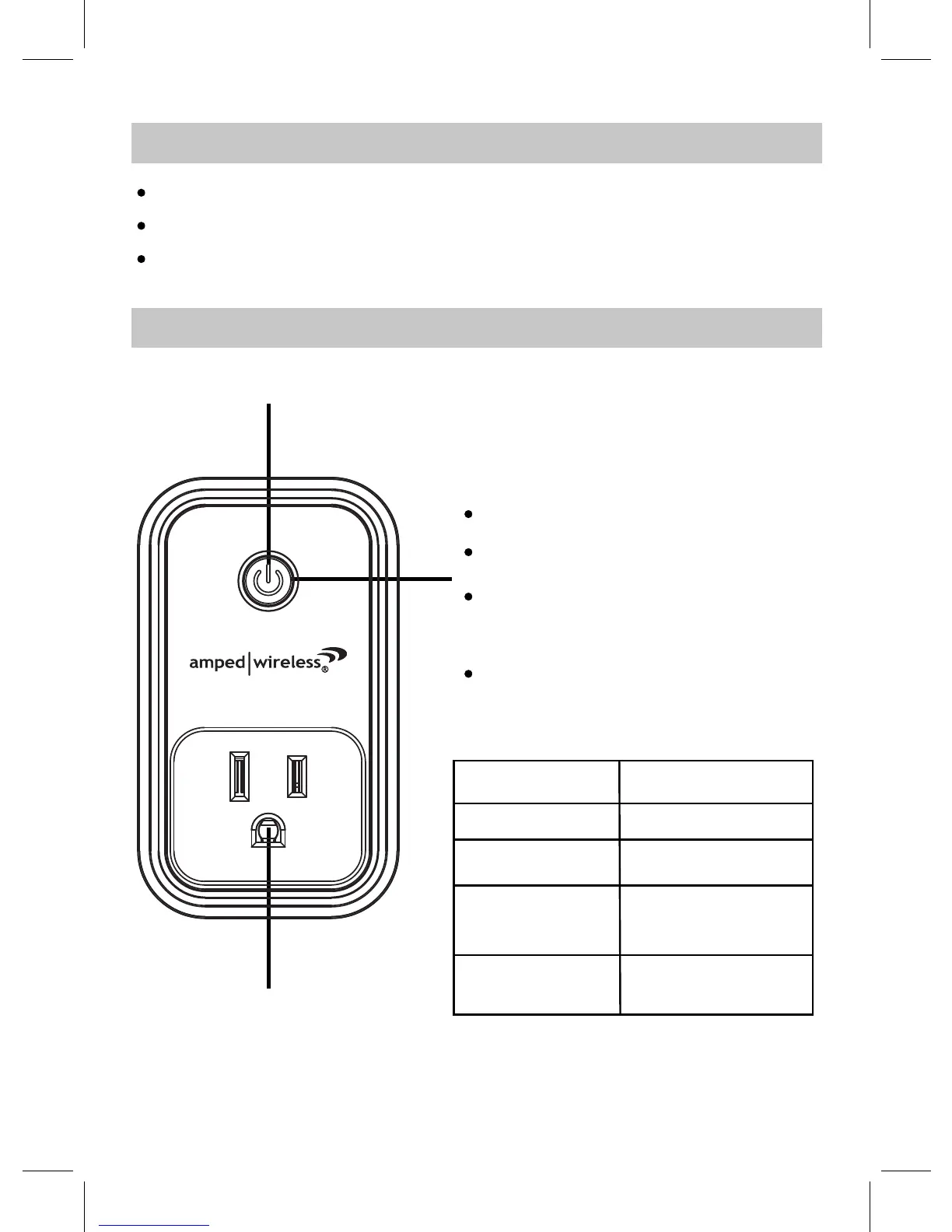
Socket
Power ON/OFF Button
LED Ring
Press and hold the power button for about
5 seconds in powering on mode, the LED
LED ring will turn red.
Press the power button to power on, the
Press the power button again to power off
PREPARATION
Smooth and rapid Wi-Fi network (2.4 GHz only)
Smart Life APP and account
One Smart Device: smart phone or tablet (not included)
the LED ring will turn off.
ring blinks fast with red and blue color,
now it is in pairing mode(EZ mode).
Press and hold the power button for about
5 seconds in pairing mode until the LED
ring blinks slowly with blue color, now it is
in compatible pairing mode (AP mode).
LED Ring Color
Smart Socket Status
Red
Powering On
No Color
Powering Off
Blue and Red or Blue
(blink fast)
Pairing mode (EZ mode)
Blue and Red or Blue
(blink slowly)
Compatible pairing mode
(AP mode)


 To Next Page