EasyManua.ls Logo

Ampex 351 - Page 27

Default Icon
103 pages
Print Icon
To Next Page IconTo Next Page
To Previous Page IconTo Previous Page
Loading...
)«C|
I
RtMOVf
TO
Oil
CAPSTAN
)
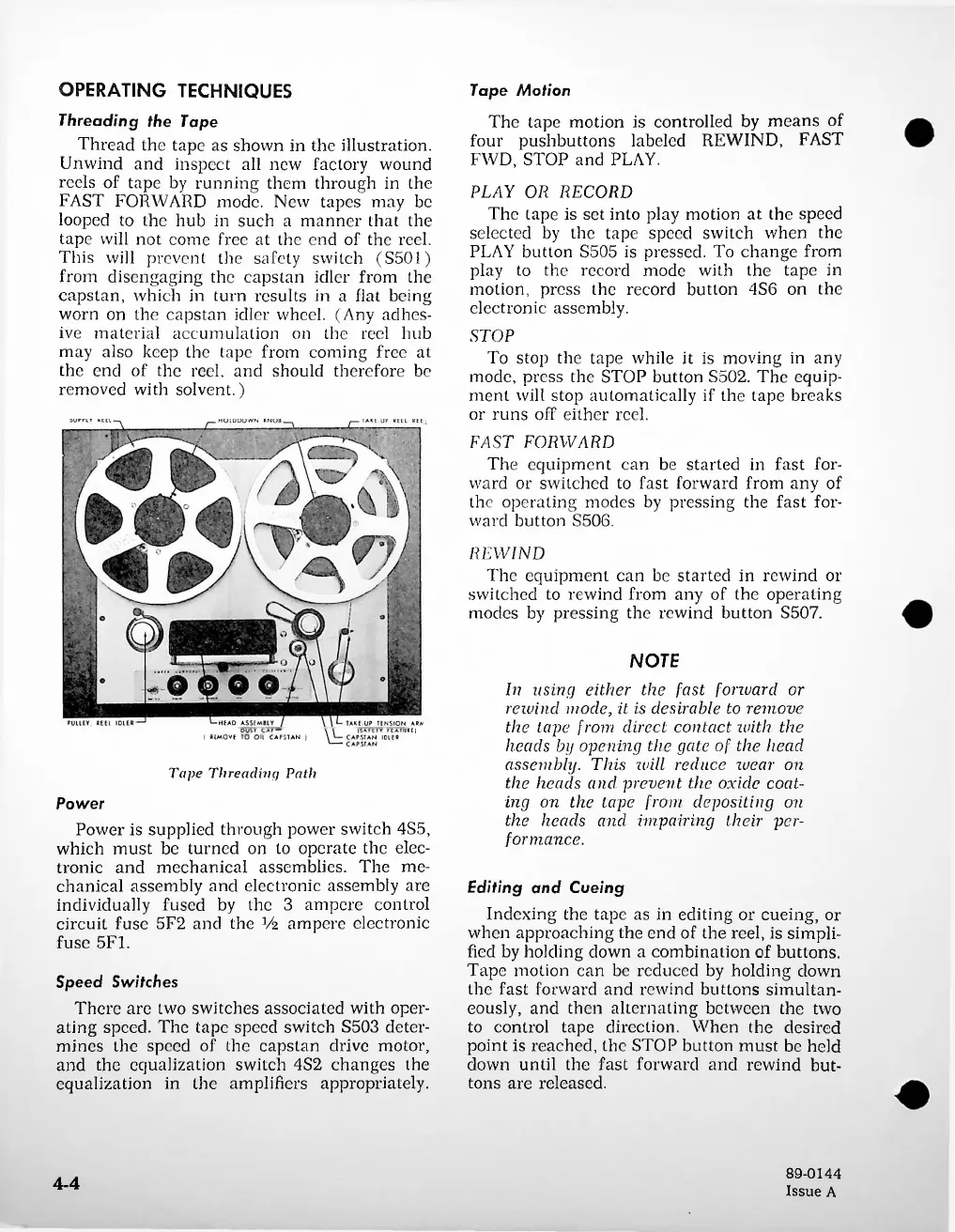
Tape
Threading
Path
4-4
Speed
Switches
There
are
two
switches
associated
with
oper
ating
speed.
The
tape
speed
switch
S503
deter
mines
the
speed
of
the
capstan
drive
motor,
and
the
equalization
switch
4S2
changes
the
equalization
in
the
amplifiers
appropriately.
Power
Power
is
supplied
through
power
switch
4S5,
which
must
be
turned
on
to
operate
the
elec
tronic
and
mechanical
assemblies.
The
me
chanical
assembly
and
electronic
assembly
are
individually
fused
by
the
3
ampere
control
circuit
fuse
5F2
and
the
¥2
ampere
electronic
fuse
5F1.
Editing
and
Cueing
Indexing
the
tape
as
in
editing
or
cueing,
or
when
approaching
the
end
of
the
reel,
is
simpli
fied
by
holding
down
a
combination
of
buttons.
Tape
motion
can
be
reduced
by
holding
down
the
fast
forward
and
rewind
buttons
simultan
eously,
and
then
alternating
between
the
two
to
control
tape
direction.
When
the
desired
point
is
reached,
the
STOP
button
must
be
held
down
until
the
fast
forward
and
rewind
but
tons
are
released.
NOTE
In
using
either
the
fast
forward
or
rewind
mode,
it
is
desirable
to
remove
the
tape
from
direct
contact
with
the
heads
by
opening
the
gate
of
the
head
assembly.
This
will
reduce
wear
on
the
heads
and
prevent
the
oxide
coat
ing
on
the
tape
from
depositing
on
the
heads
and
impairing
their
per
formance.
REWIND
The
equipment
can
be
started
in
rewind
or
switched
to
rewind
from
any
of
the
operating
modes
by
pressing
the
rewind
button
S507.
PLAY
OR
RECORD
The
tape
is
set
into
play
motion
at
the
speed
selected
by
the
tape
speed
switch
when
the
PLAY
button
S505
is
pressed.
To
change
from
play
to
the
record
mode
with
the
tape
in
motion,
press
the
record
button
4S6
on
the
electronic
assembly.
STOP
To
stop
the
tape
while
it
is
moving
in
any
mode,
press
the
STOP
button
S502.
The
equip
ment
will
stop
automatically
if
the
tape
breaks
or
runs
off
either
reel.
FAST
FORWARD
The
equipment
can
be
started
in
fast
for
ward
or
switched
to
fast
forward
from
any
of
the
operating
modes
by
pressing
the
fast
for
ward
button
S506.
Tape
Motion
The
tape
motion
is
controlled
by
means
of
four
pushbuttons
labeled
REWIND,
FAST
FWD,
STOP
and
PLAY.
89-0144
Issue
A
OPERATING
TECHNIQUES
Threading
the
Tape
Thread
the
tape
as
shown
in
the
illustration.
Unwind
and
inspect
all
new
factory
wound
reels
of
tape
by
running
them
through
in
the
FAST
FORWARD
mode.
New
tapes
may
be
looped
to
the
hub
in
such
a
manner
that
the
tape
will
not
come
free
at
the
end
of
the
reel.
This
will
prevent
the
safety
switch
(S501)
from
disengaging
the
capstan
idler
from
the
capstan,
which
in
turn
results
in
a
flat
being
worn
on
the
capstan
idler
wheel.
(Any
adhes
ive
material
accumulation
on
the
reel
hub
may
also
keep
the
tape
from
coming
free
at
the
end
of
the
reel,
and
should
therefore
be
removed
with
solvent.)

Related product manuals