EasyManua.ls Logo

Ampex 351 - Page 87

Default Icon
103 pages
Print Icon
To Next Page IconTo Next Page
To Previous Page IconTo Previous Page
Loading...
IOK
VT
VM
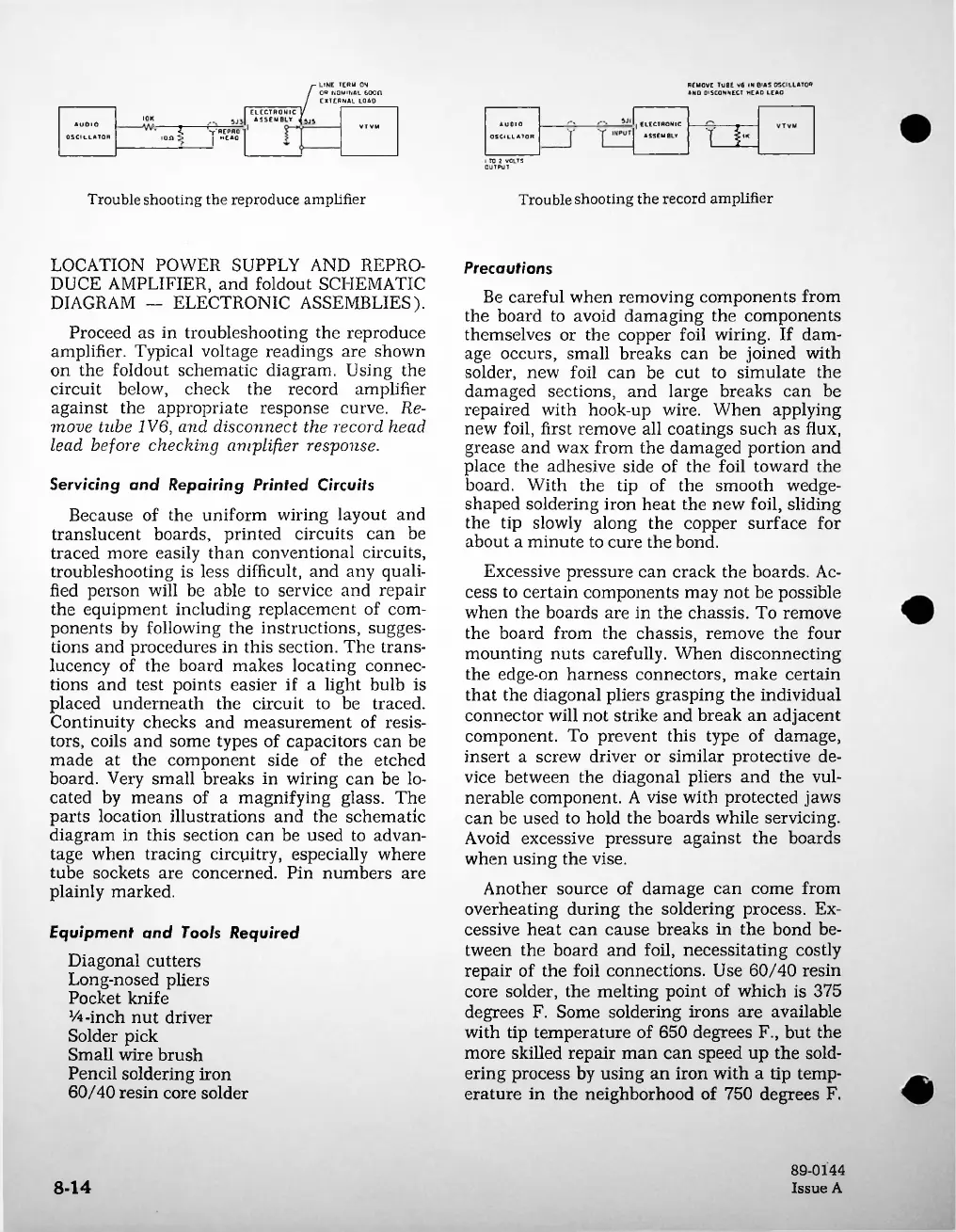
Troubleshooting
the
record
amplifier
Trouble
shooting
the
reproduce
amplifier
8-14
ELECTRONIC
ASSEMBLY
Servicing
and
Repairing
Printed
Circuits
Because
of
the
uniform
wiring
layout
and
translucent
boards,
printed
circuits
can
be
traced
more
easily
than
conventional
circuits,
troubleshooting
is
less
difficult,
and
any
quali
fied
person
will
be
able
to
service
and
repair
the
equipment
including
replacement
of
com
ponents
by
following
the
instructions,
sugges
tions
and
procedures
in
this
section.
The
trans
lucency
of
the
board
makes
locating
connec
tions
and
test
points
easier
if
a
light
bulb
is
placed
underneath
the
circuit
to
be
traced.
Continuity
checks
and
measurement
of
resis
tors,
coils
and
some
types
of
capacitors
can
be
made
at
the
component
side
of
the
etched
board.
Very
small
breaks
in
wiring
can
be
lo
cated
by
means
of
a
magnifying
glass.
The
parts
location
illustrations
and
the
schematic
diagram
in
this
section
can
be
used
to
advan
tage
when
tracing
circuitry,
especially
where
tube
sockets
are
concerned.
Pin
numbers
are
plainly
marked.
Equipment
and
Tools
Required
Diagonal
cutters
Long-nosed
pliers
Pocket
knife
14-inch
nut
driver
Solder
pick
Small
wire
brush
Pencil
soldering
iron
60/40
resin
core
solder
AUDIO
OSCILLATOR
Precautions
Be
careful
when
removing
components
from
the
board
to
avoid
damaging
the
components
themselves
or
the
copper
foil
wiring.
If
dam
age
occurs,
small
breaks
can
be
joined
with
solder,
new
foil
can
be
cut
to
simulate
the
damaged
sections,
and
large
breaks
can
be
repaired
with
hook-up
wire.
When
applying
new
foil,
first
remove
all
coatings
such
as
flux,
grease
and
wax
from
the
damaged
portion
and
place
the
adhesive
side
of
the
foil
toward
the
board.
With
the
tip
of
the
smooth
wedge-
shaped
soldering
iron
heat
the
new
foil,
sliding
the
tip
slowly
along
the
copper
surface
for
about
a
minute
to
cure
the
bond.
Excessive
pressure
can
crack
the
boards.
Ac
cess
to
certain
components
may
not
be
possible
when
the
boards
are
in
the
chassis.
To
remove
the
board
from
the
chassis,
remove
the
four
mounting
nuts
carefully.
When
disconnecting
the
edge-on
harness
connectors,
make
certain
that
the
diagonal
pliers
grasping
the
individual
connector
will
not
strike
and
break
an
adjacent
component.
To
prevent
this
type
of
damage,
insert
a
screw
driver
or
similar
protective
de
vice
between
the
diagonal
pliers
and
the
vul
nerable
component.
A
vise
with
protected
jaws
can
be
used
to
hold
the
boards
while
servicing.
Avoid
excessive
pressure
against
the
boards
when
using
the
vise.
Another
source
of
damage
can
come
from
overheating
during
the
soldering
process.
Ex
cessive
heat
can
cause
breaks
in
the
bond
be
tween
the
board
and
foil,
necessitating
costly
repair
of
the
foil
connections.
Use
60/40
resin
core
solder,
the
melting
point
of
which
is
375
degrees
F.
Some
soldering
irons
are
available
with
tip
temperature
of
650
degrees
F.,
but
the
more
skilled
repair
man
can
speed
up
the
sold
ering
process
by
using
an
iron
with
a
tip
temp
erature
in
the
neighborhood
of
750
degrees
F.
AUDIO
OSCILLATOR
89-0144
Issue
A
T
F
C
''r'REPRO
ion
>
HEAO
LOCATION
POWER
SUPPLY
AND
REPRO
DUCE
AMPLIFIER,
and
foldout
SCHEMATIC
DIAGRAM
ELECTRONIC
ASSEMBLIES).
Proceed
as
in
troubleshooting
the
reproduce
amplifier.
Typical
voltage
readings
are
shown
on
the
foldout
schematic
diagram.
Using
the
circuit
below,
check
the
record
amplifier
against
the
appropriate
response
curve.
Re
move
tube
IV
6,
and
disconnect
the
record
head
lead
before
checking
amplifier
response.
f-
LINE
TERM
ON
/
OR
NOMINAL
600
fl
I
EXTERNAL
LOAD
ELECTRONIC
/
ASSEMBLY
ifsjj
I
TO
2
VOLTS
OUTPUT
REMOVE
TUBE
V6
IN
BIAS
OSCILLATOR
ANO
DISCONNECT
HEAD
LEAD

Related product manuals