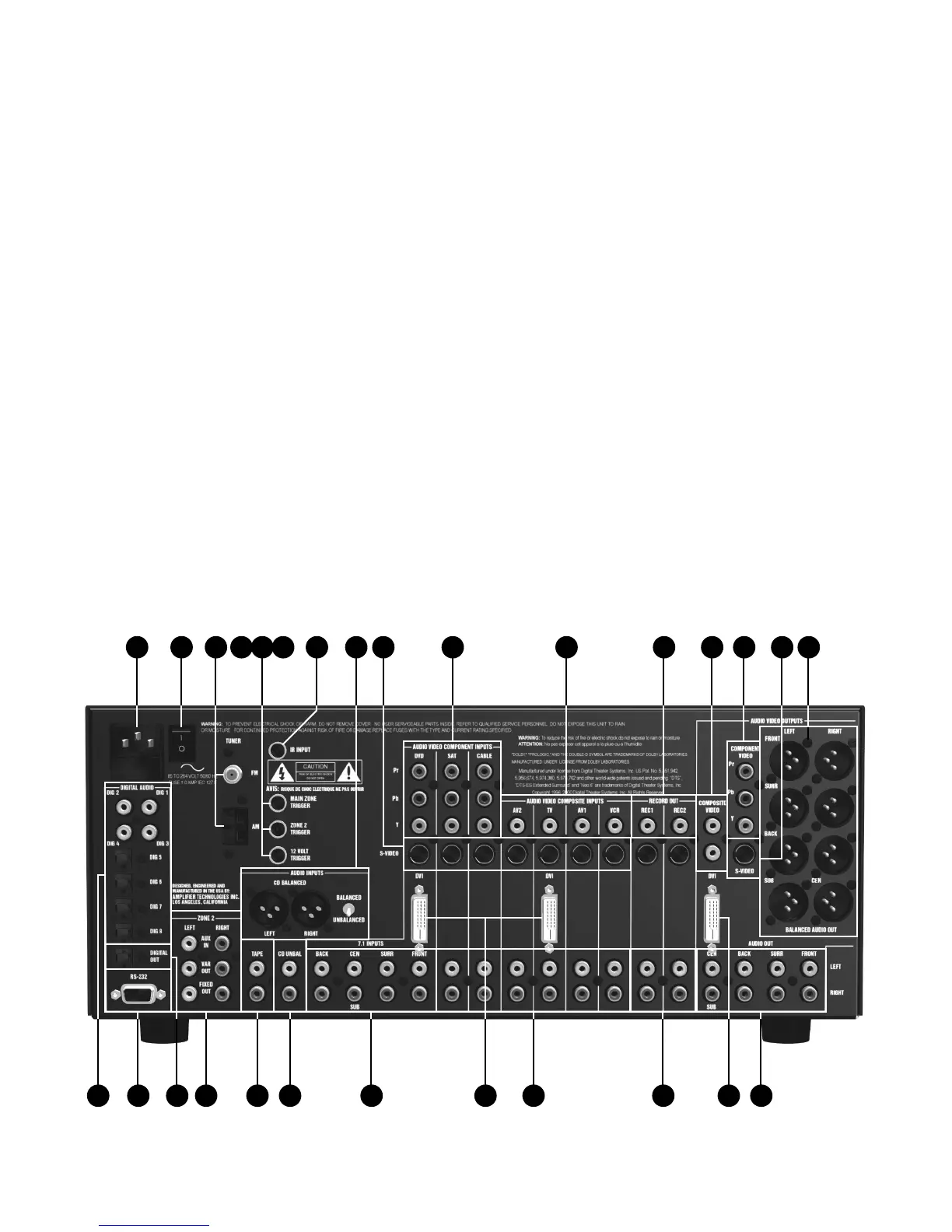
23 7.1-Channel Audio
U
se this input group to connect a device with analog
multi-channel outputs, such as a DVD player, DVD-Audio
or Super Audio CD player.
24 DVI Video Inputs (ATP8700)
T
hese jacks may be used to connect the ATP8700 to a
source requiring a digital video connection such as a
DVD player, digital cable box or satellite receiver box.
25 Analog Audio Inputs
Use these inputs to connect analog audio from video
devices, such as a VCR, a cable box or a laserdisc player.
26 Analog Audio Record Outputs
Connect these audio jacks to the input of a VCR
or DVD recorder, so you can record whatever source is being
pla
yed in the main room.
27 DVI Video Outputs (ATP8700)
T
hese jacks may be used to connect the ATP8700 to a
television with a digital video connection. With an
adapter, you can connect these outputs to HDMI inputs.
28 Preamp Audio Outputs and Subwoofer Output
These outputs carry 7.1-channel audio from the A/V
PROCESSOR to an external amplifier or amplifiers.
Connect the subwoofer output to the input of a powered
subwoofer or to an amplifier that feeds a passive
(non-powered) sub-woofer.
Page 7
11 14 15 1612 131 2 7 10983 5 64
27 2826252421 22 2317 18 19 20


 To Next Page