
 Need help?
Do you have a question about the AMT Crono S-PID 100 and is the answer not in the manual?
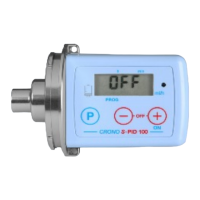
The Crono S-PID 100 is an applied medical technology device, specifically a pump designed for controlled infusions in flow mode (mL/hr). This short programming guide provides a reminder of its main functions, though users are cautioned to consult the full user instructions.
The Crono S-PID 100 is primarily used for delivering infusions at a programmed flow rate. Its default operation mode is "timed mode," allowing programming based on the duration of infusion. However, it can be switched to "flow mode" (mL/hr) by removing and replacing the battery, followed by a specific setup procedure. In flow mode, users can set a precise flow rate for the infusion. The device includes features for setting an end-of-infusion alarm, defining infusion break points, and managing syringe partial volumes. It also offers a priming function for the infusion set and automatically resets the plunger position after an infusion.
[-t-] (timed mode) is displayed, press and hold the [P] button until the display flashes. Press the [-] button until the display changes to [-F-] (flow mode). Confirm by pressing [P], and the pump will switch to [OFF] mode.[OFF], press and hold the [-] key for approximately 7 seconds. A number representing the number of completed infusions will appear.[-] key, depress the [+] key. The screen will display flashing [L.0] (unlocked). Use the (+) or (-) button to select the desired value (L1 for locked, L0 for unlocked).With the keyboard unlocked and the pump displaying [OFF], pressing the [P] button allows users to step through a menu to set the following parameters:
[P] to select flow rate setting.(+) or (-) buttons to set the desired rate (0.2 mL/hr to 300 mL/hr).[P] to confirm the flow rate and select the alarm sound setting.[-] to turn the sound off, or [+] to turn it on.[P] to confirm the alarm setting and select the Infusion Break setting.[-] to reduce the number or [+] to increase (IP.1 to IP.5, normally set to IP.1).[P] to confirm the Infusion Break setting and select the partial volume setting.[-] to reduce the volume or [+] to increase (in 1mL steps).[P] to confirm the partial volume setting. The pump will take a short time to position the plunger at the programmed position.[+/ON] button.[Pr] will appear. Press and hold the [P] button to deliver the required prime, up to a maximum of 1.5mL.[+] button again to start the infusion.[StoP] mode by pressing the [+] and [-] keys together.[P] and [-] buttons together until [END] appears on the screen.This device is designed for precise and controlled medical infusions, offering flexibility in programming and ease of use with its clear display and button interface.
 General
| Brand | AMT |
|---|---|
| Model | Crono S-PID 100 |
| Category | Measuring Instruments |
| Language | English |

 To Next Page