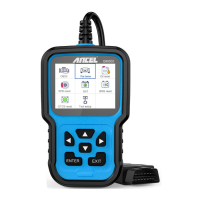
4. [LEFT] SCROLL BUTTON In the menu mode through the
menu and sub menu move to the left, when rolling in a data
interface, use the left button can be moved to the last screen
5. [RIGHT] SCROLL BUTTON In the menu mode through the
menu and sub menu item move to the right, when rolling in the data
interface, use the right button can be moved to the next screen.
6. [UP] SCROLL BUTTON In the menu mode through the menu
and sub menu item moving up. When retrieving data for more than
a screen by moving up the screen to the previous screen for more
data
7. [DOWN] SCROLL BUTTON - In the menu mode through the
menu and sub menu item moves down. When retrieving data more
than one screen, by moving down the screen to the next screen for
more data
OPERATION INSTRUCTIONS
1. Connect BM500
1.1 Turn the ignition on.
I .2 Locate the vehicle's 16-pin Data Link Connector (DLC).
2. BM500 Features
2.1 For bmw
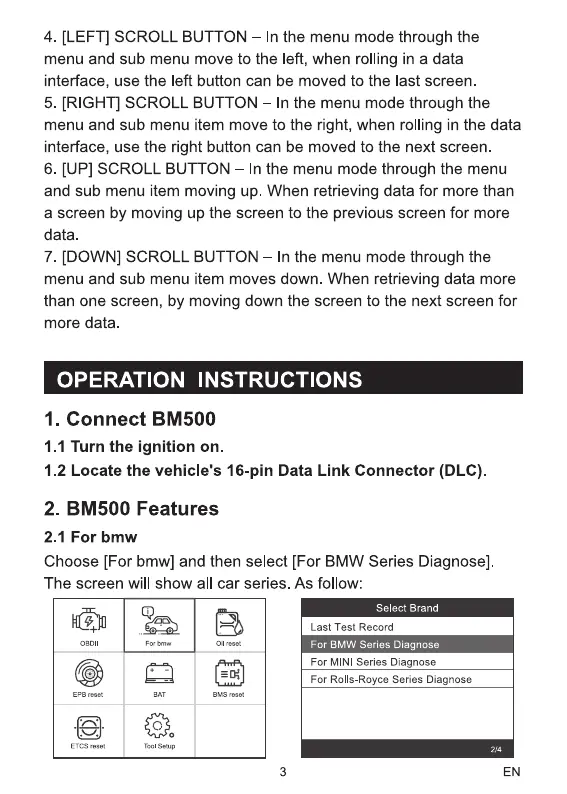
Choose [For bmw] and then select [For BMW Series Diagnose]
The screen will show all car series. As follow:
BMS
00
Setup
Select Brand
Last Test Record
For BMW Series Diagnose
For MINI Series Diagnose
For Rolls-Royce Series Diagnose
3 EN


 To Next Page
 Loading...