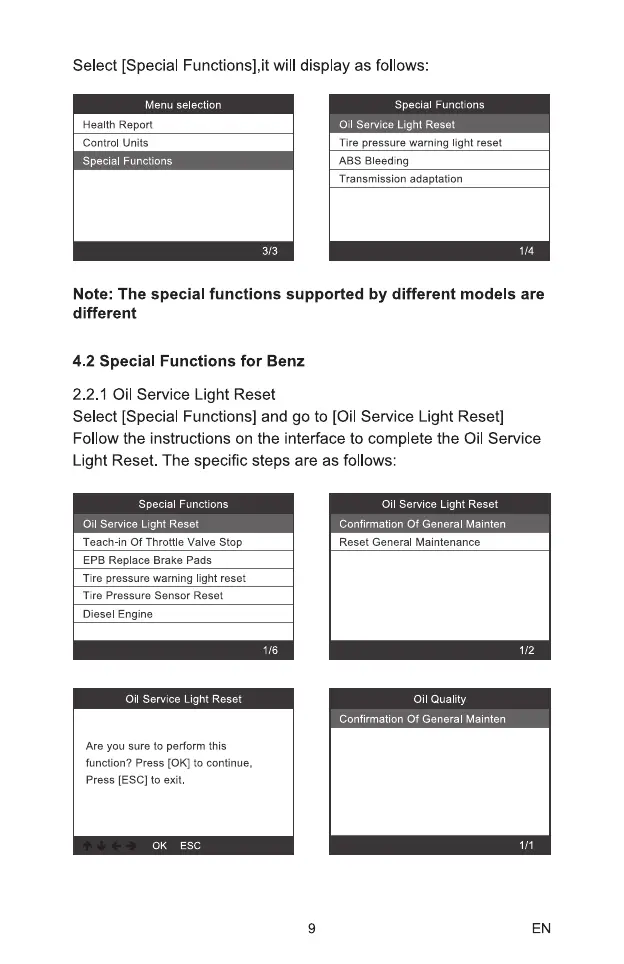
Select [Special Functions],it will display as follows:
Menu selection
Special Functions
Oil Service Light Reset
Health Report
Control Units
Tire pressure warning light reset
ABS Bleeding
Special Functions
Transmission adaptation
3/3
Note: The special functions supported by different models are
different
4.2 Special Functions for Benz
2.2.1 Oil Service Light Reset
Select [Special Functions] and go to [Oil Service Light Reset]
Follow the instructions on the interface to complete the Oil Service
Light Reset. The specific steps are as follows
Special Functions
Oil Serv,ice Light Reset
Teach-in Of Throttle Valve Stop
EPB Replace Brake Pads
Tire pressure warning light reset
Tire Pressure Sensor Reset
Diesel Engine
Oil Service Light Reset
Are you sure to perform this
function? Press [0K] to continue,
Press (ESCI to exit.
0K ESC
9
Oil Service Light Reset
Confirmation Of General Mainten
Reset General Maintenance
Oil Quality
onfirmation Of General Mainten
EN


 To Next Page
 Loading...