10 11
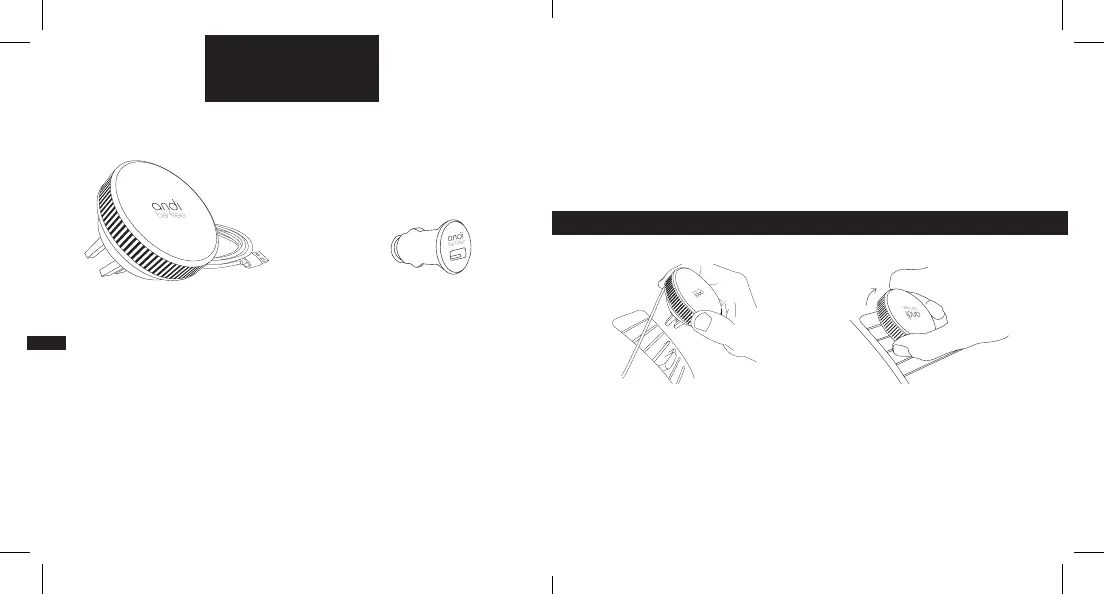
SUPPLY PACKAGE
BEFORE FIRST USE
SMARTPHONE COMPATIBILITY
You need to make your smartphone andi-ready, so you can make optimum
use of all functions. You can do this with either an andi be free
®
wireless
charging case or an andi be free
®
wireless stickypad, depending on yout
smartphone make. You will nd the right product for your smartphone at
www.andi.store.
ACCESSORIES
The andi be free
®
wireless vent mount charger must only be used with certi-
ed andi be free
®
accessories. Check the andi be free
®
wireless vent mount
charger and all supplied accessories for any damage. You must not use a
defective device under any circumstances.
USING FOR THE FIRST TIME
1. Attach your andi be free
®
wireless
vent mount charger to your car’s
ventilation grille. Tip: The andi logo
should still be upside down.
2. Turn your andi be free
®
wireless
vent mount charger to the right until
it is securely attached. The andi logo
is now the right way up again.
andi be free
®
wireless
vent mount charger with
integrated USB cable Car charger


 To Next Page
 Loading...