IT
53
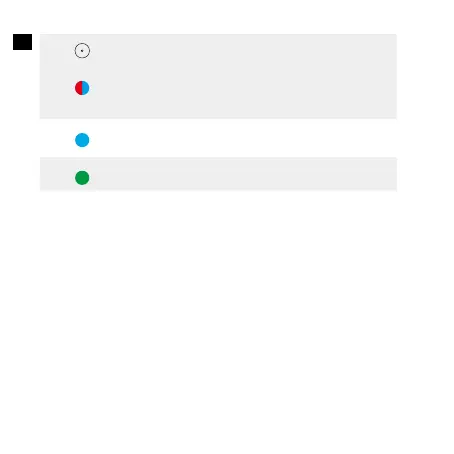
Premere due volte
Entra nella/Esci dalla
modalità di associazione
Bluetooth (modalità
ricevitore)
Rosso e blu
lampeggianti
alternativamente
Blu fisso Connesso a un dispositivo
(modalità RX)
Verde fisso Connesso a due dispositivi
Connettiti a due smartphone/tablet alla volta
• Questa funzione è disponibile solo in modalità RX.
• Soundsync può ricevere solo una sorgente audio da uno smartphone/
un tablet alla volta.
1.Connetti il primo smartphone/tablet al tuo Soundsync e disattiva il
Bluetooth sul tuo primo smartphone/tablet una volta connesso.
2.Premi due volte il pulsante multifunzione per accedere alla modalità
di associazione Bluetooth.Associa il secondo smartphone o tablet al tuo
Soundsync.
3.Quando il secondo smartphone/tablet è connesso correttamente a
Soundsync, riattiva il Bluetooth sul tuo primo smartphone/tablet e trova
“Anker Soundsync” nell’elenco Bluetooth per connetterti.


 To Next Page