This document is a user manual for the Anko Bluetooth® Karaoke Microphone with Speaker, model number 43205752. It provides instructions for operation, technical specifications, and safety guidelines.
Function Description:
The Anko Bluetooth® Karaoke Microphone with Speaker is a portable audio device designed for karaoke and music playback. It combines a microphone with an integrated speaker, allowing users to sing along to music played wirelessly via Bluetooth, from a Micro SD card, or a USB drive. It also features an AUX-IN port for connecting external audio sources and an AUX-OUT port. The microphone includes voice-changing effects and echo (REMIX) functionality, enhancing the karaoke experience. The device is powered by a rechargeable battery, charged via a USB cable.
Important Technical Specifications:
- DC Power Source: DC 5V 0.5A
- Audio Output: 3W
- Frequency Range: 100Hz-20kHz
- Bluetooth® Version: 5.0
- Bluetooth® Working Distance: Up to 10 meters in open space (walls and other structures may affect range).
- Connectivity: Bluetooth®, Micro SD card slot (TF Slot), USB port, AUX-IN (5V), AUX-OUT.
- Controls: PREV (Previous song), NEXT (Next song), VOL+ (Increase volume), VOL- (Decrease volume), PLAY/PAUSE, MIC VOL (Microphone Volume+/-), MIC (Voice changing), REMIX (Echo), ON/OFF/MODE button.
Usage Features:
- Power On/Off: Long press the ON/OFF button to turn the unit on or off.
- Bluetooth® Operation:
- Pairing: Turn on the unit, then turn on your external device's Bluetooth. Select "KM43205752" from the Bluetooth settings. If prompted for a password, enter "0000" or "1234". An alert tone will confirm successful pairing. The unit will automatically re-connect to the last paired device if found. Only one Bluetooth® device can be connected at a time.
- Wireless Audio Playback: After pairing, use the native controls on the connected Bluetooth® device or the speaker's controls (PREV, NEXT, PLAY/PAUSE) to select and manage tracks.
- Karaoke Recording (IOS System Notes): When connected to an IOS system and using music recording software, adjust media playback volume to maximum. If a phone call is received, the Bluetooth speaker will automatically return to the recording software after the call, and the volume will reset to the phone's media playback volume. Users will need to manually switch back to the Bluetooth speaker.
- Micro SD or USB Operation: Insert a USB drive into the USB port or a Micro SD card into the TF Slot. Use the speaker's controls (PREV, NEXT, PLAY/PAUSE) to play, pause, or skip tracks. Note that not all USB devices are guaranteed to be supported, and the USB port does not support USB charging for external devices.
- AUX-IN: Connect an external music player or sound source using the provided AUX-in cable. Plug the micro USB side into the speaker's AUX-IN port (labeled 5V) and the 3.5mm AUX side into the external audio source. Short press the ON/OFF button to switch to line-in mode.
- Voice Effect Changing Microphone: Long press the MIC button to cycle through different voice effects.
- Microphone Volume Adjustment: Use the MIC VOL button to adjust the microphone's volume.
- Echo Effect: Use the REMIX button to activate or adjust the echo effect.
Maintenance Features:
- Battery Charging: Use the provided USB cable for charging. Connect the micro USB side to the unit's USB port and the other USB side to a PC, wall charger, or other 5V charging devices.
- Battery Maintenance: To maintain battery power, charge and discharge the device every 3 months, even if it is not in use.
- General Care:
- Keep the appliance away from hot surfaces and naked flames.
- Place the appliance on a level, stable, clean, dry surface.
- Protect the appliance from extreme heat, cold, dust, direct sunlight, humidity, and drops or jets of water.
- Do not immerse the appliance, power cord, or power plug in water or other liquids.
- Do not place the appliance in the direct vicinity of liquids (e.g., bathtubs, sinks, damp basements, swimming pools).
- Do not place any objects on the appliance or items containing liquid (e.g., vases) on or next to it.
- Damage and Repair: Do not use the appliance if it is damaged. Defective components must only be replaced by the manufacturer, its customer service, or similarly qualified persons to avoid hazards. Do not open the housing under any circumstances or introduce any objects into the interior.
- Environmental Conditions: The appliance is only suitable for use in temperate latitudes. Do not use it in tropical or humid climatic conditions.
Safety Instructions (Important):
- Read the instruction manual thoroughly before use and keep it for future reference.
- Use the appliance solely for its intended purpose, which is household use indoors.
- The manufacturer assumes no liability for damages caused by incorrect usage or mishandling.
- This appliance is not intended for use by persons (including children) with reduced physical, sensory, or mental capabilities, or lack of experience and knowledge, unless supervised or instructed by a responsible person.
- Children should be supervised to ensure they do not play with the appliance.
- Before connecting to the mains supply, ensure the power type and voltage match the information on the type plate.

 Need help?
 General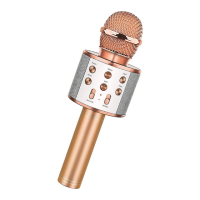

 To Next Page