S19 Maintenance Guide
15
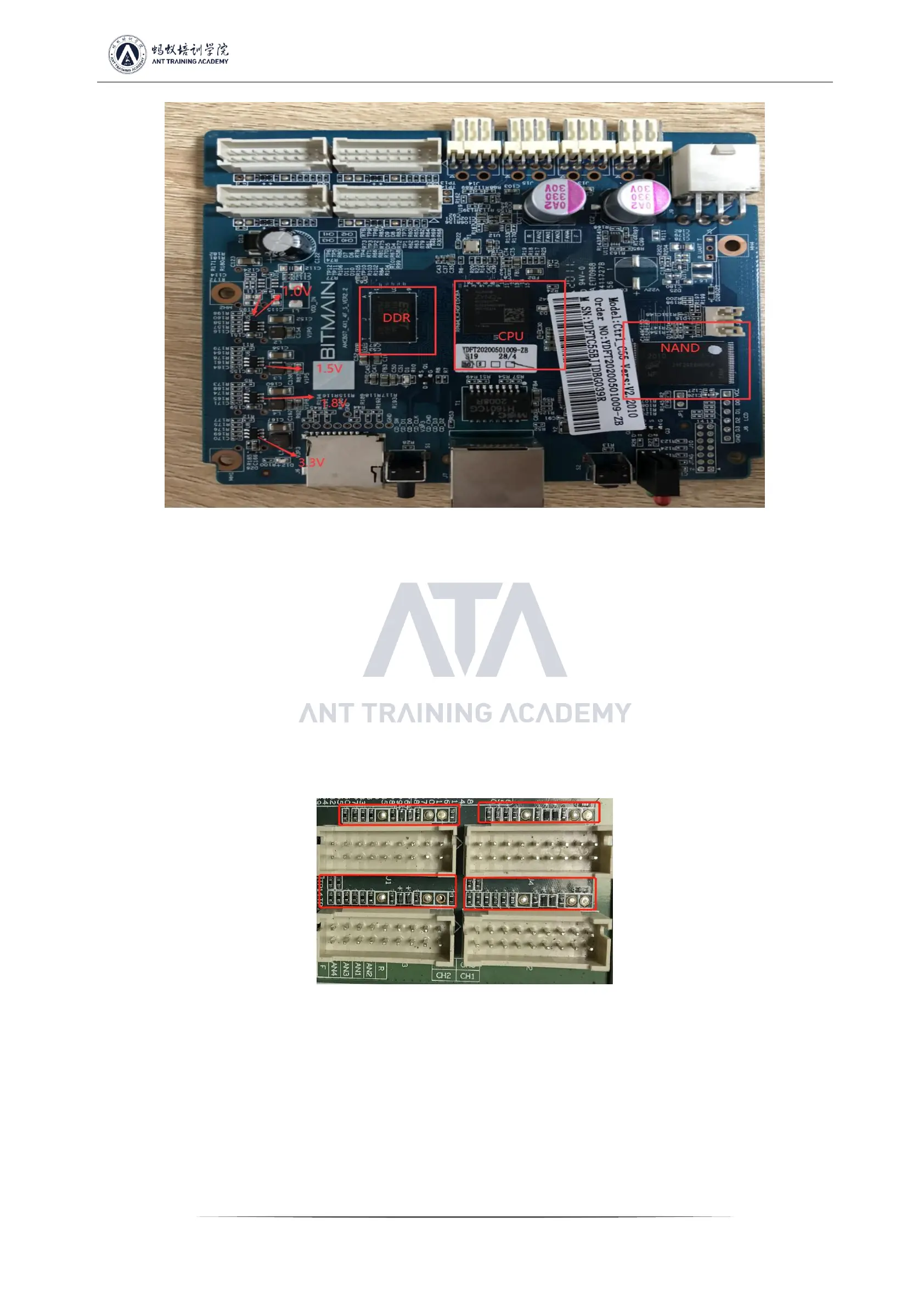
Figure 6-1
2. The whole machine cannot find the IP
Probably, the IP cannot be found due to abnormal operation. Refer to the first point for troubleshooting.
Check the appearance and welding of the network port, network transformer T1, and CPU.
3. The whole machine cannot be upgraded
Check the appearance and welding of the network port, network transformer T1, and CPU.
4. The whole machine fails to read the hashboard or has less links
A. Check the cable connection status.
B. Check the parts of the control board corresponding to the chain.
C. Check the wave soldering quality of the plug-in pins and the resistance around the plug-in interface.
Figure 6-2
VII. Failure phenomenon of the whole machine
1. Whole machine test
Common phenomena: IP cannot be detected, the number of fans is abnormal, and the chain is abnormal. If there is an abnormality in the
test, follow the monitoring interface and test LOG prompts for maintenance.
1) Fan display is abnormal - we need to check whether the fan is working normally, whether the connection with the control board is
normal, and whether the control board is abnormal.


 To Next Page