
 Need help?
Do you have a question about the Antec ISK 310-150 and is the answer not in the manual?
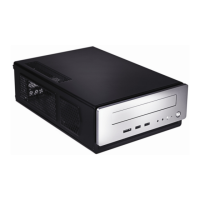
Detailed specifications of the computer case, including dimensions, weight, and drive bays.
Visual illustration of the computer case with numbered components and their descriptions.
Technical details of the included power supply unit, such as input/output characteristics and safety features.
Step-by-step instructions for safely removing the top panel of the computer case.
Guide on how to detach and remove the internal drive tray assembly from the chassis.
Procedure for installing the motherboard onto the case standoffs and connecting I/O panel.
Instructions for installing 2.5-inch storage devices into the designated drive bay tray.
Steps for installing a slim optical drive into the external drive bay of the chassis.
Details on connecting the front USB 2.0 ports to the motherboard USB header.
Information on connecting the front eSATA port to the motherboard for external storage.
Guide for connecting front panel audio jacks (AC'97 or HDA) to the motherboard.
Instructions for connecting front panel power, reset switches, and HDD LEDs to motherboard headers.
Steps and precautions for reconfiguring motherboard header connections for front panel components.
Details on the pre-installed TriCool™ exhaust fan, its specifications, and speed control.
 General
| Model | ISK 310-150 |
|---|---|
| Form Factor | Mini-ITX |
| Motherboard Compatibility | Mini-ITX |
| Material | Steel |
| Front Ports | 2 x USB 3.0, Audio In/Out |
| Color | Black |
| Case Type | Mini-ITX |
| Power Supply | 150W |
| Drive Bays | 1 x 2.5" Internal |
| Expansion Slots | 1 x Low Profile |
| Cooling System | 1 x 80mm Rear Fan |

 To Next Page

