Need help?
Do you have a question about the Anytek Q2N and is the answer not in the manual?
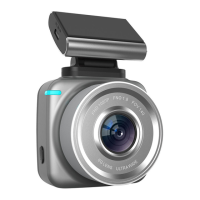
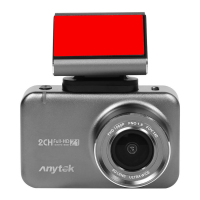
Identification of device parts including screen, slots, buttons, lens, and indicators.
Details on using the power button for on/off and the OK button for taking photos.
Guidance on using the reset function to resolve unusual phenomena.
Instructions for accessing recording/playback menus and settings interfaces.
Explanation of right and left buttons for menu navigation and selection.
How to start and identify normal video recording status.
Settings for loop recording duration and automatic overwriting.
Method for locking files to prevent accidental deletion.
The Anytek Q2N Full HD Dash Camera with G-sensor is a compact and versatile device designed to record video while driving, offering a range of features to enhance road safety and provide evidence in case of incidents. Its primary function is continuous video recording, capturing the road ahead in high definition.
One of the core usage features of the Q2N is its straightforward operation. The device is equipped with a Power/OK button that serves multiple purposes. A short press of this button will turn the camera on, initiating its operational sequence. To power off the camera, a long press of the same button is required. In addition to power control, the OK button also functions as a shutter button for taking photos, allowing users to capture still images of important moments or scenes encountered during their drive.
The Q2N incorporates a "Reset" function, which is a crucial maintenance feature. Should the camera experience unusual phenomena or malfunctions due to incorrect operations, users can reset the device. This helps to restore the camera to a stable state, resolving potential software glitches or operational errors without requiring complex troubleshooting. It's recommended to perform a reset before continued use if any anomalies are observed.
Navigation and settings adjustment are facilitated by a user-friendly menu system. A short press of the "Menu" button grants access to various modes, including video recording, photo capture, and playback. This allows users to review recorded footage or captured images directly on the device. For more in-depth configuration, a long press of the "Menu" button will lead to the video recording settings. Pressing the "Menu" button again from this point will transition to the general settings interface, where further adjustments can be made.
To navigate through these menus and settings, the Q2N utilizes "Right" and "Left" buttons. These buttons act as navigational tools, allowing users to move their selection up or down within the menu options. This intuitive control scheme ensures that users can easily browse and select desired settings or modes without confusion.
The primary mode of operation for the Q2N is "Normal recording." When the camera is powered on and in a standby state, pressing the Power button will initiate video recording. A flashing recording icon on the display serves as a clear visual indicator that the camera is actively capturing footage, ensuring users are aware of its operational status.
A significant usage feature is "Loop recording," which is essential for continuous operation without manual intervention. Users can configure the loop recording duration to 1, 2, 3, or 5 minutes. This feature ensures that when the microSD memory card reaches its capacity, the oldest video files are automatically overwritten by new recordings. This prevents the memory card from becoming full and stopping recording, guaranteeing uninterrupted coverage.
For safeguarding important footage, the Q2N includes a "File protection" feature. This allows users to lock specific video files, preventing them from being accidentally deleted or overwritten during loop recording. This is particularly useful for preserving evidence of incidents or memorable events. If a locked file needs to be removed, the user must format the entire memory card, emphasizing the protective nature of this feature.
Connecting the Q2N to a computer is a straightforward process. When the camera is connected to a computer with the microSD card inserted, users are presented with two memory options: accessing the camera's internal memory (if applicable) or directly accessing the microSD card. This allows for easy transfer and management of recorded video files and photos on a larger screen, facilitating backup and review.
The camera's design emphasizes ease of use and reliability. Its compact form factor makes it unobtrusive when mounted in a vehicle, while the inclusion of a G-sensor (though not detailed in the provided text, it's mentioned in the title) typically means the device can automatically detect sudden impacts or events and lock the corresponding video footage, further enhancing its utility as an accident recorder.
Maintenance primarily involves ensuring the microSD card is in good working order and occasionally formatting it to maintain optimal performance, especially after locking and unlocking files. The reset function provides a simple solution for operational issues, minimizing the need for complex troubleshooting. The super capacitor battery (mentioned in specifications but relevant to usage) ensures reliable power in varying temperatures and offers a longer lifespan compared to traditional batteries, contributing to the device's overall durability and low maintenance profile.
In summary, the Anytek Q2N is designed to be a reliable and user-friendly dash camera, offering essential recording capabilities, intuitive controls, and features like loop recording and file protection to ensure continuous and secure documentation of journeys. Its simple maintenance features contribute to a hassle-free user experience.
 General
| Resolution | 1920x1080 |
|---|---|
| Loop Recording | Yes |
| G-Sensor | Yes |
| Night Vision | Yes |
| Frame Rate | 30fps |
| Photo Format | JPEG |
| Motion Detection | Yes |
| Field of View/Lens Angle | 170 degrees |
| Storage | MicroSD card |
| Microphone | Built-in |
| Speaker | Built-in |

 To Next Page