The TR-720 is a fully synthesized VHF/AM Hand-held transceiver designed for use in the aircraft NAV-COM band. It operates between 108.000MHz and 135.975MHz in 25kHz steps. Frequency selection is achieved using thumb-wheel switches, while a slide switch provides access to three user-programmable channels within the band.
Function Description:
The TR-720 can be used for fully portable operation, producing a 3-Watt (PEP) output with an internal rechargeable NiCd battery pack. For mobile or aircraft operation, it can be powered by an optional DC adapter (model CCR-240) from 13.8VDC to 28.0VDC. A rubber flexible antenna is provided for hand-held use, and a standard BNC antenna connector allows for the use of an external antenna for mobile and base station applications. An optional palm-size hand-held speaker/microphone unit with a push-to-talk (PTT) function is available for noisy portable or mobile operation. An earphone jack is included for private listening. A combination LED lamp indicates the TR-720's status and battery condition.
Important Technical Specifications:
- Model: TR-720 Air-band Transceiver
- Frequency Range:
- Communication: 118.000MHz - 135.975MHz
- VOR Receive only: 108.000MHz - 117.975MHz
- Number of Channels:
- Communication: 720
- VOR Receive only: 200
- Frequency Determination: Microprocessor controlled C-MOS Phased Locked Loop
- Frequency Stability:
- +/- 0.001% (-10°C to +60°C, 25°C Ref.)
- +/- 0.002% (-30°C to +60°C, 25°C Ref.)
- Operational Mode: Amplitude modulation, AM
- Type of Communication: Simplex
- Power Consumption:
- Receiver squelched: 40mA
- Receiver 300mW Audio output: 130mA
- Transmit: 700mA
- Antenna Type & Impedance: Rubber flexible, 50-ohm unbalanced type
- Battery Type:
- 9.6V/450mAh NiCd battery pack (standard)
- 9.6V/750mAh NiCd battery pack (optional)
- 12V, 8 x AA size dry-cell batteries (with optional AA-cell pack)
- RF Output Power: 1.0W (DC), 3.0W (PEP) into 50-ohm load
- Receiver System: Dual conversion superheterodyne receiver
- Usable Sensitivity: Less than 1uV for 20dB SINAD
- Selectivity:
- +/-15kHz @ 6dB bandwidth
- +/-40kHz @ 60dB
- Squelch Sensitivity: 0.5uV threshold point, Noise type squelch
- Audio Output: 500mW maximum, less than 10% THD
- IF Image Rejection: Greater than 60dB
- Spurious Response: Greater than 60dB
- Modulation System: Class B, Collector modulation
- Spurious Harmonics: Greater than 60dB below carrier
- Operating Temperature: -10°C to +60°C (approximately 20 to 120 degrees F)
Usage Features:
- Antenna Connector: A twist-off radio frequency connector for the rubber flex antenna. To connect, push and twist clockwise until it locks. To remove, push and twist counter-clockwise until it unlocks. Allows connection to an external antenna system when the flex antenna is removed.
- Memory/Dial Select Switch: Slides to "MEMORY" position for operation using three pre-programmed frequencies, bypassing the frequency selection switch settings.
- Squelch Control (SQL): Rotates to adjust the threshold for rejecting background channel noise in receive mode. It does not affect the transmitter or received signal volume. For proper operation, turn fully counter-clockwise to hear channel noise, then clockwise until the noise disappears. Turning it beyond this point reduces receiver sensitivity.
- Frequency Selection Switch: A four-decade thumb-wheel switch for selecting the operating frequency. Add 100MHz to the dialed frequency (e.g., 118.375MHz is dialed as 1-8-3-7). The last 10kHz digit indicates the operating frequency in 25kHz steps. The thumb-wheel switch has mechanical stoppers to prevent further rotation beyond 0 or 7, to avoid damage.
- Volume Control & On-Off Switch: Rotates clockwise to turn the TR-720 on (a click will be heard). Adjust for desired audio level. Rotate counter-clockwise until a click is felt to turn the radio off.
- Earphone Jack: A miniature 3.5mm jack for using the supplied earphone for listening in loud environments or for privacy.
- External Microphone-Speaker Connector: A 6-pin jack for the accessory MPE-20 speaker-microphone. The threaded connection ensures secure attachment. Using an external microphone-speaker disconnects the internal speaker.
- LED Indicator: This lamp provides three functions:
- Transmit Indicator: Glows RED continuously when transmitting.
- Receive Indicator: Glows GREEN when receiving a signal, when the channel is busy, or when the squelch threshold is reduced to hear channel noise. When setting squelch, turn until the GREEN light just goes out.
- Battery Condition Indicator: Indicates when battery voltage drops to a marginal level. If the RED LED does not glow in transmit mode, battery charging is required.
- Memory Selector Switch: A three-position slide switch to select one of three pre-programmed frequencies.
- Memory Input Switch: A small button used to program the current frequency into the TR-720's memory circuit.
- PTT Bar (Press-To-Talk Bar): Depressing this bar switches the TR-720 into transmit mode. Releasing it returns the TR-720 to receive mode.
- Memory Programming:
- Slide the DIAL-MEMORY switch to MEMORY position.
- Select the desired memory channel number (1 to 3).
- Select the desired frequency using the frequency selector thumbwheel switch.
- Push the small yellow MEMORY INPUT button (e.g., with a paper clip or pencil). An alarm tone will sound, indicating the TRANSMIT frequency is programmed. For COM frequencies, two alarms will sound (second for RECEIVE frequency). For NAV frequencies, only one alarm will sound as transmission is prohibited.
- Slide the memory channel switch to the next number to program the next frequency, repeating the process.
- After programming, slide the DIAL-MEMORY switch to DIAL position. To recall a memory channel, slide the DIAL-MEMORY switch to MEMORY position and select the desired channel. To change a memory program, repeat the programming steps.
- Memory Backup: The memory circuit is backed up by the battery pack (consuming ~20uA), maintaining frequencies as long as the battery pack is connected, even if it needs recharging. If the battery pack is replaced within 1 hour, re-programming is not required. If replacement exceeds 1 hour or the battery is charged separately, re-programming is necessary.
- Transmitting: Hold the TR-720 2-3 inches from your mouth, press the PTT bar, and speak. If using an accessory speaker-microphone, hold it 2-3 inches from your mouth and press its PTT bar. The RED LED will glow during transmission.
- Turning Off: Rotate the VOLUME CONTROL knob fully counter-clockwise until a click is heard.
Maintenance Features:
- Battery Replacement: To remove the battery pack, depress the locking mechanism on the side of the TR-720 towards the top panel and twist the pack a quarter turn counter-clockwise. Replace by reversing the process.
- Battery Charging:
- Wall Type Charger (Standard): Plugs into the charging jack on the side of the battery pack. Connect to a 110V (or 220V for overseas) wall receptacle. Charging takes 12-16 hours overnight. Avoid leaving it plugged in for more than 24 hours to prolong battery life. The TR-720 can be operated while charging, but charging time increases by ~50% (18-24 hours).
- DC Adaptor (Optional): Plugs into a cigarette lighter receptacle of a vehicle (13VDC to 28VDC, negative ground). Charging rate is ~45mA. The TR-720 can be operated while charging, but charging time increases by ~50% (18-24 hours). Recommended as a backup power supply in vehicles.
- Desk-Top Type Charger (Optional): Convenient for business operation, with built-in trickle charge function.
- Quick Charger (Optional, Model ACH-15): Designed for rapid charging (30-60 minutes for standard NiCd pack). Includes overcharge protection. Can be used with both standard and heavy-duty NiCd packs.
- NiCd Battery Care: NiCd batteries have a "memory" effect. To overcome this, periodically use the radio until the battery is fully discharged, then charge it fully. Avoid overcharging with the standard wall charger (which doesn't automatically reduce charging rate). Accessory battery chargers for the TR-720 automatically correct the charge rate. NiCd packs also slowly lose charge when not in use; most are designed to accept a small trickle charge to maintain full charge. The accessory drop-in charger automatically switches to trickle charge mode.
- Troubleshooting: A user troubleshooting guide is provided to address common issues (e.g., no sound, poor signal, inability to change frequency, LED not glowing) before seeking service.
- Safety Information:
- Never operate without an antenna to prevent damage.
- Avoid receiving excessively strong signals from high-power transmitters to prevent receiver damage.
- Operate within -10°C to +60°C. Avoid high temperatures (e.g., leaving in a closed car in direct sunlight).
- No user-serviceable controls inside; do not open the case. Refer to a qualified, licensed radio technician or authorized service center for repairs.
- Do not hold the antenna close to or touching exposed body parts (especially face or eyes) while transmitting. Optimal performance is achieved with the microphone 2-3 inches from lips and the radio held vertically.
- Do not hold the PTT bar down when not intending to transmit.
- Do not allow children to play with radio equipment containing a transmitter.
- Do not operate near unshielded electrical blasting caps or in explosive atmospheres unless specifically qualified for such use.
Optional Accessories:
- Antenna Group:
- Flexible Rubber Antenna (S): High-performance, tuned to NAV-COM frequency.
- Quarter Wave Mobile Antenna with Magnetic Base: For mobile or tentative base station operation.
- Audio Accessory Group:
- Earphone (S): For private listening. May disconnect internal speaker.
- Speaker-Microphone with Belt Clip (Model MPE-20): Palm-size, hand-held unit with PTT switch for noisy portable/mobile operation.
- Airline Head-Set Adaptor: Matches standard airline type headsets to the AR-720 for transmission and reception.
- Manual Group:
- Operating Manual (S): Provides essential operating information and precautions.
- Service Manual: Offers technical descriptions, schematic diagrams, parts lists, and component layouts for maintenance.
- Power Pack Group:
- Standard Power Pack (Model BP-451) (S): 450mAh NiCd pack, provides at least 6 hours operation (5% TX, 5% RX, 90% STBY). Includes thermal protector for 1-hour rapid charge with optional quick charger.
- Heavy-Duty Power Pack (Model BP-75): Provides minimum 16-20 hours continuous operation (5% TX, 5% RX, 90% STBY). Includes thermal protector for rapid charge with optional quick charger.
- AA-Cell Pack: Holds 8 AA-size dry-cell batteries for emergency or substantial power source where recharging is impossible.
- Charger & Adaptor Group:
- Wall Type Charger (S): Plug-in type, 8 hours for full charge. 220V type available.
- Desk-Top Type Charger: Drop-in type, with built-in trickle charge. 220V type available.
- Quick Charger: Charges battery in 30-60 minutes. Built-in overcharge protection.
- DC Adaptor (S): Charges from car or aircraft battery source (12-28VDC input) via cigarette lighter jack.
- Case Group:
- Soft Leather Case (S): Protects against shock.
- Heavy-Duty Delux Case: Genuine leather carrying case for tough business operations.
- Belt Clip Metal Holster: For attaching the unit to a belt.

 Need help?
 General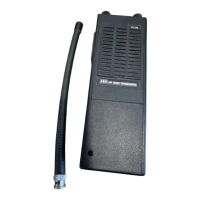

 To Next Page