15
Placement
Parts
Setup M.L. How to
M.L. Software Download Troubleshooting
Hardware Cong
Tech Stats/Info
Parts
Setup M.L. How to
M.L. Software Download Troubleshooting
Hardware Cong
Tech Stats/Info
Parts
Setup M.L. How to
M.L. Software Download Troubleshooting
Hardware Cong
Tech Stats/Info
Parts
Setup M.L. How to
M.L. Software Download Troubleshooting
Hardware Cong
Tech Stats/Info
Parts
Setup M.L. How to
M.L. Software Download Troubleshooting
Hardware Cong
Tech Stats/Info
Parts
Setup M.L. How to
M.L. Software Download Troubleshooting
Hardware Cong
Tech Stats/Info
Parts
Setup M.L. How to
M.L. Software Download Troubleshooting
Hardware Cong
Tech Stats/Info
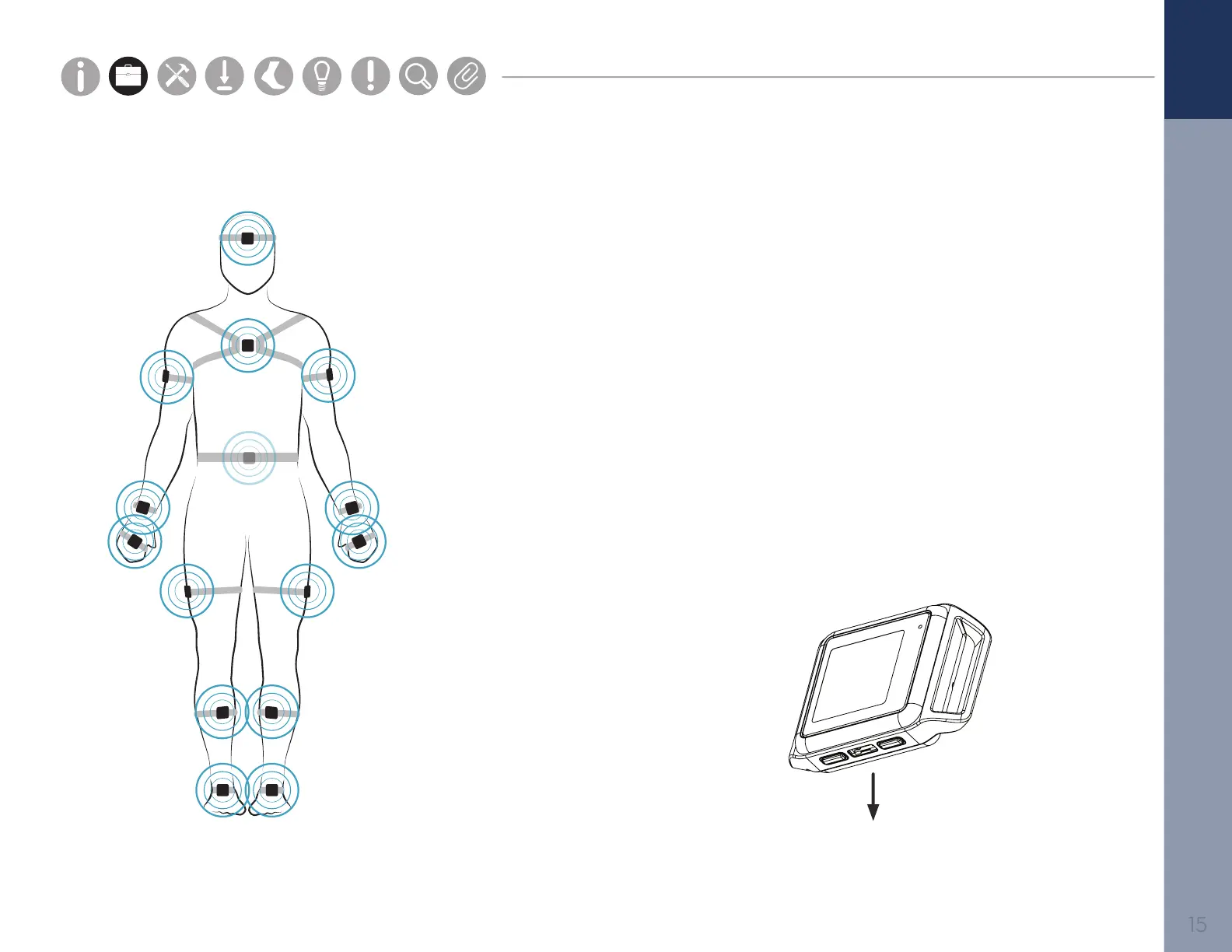
Your Opal System may come with a complete or partial set of the sensors shown. For high impact
or long duration activities, we recommend reinforcing strap/sensor placement with double sided
skin-safe adhesive or additional wraps.
To upgrade your system, contact us at +1 503-445-7757 or sales@apdm.com.
Suggested Sensor
For consistency, it
is recommended to
place the Opal port-
side down
Foot
Centered on top of the foot
Lower Leg
Inside the front of the
shin, on the at surface of the
bone, high enough for the
strap to wrap just above the
widest part of the calf muscle
Upper Leg
Side of thigh, midline,
between muscular tissue, one
hand’s width above the knee
Lumbar
Centered on the low back, at
the base of the spine
Sternum
Centered on the at surface
of the chest just below where
the collar bones meet
Head
Centered on the front of the
forehead
Upper Arm
Centered on the outside of
the arm, just below the
shoulder muscle
Wrist
On the wrist worn like a watch
Hand
On the back of the hand


 To Next Page
 Loading...